Verify SSL/TLS Certificate Signature
This article lets us take the reins of browser and be the verification guard using openssl tools. Let’s try to understand what goes behind the scenes of a browser’s certificate signature verification.
Prerequisites
- Linux based machine
- OpenSSL (it’s usually installed on linux based machines)
First of all, why should we (as in browsers) verify?
Let’s say we’ve read about uses of Diffie-Hellman, RSA 1 public key cryptography, AES-CBC 2 and hash algorithms. Now, if we were supposed to design a secure architecture to browse amazon.com, our thought process would be something like:
- “Hmm, let me see… First of all, I need to encrypt my passwords, credit card info etc, so I need a key to encrypt. The server also needs to have the same key to decrypt my content and to encrypt the data it sends me”
- “However, it’s impractical to visit Amazon Seattle HQ and get a key exchanged. It’s also ridiculously idiotic to trade our secret key as plaintext on internet. It’s as good as handing out the key to anyone listening to our connection. I need a secure key exchange protocol like DHKE 3 !”
- “If I can trade my DH 4 public parameters with amazon.com, we (server and I) can securely generate our own little shared secret key and we can use that to encrypt/decrypt stuff”
- “Whoops! If I receive DH public parameters as plaintext on internet, the person listening to our connection in starbucks could also send me those parameters and I could end up trading keys with him! That’s bad!”
- “IDEA!! Is this the best idea or what! What if amazon.com can share it’s public key with me, sign DH parameters using it’s private key! Now, when I decrypt using amazon’s public key, I can be 100% sure that amazon.com had signed it using it’s private key and nobody else! YAY!! Problem solved!”
(After a few minutes …)
This is where we need a “Trusted Third Party/Certificate Authority/CA)”. CA computes a hash over all the certificate data (except signature) and encrypts the hash with it’s private key.
[Q] Why was the signature excluded from hash?
[A] CA doesn’t have a time machine to go into the future and see what signature would be generated. If it did, it would sign the entire certificate including the future signature.
FYI: Encrypting the hash is called signing. This is how a signature is generated. We can’t know the signature beforehand to sign it.
[Q] So, the signature is delivered separately to clients?
[A] No, it’s part of the certificate. All of the data you need to validate the server’s identity is contained in the certificate (including the signature). So, you need to remove the signature field before computing the hash and verifying.
[Q] What data is signed??
[A] Entity’s identity, validity, extensions, public key and a lot of other data related to entity is signed by the CA. If any parts of the certificate are modified by a man-in-the-middle, the CA’s signature will not validate.
Basic structure of a X.509 certificate
The basic structure of a certificate is shown in the specification for X.509 certificates on the Internet, RFC5280.
| label | meaning |
|---|---|
| tbsCertificate | The field contains the names of the subject and issuer, a public key associated with the subject, a validity period, and other associated information |
| signatureAlgorithm | Identifier for the cryptographic algorithm used by the CA to sign this certificate |
| signatureValue | Digital signature computed upon the ASN.1 DER encoded tbsCertificate |
Consider tbsCertificate, signatureAlgorithm, signatureValue as custom data types (struct) with other fields.
So, Certificate has a SEQUENCE. A SEQUENCE contains an ordered field of one or more types. It is encoded into a TLV triplet that begins with a Tag byte of 0x30. tbsCertificate and signatureAlgorithm also have a SEQUENCE.
Just to get a glimpse of how this data is structured, it’s probably a good time to take a look at the super helpful ASN.1 decoder by Lapo Luchini.
Download a sample google certificate in PEM format from here
Upload the file on ASN.1 JavaScript decoder and observe the hierarchy
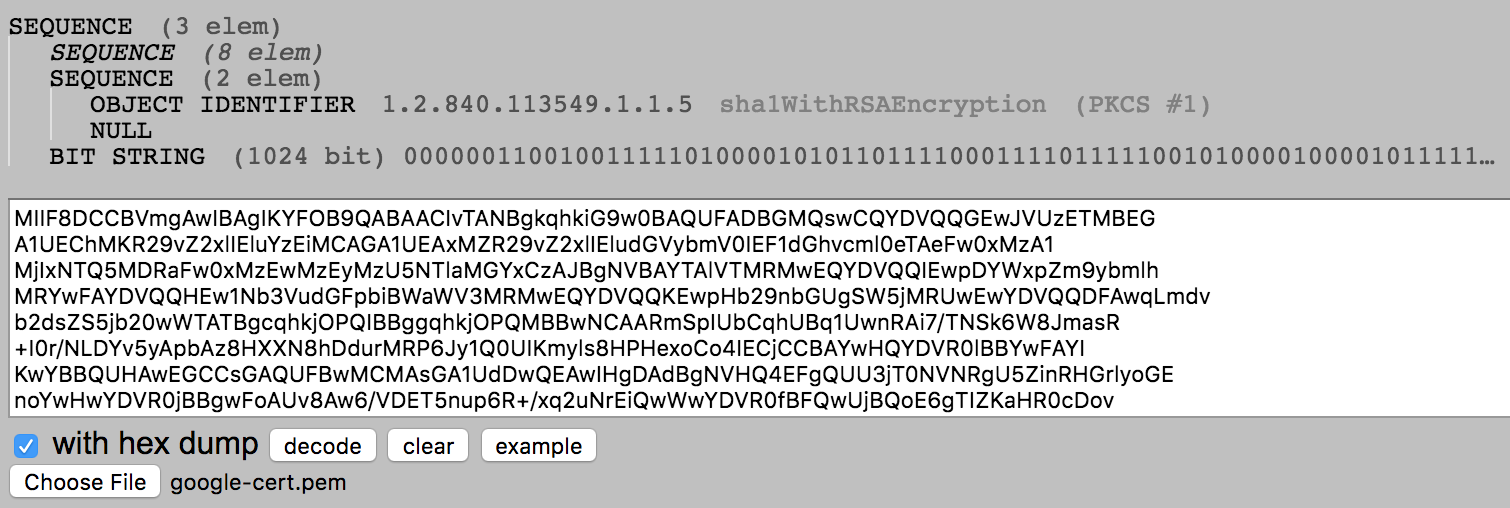
The top level SEQUENCE has 3 fields (SEQUENCE, SEQUENCE, BIT STRING) which corresponds to tbsCertificate, signatureAlgorithm and signatureValue respectively.
In this certificate:
TBSCertificate lives at offset 4
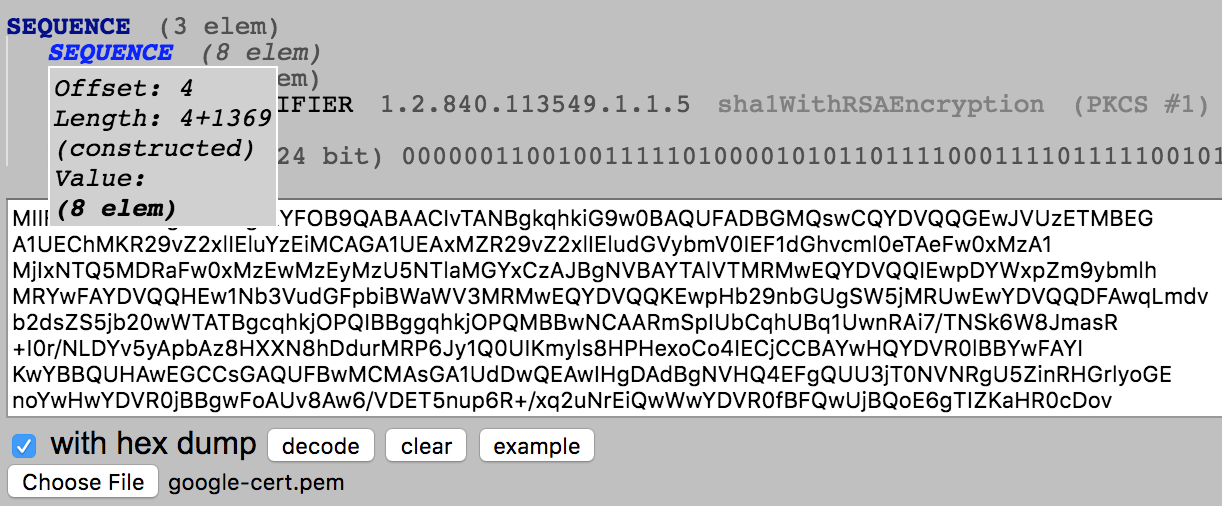
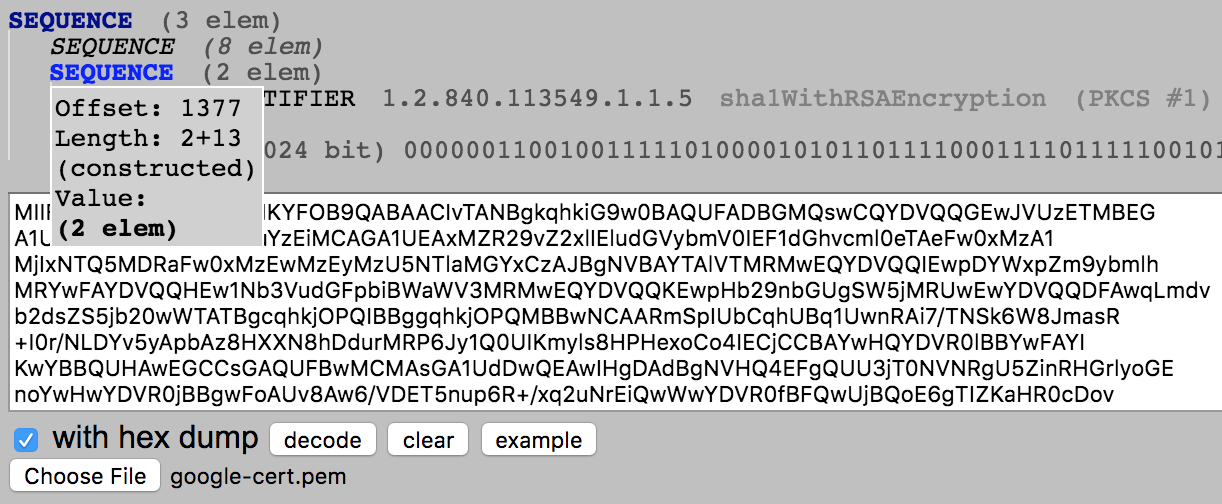
AlgorithmIdentifier lives at offset 1377
signatureValue lives at offset 1392
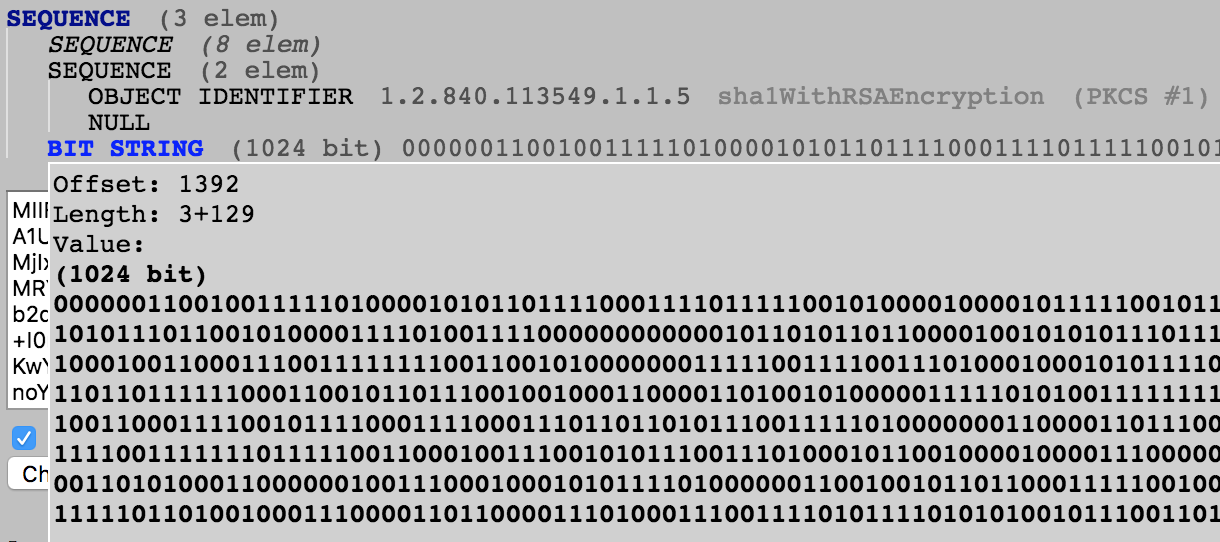
You can confirm the same using openssl asn1parse tool as well (Shown later in this article)
In order to verify that a certificate was signed by a specific CA, we would need to possess the following:
- Public key of the CA (issuer)
- Signature and Algorithm used to generate the signature
Verifying server’s public key
Download the server’s certificates to /tmp in PEM format.
s_client : Implements a generic SSL/TLS client which connects to a remote host using SSL/TLS
-connect : Specifies the host and optional port to connect to
-showcerts : Displays the server certificate list as sent by the server
2>/dev/null : redirects stderr to /dev/null
< /dev/null : instantly send EOF to the program, so that it doesn’t wait for input
/dev/null is a special file that discards all data written to it, but reports that the write operation succeeded
sed : stream editor for filtering and transforming text
-n : suppress automatic printing of pattern space
PEM (Privacy Enhanced Mail) is nothing more than a base64-encoded DER (Distinguished Encoding Rules)
[Q] I thought a server has one certificate, what are these other certificates that we’re downloading?
[A] You are right, server always needs to show just one certificate. The other certificates are the intermediary and probably root CA certificates. We need those to get the intermediary public keys (Issuer’s public key)
The above openssl command creates a file in this format:
There’s a bash one-liner magic that can extract certificates in their own files:
Command credits: stackoverflow.com The above command will create the following for stackoverflow.com :
OR
If you’re uncomfortable using that one-liner, that’s fine too. 2 more steps and we will get the same output.
Download all the certificates offered by server to a file /tmp/stackoverflow-certs.crt
*.crt is just an extension to identify it as certificate but the file is of PEM type
Just copy the contents between ——BEGIN CERTIFICATE—— and ——END CERTIFICATE—— (including these delimiters) into their own files. In this case, I have 2 sections with those delimiters and hence I will create 2 files
Look for the subject names and rename the certificates for easy identification
FYI: You can also do this process in GUI but with the ever changing UI landscapes and increasing number of browser options, it’s just hard to keep an article up-to-date with those changes and ways to download certificates from a website.
Make sure you have the issuer certificate of stackoverflow.com certificate
The issuer is DigiCert SHA2 High Assurance Server CA and we have issuer’s certificate DigiCert_SHA2_High_Assurance_Server_CA.crt which has issuer’s public key
Obtain Issuer’s public key
Get the signature of certificate in binary format
The default behavior of the following command is to print all fields
However, there are command line options to specify which fields should be excluded while printing
The output tells us that the certificate was hashed using SHA256 . However, the output you see is in hex and is separated by : . Let’s remove the first line, colon separator and spaces to get just the hex part
Convert the signature to binary
xxd : makes a hexdump or does the reverse
-r : convert hexdump into binary.
-p : plain hexdump style
We need to use the combination -r -p to read plain hexadecimal dumps without line number information and without a particular column layout.
OR
If you prefer a straightforward command-line to obtain your signature in binary:
Find out the offset where RSA signature lives in the certificate:
You can also use https://lapo.it/asn1js to verify where your BIT STRING starts 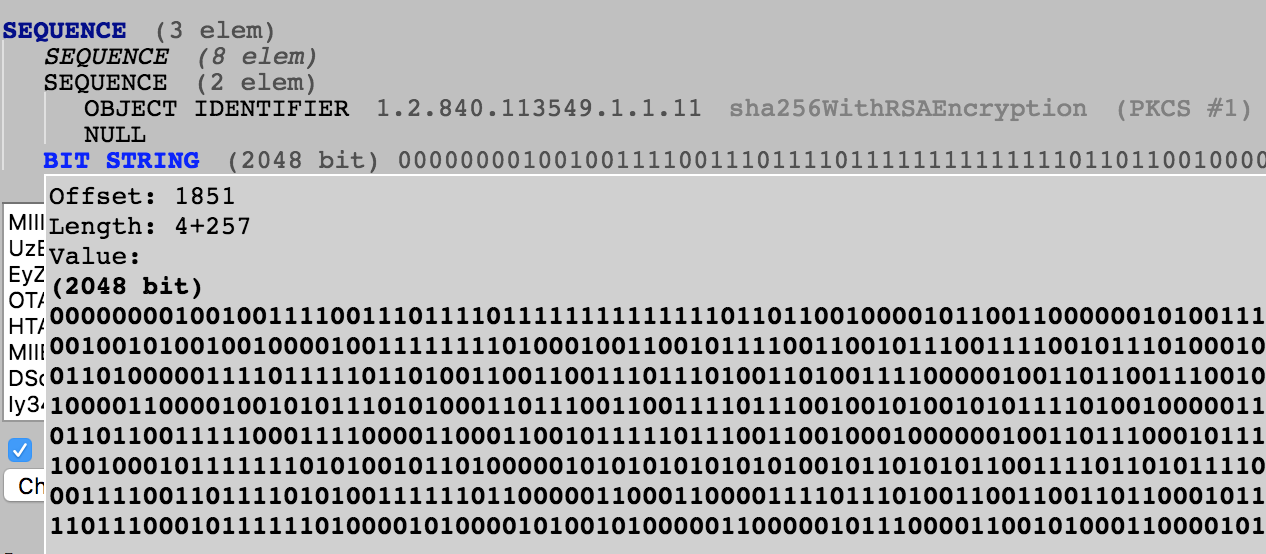
In my example, the signature begins at an offset of 1851 . There is no other section/content below it. So you can safely consume everything from offset 1851 and it will be the signature bytes
I’ve no idea why that throws up that encoding error but the signature dump is successful.
Use issuer’s public key (Remember the issuer signed the server certificate using the corresponding private key) to decrypt the signature.
The decrypted signature is in binary again. The decrypted signature also contains the signature Algorithm and other details in DER format. So, use asn1parse to find out the decrypted hash
So the hash of certificate body is CACF0060E3899C13F5758307C2050FCA8BB575F8760CCD80A99402A51B193AF1 . Make a note of this
Calculate the hash of the certificate body (excluding the RSA signature part)
Why did we use offset 4?
We used 4 because the certificate body is at offset 4 . How do we know? 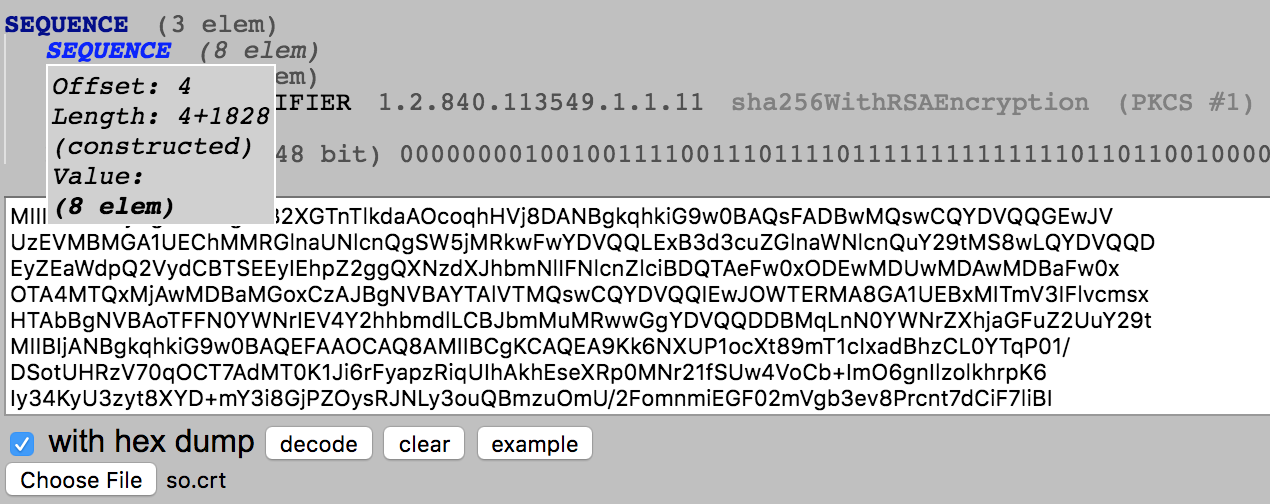
We can see that the hash of body cacf0060e3899c13f5758307c2050fca8bb575f8760ccd80a99402a51b193af1 matches the decrypted hash
This confirms that the contents of the certificate were not tampered and the issuer has really signed this certificate with their private key.
[Q] Let’s say the website delivered a fake self signed certificate as issuer certificate, is there a way to ensure we’re not being cheated?
[A] Sure, check the issuer in your server’s certificate and look up the Issuer on Google. For example, in this example, this is the issuer information from Server’s certificate:
If I search for «DigiCert SHA2 High Assurance Server CA» . I can find a list of certificates listed on the official website of Digicert
Scroll down to the section that shows our listed certificate:
| Certificate Name | Information |
|---|---|
| DigiCert SHA2 High Assurance Server CA | Issuer: DigiCert High Assurance EV Root CA Valid until: 22/Oct/2028 Serial #: 04:E1:E7:A4:DC:5C:F2:F3:6D:C0:2B:42:B8:5D:15:9F Thumbprint: A031C46782E6E6C662C2C87C76DA9AA62CCABD8E Download |
The thumbprint published by Digicert is 160 bits and hence I believe it’s a SHA-1 hash.
Let’s create a SHA-1 hash of the Digicert certificate that we received from the server
Now, we can be sure that the server didn’t produce some fake certificate and signature since the certificate matches the certificate published by official Digicert website.
[Q] Is there a simpler way of verifying the signature using openssl ?
[A] Yes. We can let openssl do the verification for us:
openssl dgst creates a SHA256 hash of cert-body.bin . It decrypts the stackexchange-signature.bin using issuer-pub.pem public key. It verifies if the decrypted value is equal to the created hash or not.
[Q] How does my browser inherently trust a CA mentioned by server?
[A] Your browser (and possibly your OS) ships with a list of trusted CAs. These pre-installed certificates serve as trust anchors to derive all further trust from. More information:
Please don’t blame me if this link doesn’t work. Documentation team at this company has a bad habit of moving/deleting support documentation from time to time
[Q] What if those pre-installed certificates expire?
[A] Root certificates do expire, but they tend to have exceptionally long validity times (often about 20 years). In any case, your browser/OS update will provide you fresh root certificates before the old ones expire.
Как сделать слепок SSL сертификата
Некоторые сервисы (например, Яндекс.Маркет), требуют предоставления т.н. слепка (отпечатка) SSL сертификата. Получить его можно следующим образом:
1. Дважды нажимаете на замок SSL сертификата в адресной строке
2. Нажимаете кнопку "Данные сертификата", далее "Состав"
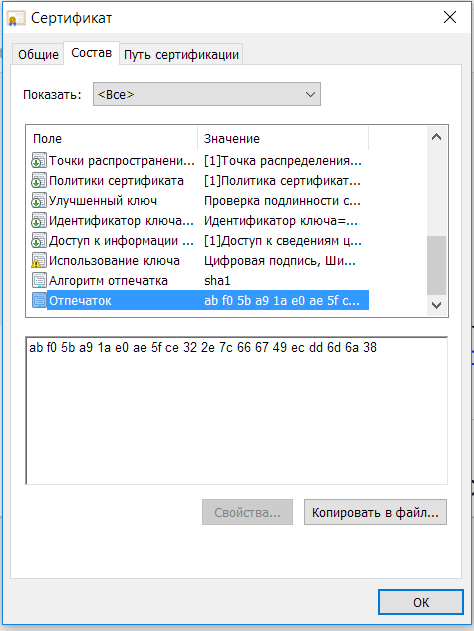
3. Последней строчкой будет написан отмечаток SSL сертификата (анг. SSL fingerprint)
Лицензии ISPsystem, Cpanel, Plesk, DirectAdmin, SSL сертификаты, а также услуги администрирования
Лицензии на программное обеспечение, SSL сертификаты, а так же услуги администрирования
How to get the SHA-1 fingerprint certificate for debug mode in Android Studio?
A simple solution for generating the SHA-1 fingerprint for debug mode and adding it to your Firebase project.


Firebase Tips & Tricks
As a constant contributor to the Firebase community on Stackoverflow, I’ve seen so many users struggling with how to generate the SHA-1 fingerprint that is required in their Firebase projects.
Before actually seeing how to generate it, first, let’s understand what exactly the SHA-1 is. According to Wikipedia:
In cryptography, SHA-1 (Secure Hash Algorithm 1) is a cryptographically broken but still widely used hash function which takes an input and produces a 160-bit (20-byte) hash value known as a message digest.
When is such an SHA-1 required?
The debug signing certificate SHA-1 is required only for Dynamic Links, and Google Sign-In or phone number support in Auth. If you don’t want to use these Firebase services in your Android application, adding the certificate SHA-1 is optional.
Why is this SHA-1 necessary?
It’s because certain Google Play services (such as Google Sign-in and App Invites) require us to provide the SHA-1 of our signing certificate so we can create an OAuth2 client and API key for our app.
If you’re interested in how to implement Firebase sign-in with Google in your Android project, I recommend you read the following article:
How to generate SHA-1 for debugging?
There are three ways in which we can get the SHA-1, the first solution would be to use Keytool utility, the second one would be to use Gradle’s Signing Report, and the third one would be to read it directly in Android Studio. By the time I’m writing this article, the latest version of Android Studio is Chipmunk | 2021.2.1. So let’s start with the first solution.
How to get SSL-Certificate sha1 fingerprint?
The SHA-1 fingerprint of a certificate is simply the SHA-1 digest value of its DER representation.
- If your certificate is in PEM format, you’d need to convert it in DER format first (this is a base-64 decoding).
- Then, use a SHA-1 digest algorithm (in whichever language you’re using) on this DER document.
For example, if you get the fingerprint with OpenSSL directly, you would get this:
If you convert the same certificate into DER and then compute its SHA-1 digest, you’ll get the same result:
( openssl . -outform DER produces a DER output on stdout, and sha1sum is a common utility for computing SHA-1 digests from its stdin.)
Solution 2
1.3.6.1.4.1.34697.2.1 is one certificate manufacture’s OID for an EV certificate. Different issuers use different OIDs to denote the EV certificate. There’s a question that lists a collection of the EV OIDS here.
Which program can I use for this and what is the name of the command,