TeamViewer Very Slow? 3 Methods to Speed it Up
If you’re experiencing lag and pauses when using TeamViewer, don’t worry. This post primarily introduces 3 methods to fix TeamViewer very slow. Keep reading if you’re interested.
By Ellie  / Last Updated May 5, 2023
Why does TeamViewer lag so much?
I can move the mouse on my partner’s computer when we are connected, but it takes a very long time for an application or folder to respond when I click on it. Opening a file or getting a response from the remote computer takes five minutes.”
— Question from TeamViewer Community

TeamViewer is a popular remote access software. Why is TeamViewer so laggy? The performance of TeamViewer depends on three settings: Internet settings, Windows settings, and TeamViewer settings. While a fast Internet connection on both sides counts to a large extent, you can apply a number of Windows and software optimizations to get the most out of the problem if you’re experiencing lag and pauses when using TeamViewer.
3 methods to fix TeamViewer very slow
Next, we’ll introduce how to fix TeamViewer very slow from three perspectives: TeamViewer settings, Windows settings, and Internet settings.
Method 1. Optimize TeamViewer settings
In order to improve the speed of your remote connection, you can change the settings beforehand in your TeamViewer options. Screen resolution and wallpaper both play big parts in performance. Higher resolution and wallpaper mean greater details, and that details take longer to be sent over the Internet. Therefore, you’re recommended to change the screen to a smaller size but not too small and hide the wallpaper. You can also change the display quality to an optimized speed.
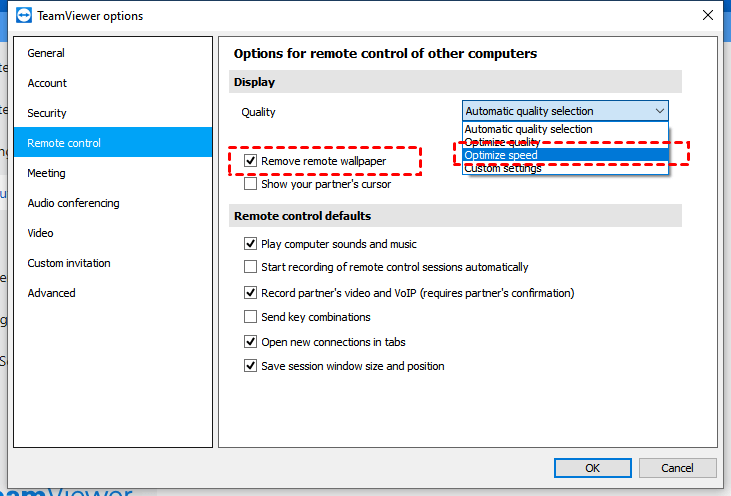
Step 1. Go to Options (on the top right corner) > Remote Control > Quality > Optimize speed. Check the box marked Remove own wallpaper as well.
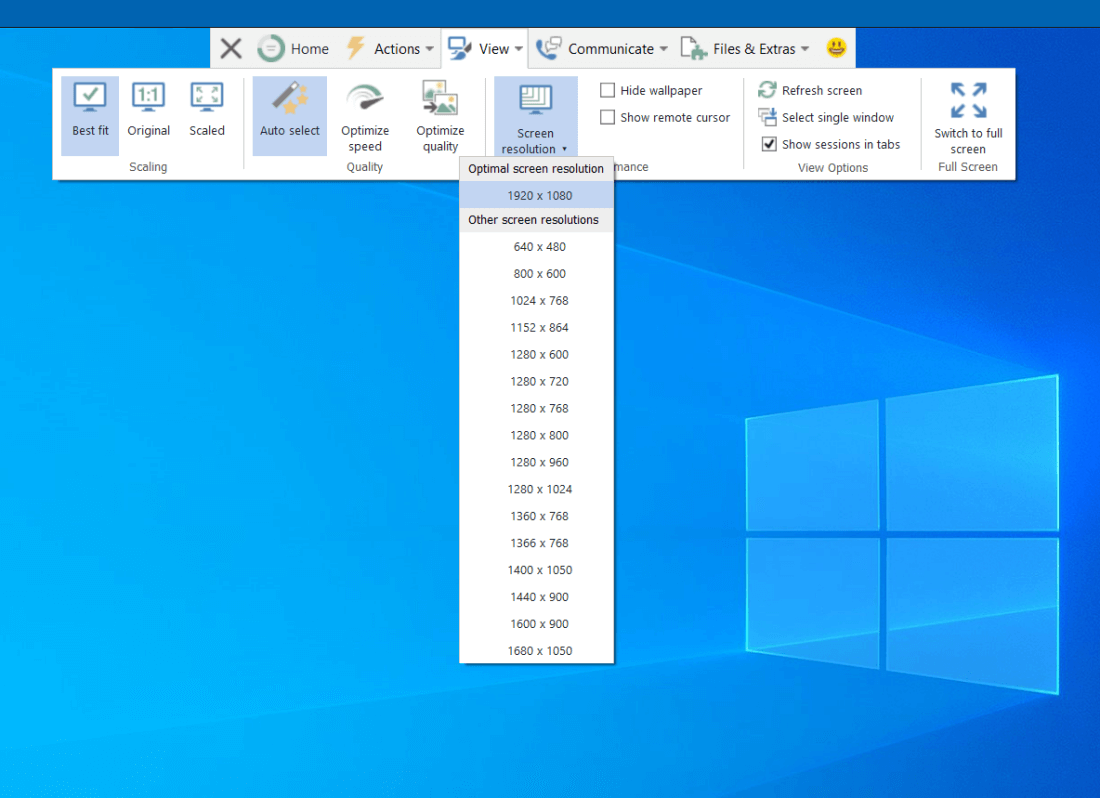
Step 2. You can also change to a lower resolution during the remote session. Go to the menu bar View and choose the suitable resolution from the pull-down menu in Performance.
Method 2. Optimize Windows settings
Visual Effects in Windows settings enhance the overall design and look of the operating system. Some features, including Aero, are visual eye candy but unnecessary for essential functions. Turning off visual effects makes more resources available to TeamViewer.
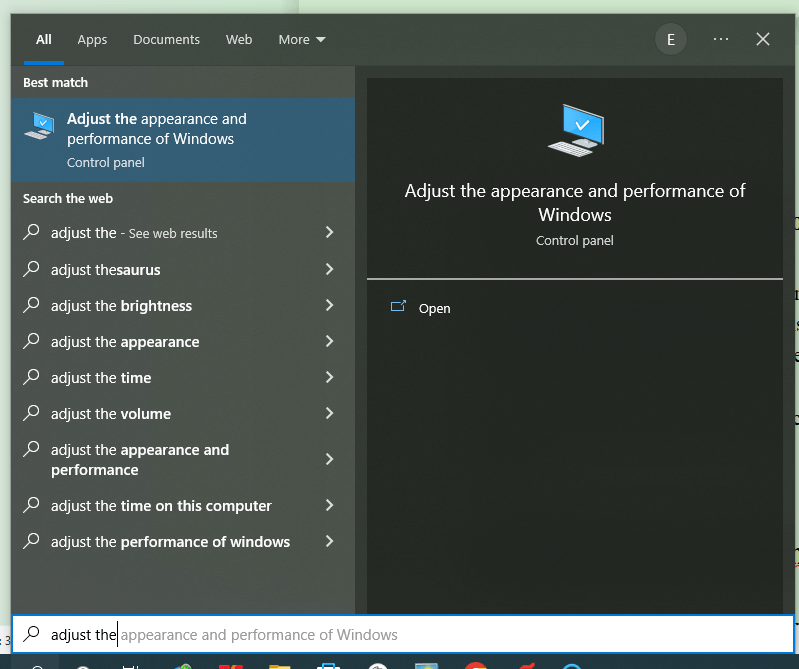
Step 1. Typing Adjust the appearance and performance of Windows in the search box on the taskbar. Open it.
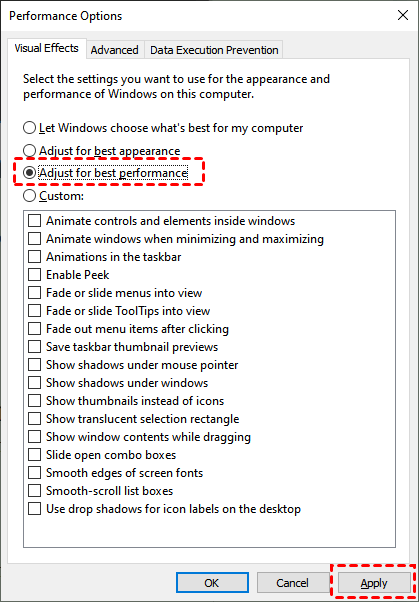
Step 2. On the Visual Effects tab, select Adjust for best performance > Apply.
Method 3. Optimize Internet settings
Data from the remote computer is transmitted using your Internet connection by TeamViewer. It is advised to use a fast download speed to prevent lag. The distant computer is uploading concurrently. The rate at which the other computer can send information limits how quickly your computer can receive it.
Here are some tips to lower the effect of Internet settings on TeamViewer performance. Installing the latest drivers for your network devices, such as a Wi-Fi adapter or network card, and installing the latest firmware for your router can improve performance and fix persistent bugs. Avoid using the Internet and limit Internet access from other devices on the network while TeamViewer is running.
AnyViewer: Fast TeamViewer alternative
If you still experience TeamViewer display very slow, the final advice for you is to find a TeamViewer alternative. For example, AnyViewer. Like TeamViewer, AnyViewer is a free remote desktop tool. But AnyViewer runs smoothly without any lags. The stable and fast remote connection makes it one of the most popular remote desktop software. Free download it on your PC and see how it works.
Note: It’s available to access a computer from a phone, and you need to download AnyViewer mobile app.
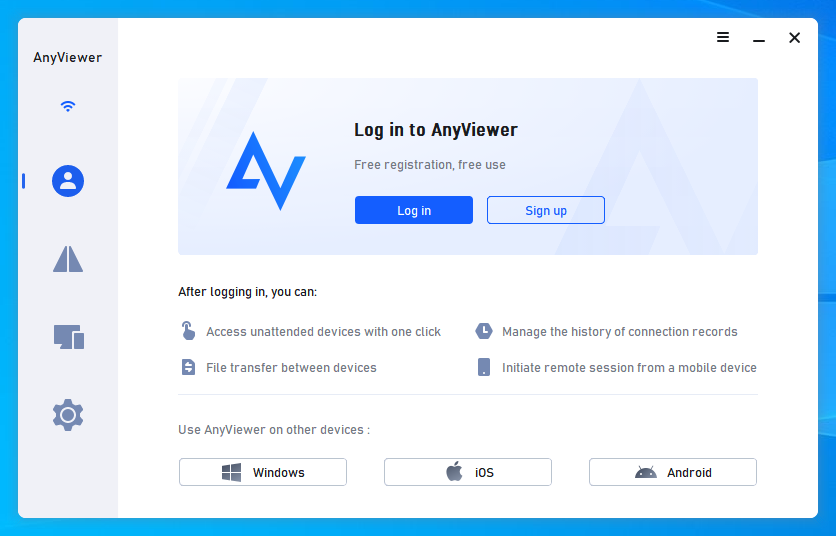
Step 1. Install and run AnyViewer on both of your computers. Navigate to Log in and then Sign up and fill up the necessary information (if you have already registered on the official website, you can log in directly).
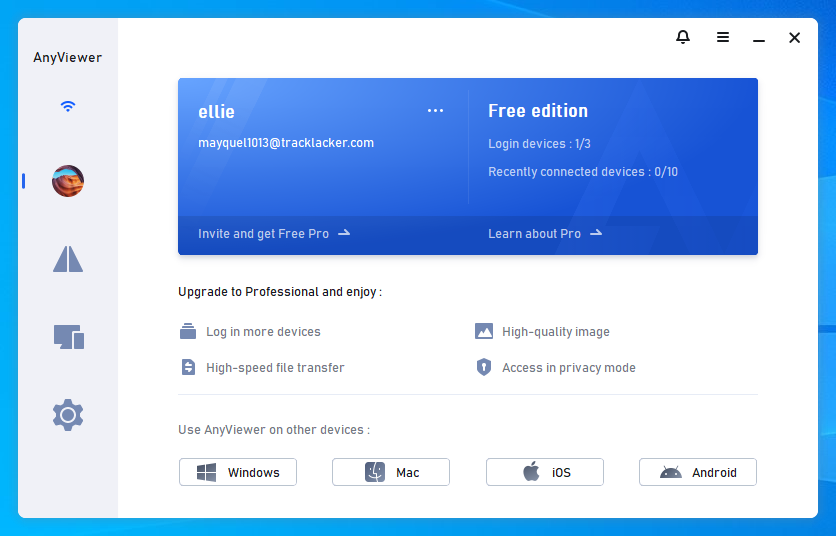
Step 2. You should now see that you have successfully logged into AnyViewer. Your device will be assigned to the account to which you have logged in automatically.
Step 3. Log in to the same AnyViewer account on the two devices; on your local device, go to Device, then you can click One-click control to achieve a direct connection, click View the screen to see another’s screen, or click File transfer to share files between computers.
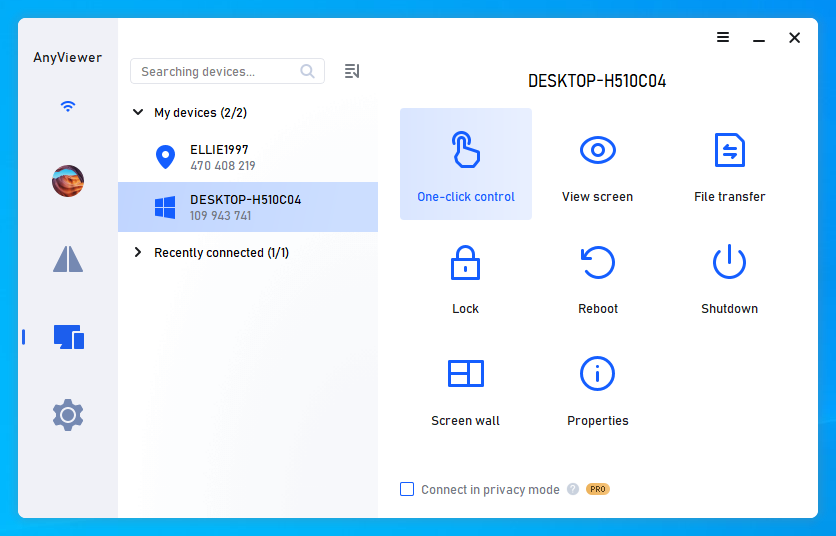
✍ You can also upgrade your account to a Professional or Enterprise plan to enjoy more rights: Connect in privacy mode to protect privacy: Black the physical screen of the remote computer and disable the mouse & keyboard. Assign more devices: One-click unattended remote access is only available between assigned devices. Control more computers: You can control more computers from one computer at the same time. High-quality image: You can change the mode to High-quality image for a better experience. .
Почему TeamViewer начал тормозить по wifi, но корректно работает по мобильному интернету?
Нахожусь в Таиланде на компе А, работаю с компом Б в России по teamviewer уже более года.
И вот неизвестно почему teamviewer начал сильно тормозить. Проблема какая-то сетевая на моей стороне.
Так как при смене сети на мобильнй интернет (раздаю со смарфона) , тимвьювер летает.
То же самое наблюдается, если вместо компа А использую другой комп В (wifi — teamviewer тормозит, мобильный интернет — летает).
1. ОС на компах А и В разные
2. Сеть не трогал давно (настройки не менял)
3. teamviewer не обновлял
4. Качество wifi судя по speedtest.net прежнее (точно такое же как весь год)
Куда копать?
Могу конечно позвать тацев из компании интернет-провадера, но это низкоэффективно, так как донести до них суть проблемы сложно.
Одминский блог
Столкнулся тут с очень занятным глюком работы TeamViewer через вайфай 5Ghz. Заключается он в том что TV дико лагает, картинка подвисает на 10-20 секунд, а порою и на дольше, т.ч проще перелогиниться, чем ждать когда отвиснет.
На эту частоту я переполз уже достаточно давно, а вот тупить тимвьювер начал совсем недавно. И я как то на это закрывал глаза, пока не надо было постоянно ковырять машину на парсинге базы для прогонов. И оказалось, что это весьма вышнуривает.
 Попробовал пробрасывать порт 5938, разрешать его в фаерволе, но это не возымело никакого действия. И в процессе ковыряния, в очередную перезагрузку рутера, комп переключился на олскульный 2.4GHz на котором данные тормоза исчезли и все стало шуршать, словно целевой комп рядом на столе стоит.
Попутно еще и исчез баг с квипом, который последнее время мог коннектиться к акку по полчаса.
Стало понятно, что дело вовсе не в пробросе портов, а в какой то аппаратной реализации 5GHz в МГТСовском GPON рутере ONT SERCOM RV6699. Путем метода научного тыка, выяснил, что дело в реализации стандарта 802.11ac, включающего полосу 80МГц и за счет этого поддерживающий скорость работы до 6+ гигабит.
Если отключить микс режим с ac, а просто оставить a+n то все начинает отлично работать без малейшего намека на лаги и зависоны.
Самое интересное, что на него я переключался, чтобы в свое время убрать лаги вовки и дыбалы.
При подключении к серверу через любую программу удаленного доступа начинает очень сильно тормозить
Acer Aspire One 532h-28 сильно начинает тормозить при подключении к интернету
Вечер добрый. Одна надежда на Вас. я перепробывал уже все что знал. В общем проблема такая.
При подключении через USB 3.0 винчестера пк начинает тормозить
В общем есть переносной винчестер когда я его подключаю через USB 3.0 он как бы определяется но.
Сильно начинает тормозить браузер Гугл Хром при открывании новой вкладки
Добрый день. Открываю любую ссылку в хроме и тут же начинаются жесткие тормоза в браузере. Если.
Подключение удаленного доступа к серверу через интернет
Есть комп с Windows Server 2008 с рабочей локальной сетью на несколько компьютеров. Раньше, 3 года.