What does It Mean to Vanity Search?
A vanity search may be more commonly known as ego surfing. This is a term that may have been coined by Internet mogul, Sean Carton. When you vanity search, you are essentially using a search engine to look up yourself. Other names for this practice include self-googling, googling yourself, ego searching or autogoogling. These names reference the common practice of using Google to perform this search.
If you’re new to the Internet, it can be interesting to vanity search, to see if anyone knows who you are. Of course, what you may see at first is a lot of people who have the same name as you. Once you start to blog, post, or put information up on places like Facebook, a vanity search may reveal more pages that refer to you.
Sometimes the term is used derogatively to describe those people who are obsessed with seeing their names pull up on a search engine. If your name ends up with thousands of results, it can be a boost to ego, hence the term ego surfing. It can raise your self-esteem when other people write about you, cite your work, or give links to your work.
However, there may be some other reasons to vanity search. First, the Internet is unfortunately a place where a lot of theft of original material occurs. Sometimes this theft is extremely incautious. People may lift something you’ve written and still credit you for it, but they may be violating copyright or terms of use of a blog you write. You can contact these people and ask them to stop using your work, or you can make arrangements with them that may be profitable to you. Theft is not always ill intended, and some people just don’t realize they’re affecting profits or violating copyright laws, when they use your work without your permission.
Another reason why some people vanity search is to find out if people are reporting untrue things about them, or saying unkind things. This may most be applicable to people who are well known, either for some reason in the Internet community or offline in some celebrity fashion. When hurtful things are written about a person, or moreover inaccurate things, it may be possible to change this by commenting on someone’s website. You can correct false reports though you may not be able to do much about vicious attacks that are opinion based.
A great number of people may occasionally vanity search just for the fun of it. It’s generally a harmless activity. Given the vast information available online, searching your own name and coming up with results that have nothing to do with you may be a check to vanity rather than encouraging it.
Tricia has a Literature degree from Sonoma State University and has been a frequent EasyTechJunkie contributor for many years. She is especially passionate about reading and writing, although her other interests include medicine, art, film, history, politics, ethics, and religion. Tricia lives in Northern California and is currently working on her first novel.
Tricia has a Literature degree from Sonoma State University and has been a frequent EasyTechJunkie contributor for many years. She is especially passionate about reading and writing, although her other interests include medicine, art, film, history, politics, ethics, and religion. Tricia lives in Northern California and is currently working on her first novel.
You might also Like
AS FEATURED ON:
AS FEATURED ON:
Related Articles
- How do I Create my Own Website?
- What is the Facebook Generation?
- What is Facebook?
- What is Offline Mode?
- What is a Profile Image?
- What is the Difference Between Ego and Pride?
- What is a Querystring?
Discussion Comments
@clintflint — In some cases I think it's actually a good idea to do this though. People have done all kinds of malicious things online, including posting images they shouldn't or saying things they shouldn't and it's better to know what is being said than to live in ignorance and maybe get burned later on.
@KoiwiGal — That's actually a really easy line to cross, unfortunately and I know I've done it. Usually I think a real vanity search isn't necessarily going to be for your name, but for the names of the people around you so you can figure out what they've been saying about you in private.
I remember when I was a teenager all my friends were into LiveJournal and would write stuff about our classroom all the time and I was constantly surfing around trying to see if anyone had mentioned me.
I try not to let myself get that interested in it these days and mostly you don't find anything interesting anyway, but I know it can be difficult to resist the temptation.
If you've got a valid reason to need to know if your name comes up online, then I would suggest signing up for a notification system that will let you know when it happens without your having to search for it. Whenever I put up unique articles online that I don't want people to steal, I will use a fragment of the text in the same way, so I will get a notification if someone else posts it online.
I think it's only really a vanity search if you are constantly looking yourself up to see what people think of you.
Vanity Address
Bitcoin addresses are identifiers using alphanumeric characters that aren’t always recognisable at first glance. To encourage public acceptance, we should facilitate whatever can be facilitated.

Moreover, the vision of this sequence of numbers and letters can be strongly repulsive for people with no knowledge of cryptography. Generating your own address through Vanity is not really complicated and even fun. That’s why you have to do this yourself rather than using a third-party service. The main reason is always the same. For one trusted site you will find nine who will try to rip you off. So if you do not believe that you have sufficient knowledge to detect a scam, it would be best to go back.
How do they do that?
Scam sites offer you to enter a string of characters and run the tests to find an address with a shape of the desired character string. For example, you want your address to start by 1Bet because you have a betting site. The site gives you
1Betx42BCrgrt56fgFrgkr4dfXer3gmIEf and the private keys of this address!
Then, the public address and its private key will be registered in their database of the site and therefore will have an instant access to your funds! Your Bitcoins will be in danger if you import the given address on your Bitcoin wallet.
The safe way to use vanity is to use the Vanity open source software and its command line. For more information, please take a look here: https://en.bitcoin.it/wiki/Vanitygen
How it works
First important thing, Vanity works only with existing bitcoin wallets. If you don’t have one yet, it’s time to take the big step forwards.
If you have one, run your command line.Vanitygen takes as input data from the model or model list, after which it takes address options and private keys. Vanitygen selection is based on probabilistic research, which takes a certain amount of time. The time depends on the complexity of the model setpoint, the speed of your computer and your luck.
Then, you are able to tape your pattern. In your example it is 1Bet. It should be noted that in the line you can not use 0 (zero), O (large o), I (large i), l (small L), and it must start with 1 (one unit).
Once your pattern is entered as input data, Vanity start his search. Please note that it’s probably not worth looking for long strings, in order to shorten processing times. The final result will be something like this:
(Note that an ‘easy’ string to find like this does not mean that specific private key can be guessed easily .)
Vanitygen
Vanitygen is a command-line vanity bitcoin address generator.
If you’re tired of the random, cryptic addresses generated by regular bitcoin clients, you can use vanitygen to create a more personalized address. Add unique flair when you tell people to send bitcoins to 1stDownqyMHHqnDPRSfiZ5GXJ8Gk9dbjO. Alternatively, vanitygen can be used to generate random addresses offline.
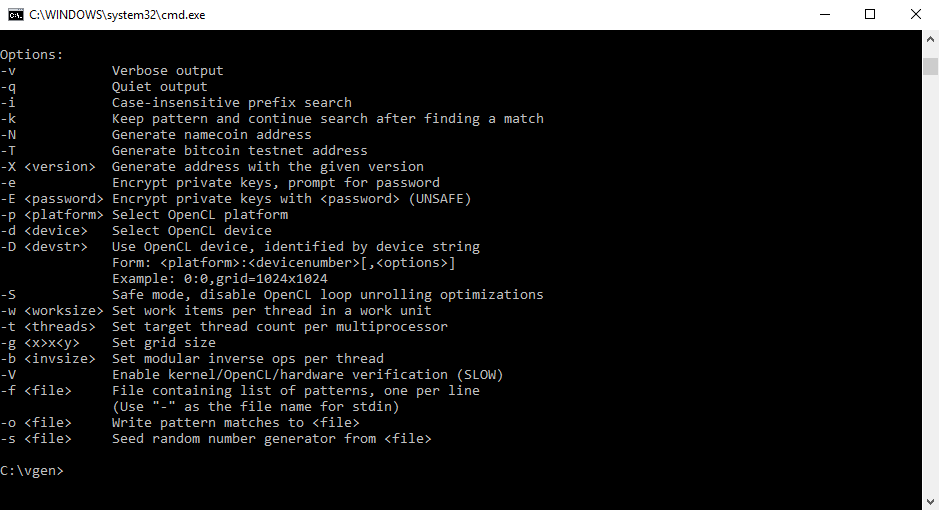
Vanitygen accepts as input a pattern, or list of patterns to search for, and produces a list of addresses and private keys. Vanitygen’s search is probabilistic, and the amount of time required to find a given pattern depends on how complex the pattern is, the speed of your computer, and whether you get lucky.
The example below illustrates a session of vanitygen. It is typical, and takes about 10 sec to finish, using a Core 2 Duo E6600 CPU on x86-64 Linux:
Vanitygen includes components to perform address searching on your CPU (vanitygen) and your OpenCL-compatible GPU (oclvanitygen). Both can be built from source, and both are included in the Windows binary package.
Current vanitygen version: 0.21
Get the source from includes Makefiles for Linux and Mac OS X.
Main discussion at Bitcointalk
Use of vanitygen to try to attack addresses
Using vanitygen you might think that you would be able to find the private key for a given address. In practice, this is considered impossible. Given that the difficulty increases exponentially the longer your vanity is, so does the average time required to find that vanity. The example table below shows how an increasingly complex vanity affects the difficulty and average time required to find a match only for that vanity, let alone the full address, for a machine capable of looking through 1 million keys per second.
Как я делал блог, который вы сейчас читаете

Один умный человек как-то справедливо заметил, что, попробовав винтажное шампанское 60-х годов, вы обеспечите себя билетом в один конец: вас будет сложно удивить какими-то там нищенскими винами 10-летней выдержки. Что уж тут говорить про обычные экземпляры из винного.
С технологиями так же: попробовав что-то очень крутое и качественное, вы будете не без оглядки пользоваться чем-то похуже. Увидев лаконичный интерфейс айфона, не сможете пользоваться Huawei без крови в глазах; попользовавшись удобным приложением Тинькофф-банка, вы вряд ли когда-нибудь будете довольны приложением ВТБ, а если вы видели редактор новомодного приложения для заметок, идей и структурирования информации Notion — вы поймете, как далеко ушел его редактор и какую планку он задал всем CMS, соцсетям и всему, где сегодня пальчиками текст надо тык-тык. На самом деле он просто минималистичный, ничего лишнего, в этом его сила.
Эту вводную часть я написал к тому, что первая мысль при создании блога звучала так: «Хорошо, если то, где нужно будет писать — было бы лаконичным и функциональным». Прям как дизайн Дитера Рамса. Референс в виде Notion’а уже был, далеко ходить не надо.
Начал выбирать CMS (Content Management System, штука для того, чтобы создавать контент с минимальными затратами по времени), немного посерфил по интернету и остановился на Ghost.
 Редактор выглядит так. Произошла рекурсия ��
Кстати, маленькая деталь под названием «markdown» также важна. Markdown обеспечивает весь визуальный текстовый дизайн, который сделает текст красивым, читабельным и вообще секси. Markdown — это когда ты без мышки можешь сделать любые махинации с текстом, например:
Сделать текст жирным? Добавляешь ** вокруг текста
Хочешь сделать заголовок H1? Пиши # перед словом
Выделить текст? == Хайлайт == превращается в Хайлайт
И все остальное.
Синтаксис очень простой, один раз выучишь и жить станет легче.
 Очень удобно
Markdown крайне облегчает жизнь, без него никак. Ну а выбор CMS для блога я делал исходя из редактора. Увидел Ghost и сразу влюбился.
Наверное, это не самый умный ход, плясать от редактора, но цель блога была лишь одна — больше писать. Чтобы больше писать — нужно сделать так, чтобы это было просто. Простой редактор для создания контента — все, что нужно. Если редактор подходил, то можно было идти дальше: смотреть на простоту администрирования контентом, сложность привязки домена, внешний вид, локализацию, интеграции, шрифты. Кстати, а что у Ghost в этом плане?
Что есть эта CMS
Не хочу здесь устраивать занудный обзор и делать сравнительные таблицы. В интернете этого полно, вот тут можно сравнить с чем угодно, например. А тут есть хороший подробный обзор от моего знакомого.
А я скажу, что подкупило меня:
- Как уже писал — минималистичный идеальный редактор
- Такая же минималистичная админка для деплоя контента
- Интеграции. Те, что нужны были мне — есть. Честно говоря, их не так много: комментарии и возможность вставлять свои куски кода для прикрутки аналитики и всякой фигни типа поп-апов
- Красивые темы (шаблоны)
- Возможность сделать что-то под себя. Эта CMS опенсорсная, а значит вы ее код можете брать, переписывать под себя, что-то добавлять, что-то убирать. Но для этого нужно понимать код
- SEO-настройка (Лично мне не особо нужна, но ее отсутствие как-то поставило бы Ghost под вопрос, ведь как можно делать контент без возможности настроек под поисковики?)
Что касается сравнений с WordPress, то я не хочу быть фанбоем Ghost’а, но сравнивать Ghost с WP — некорректно.
WordPress — как конструктор Lego, из которого ты можешь сделать хоть небольшой домик, хоть звезду смерти. Весьма глупо сравнивать 17-летний движок, у которого 63% рынка среди всех CMS — с новомодной опенсорсной Ghost, поднявшей 200к евро на Kickstarter и позиционирующей себя как платформу для блоггинга.

Возвращаясь к шаблонам — по сравнению с WordPress, у Ghost крайне мало шаблонов, хотя в этом есть и плюсы, не приходится умирать от выбора «той самой». Я сначала приметил тройку понравившихся и финально остановился на базовой теме «Casper». Она минималистичная и выглядит стильно, а когда я узнал, что она еще и меняет цвет на темную тему в зависимости от времени суток — я просто поплыл.
 Минимализм — заебись!
Что было сделано, чтобы блог выглядел так, как выглядел. На самом деле —немного. Я растянул процесс на 2 месяца, а по факту там работы на несколько вечеров.
Что было сделано:
Локализовал базовые переменные. Ghost — американская CMS, админка также на английском. Всякие «5 min read», «More publications», «Next, prev» на русский автоматом не переводятся. Даже дата остается, как «5 july», все это НЕ своими руками пришлось менять на уровне кода.
Прикрутил интеграции. Disqus для комментов, Google Analytics и Я.Метрику через GTM для тщеславных цифр. Можно было бы какую-нибудь форму Mailchimp добавить для ЭЛЕКТРОПОЧТ, но кому это надо? Еще хотел сделать sharing bar, но потом поймал себя на мысли: «Блин, кто-то реально шерит понравившиееся статьи через специальные кнопки, зачем тогда буфер обмена?»
Немного фронтенда в ленту. Все также не своими руками знакомая-фронтендер (дикое спасибо ей) помогла с настройкой шрифтов (Montserrat), их размеров, отображением на мобилках + прикруткой progress bar. Кстати для меня также было важно, чтобы эта тема нормально выглядела на телефонах, и с этой задачей Casper также справился на пятерочку.
Самое долгое. На заливку всех статей, которые я писал на разных UGC площадках — Медиумах, VC, в Telegram-канале, — ушло около 4х часов + я решил все заново отредактировать и обновить верстку. Кому нужно читать полотна?
Что еще подчеркивает охуенность редактора Ghost? Скопировав через Ctrl+C Ctrl+V мои статьи с VC.ru — они идеально встали в редактор. То есть почти без правок, с сохранением заголовков, отступов, выделенной жирности и цитат.
Вот это я понимаю clipboard-friendly. После заливки я сделал пару взмахов по SEO — тайтлы, дескрипшны, заголовки. В общем, обычная фигня, которая в целом никакого органического трафика не принесет, ибо контента мало, домен новый: может, через год будет заходить 10 чел с поиска в день, если писать по одной статье в месяц.
Вот вам памятка по этому поводу:

Нейминг
По версии Vanity Search в лице меня, подходов в нейминге три:
-
Душный (нишевой). Вы пытаетесь в названии компании/проекта/услуги зашить привязку к роду деятельности, нише.
Вы занимаетесь производством столов: Столстрой
Вы ведете канал про дурацкую рекламу: Дурацкая реклама
Вы занимаетесь производством столов: Tabula Sense
Tabula (лат.) — доска, Sense (англ.) — смысл.
Вы ведете канал про дурацкий маркетинг: Stupido publicité
Рандомный способ — самый клевый, чтобы назвать что-то. Берешь с потолка понравившееся слово или определение, а в будущем дополняешь его сторителлингом о том, как вы к этому названию пришли.
Ладно, если мне не верите, вот как Stackoverflow пришел к своему названию. Топовый портал для программистов, занимающий 43 место в мире в рейтинге Alexa — был назван в честь ошибки в коде.
Для интереса я исследовал эту тему среди российский агентств:
Я не хотел использовать слова «digital» и «маркетинг» в блоге про digital и маркетинг. Душно называть блог рука не поворачивалась, поэтому я решил назвать так, чтобы это было связано с интернетом и приятно звучало.
Vanity Search (англ. — тщеславный поиск) — процедура поиска упоминаний своего ФИ (или поиск своих фоток) в большом необъятном вебе. Прикольная штука, символизирующая то, как человек сегодня живет.
Мы каждый день сидим в интернете по 6-7 часов, заливаем гигабайты фоточек, текста и видео, генерим по 10000 сообщений в рабочих чатах. И в какой-то момент спустя 5-6 лет существования становится интересно, где же ты засветился. Digital-привычка, получается.
Кстати, из всех вариантов нейма для блога сложно было «сметчить» его со свободным доменом в зоне RU. Я не думал, что это будет так долго, поэтому не попсовый термин «Vanity search», слава б-гу, был свободен. Но чтобы прийти к этому названию, я реально убил часа 2-3. Вариантов было в районе 30, показывать я их, конечно же, не буду.
А, по поводу домена. Не используйте РегРу, эти суки за простой 301 редирект берут 120 рублей в год, я же сам сделал это бесплатно через CloudFlare, ну как сам, подписчик помог.
 Кстати, по поводу загрузки. Работает шустро, не последний Ruby on Rails, но тоже ничего
Другие ЦМСки
Tilda
Вообще я нормально отношусь к Tilda и уважаю ее прежде всего за то, что компания сломала барьер по созданию простых сайтов/лендосов для простых смертных. Собственно из-за этого Tilda и стала популярной, а ее верстку можно узнать за тысячу миль по базовому шрифту Futura и однотипному расположению блоков.
Tilda шаг за шагом идет к полноценной CMS и в декабре 2019 добавила функцию «Потоки», где также просто можно делать статьи и публиковать в 2 клика. Если раньше тебе нужно было делать статью через блоки и танцевать с бубном, то сейчас там есть собственный редактор и логика создания контента в стиле современных CMS.

Но есть существенный минус — сейчас это весьма ограниченный и сырой продукт.
С момента, когда я писал об этом раньше — они пофиксили много багов, но основные проблемы, которые отличают Потоки «Тильды» от нормальной CMS — остались:
- Редактор говно и лагает. Мало того — не поддерживает markdown
- Нельзя вставить HTML код, нельзя даже вставить обычный код (!)
- Комментарии подключить нельзя
- Шрифт поменять нельзя
- URL не кастомизируются и по дефолту выглядят, как ID транзакции на блокчейне
- SEO логика нарушена
Вывод: «Тильда» для лендосов — норм, но для регулярной публикации статей она не подходит. Если хотите делать корпоративное медиа — забудьте.
Зная все эти нюансы, «Тильду» я даже не рассматривал.
«Эгея»
Еще есть такой модный движок под названием «Эгея», который весьма популярен в редакторской тусовке. Тоже посмотрел демку этого движка и понял, что это очень сложно, до свидания. Ну а зачем усложнять жизнь?
 Выглядит, как отправка имейла
Создатель «Эгеи» решил сделать свой markdown. Зачем?
 Че, почтовый синтаксис??
Помимо этого в движке явно виден редакторский шлейф, который свойственен ее создателю Илье Бирману, любителю типографики. Например движок автоматически исправляет кавычки с учетом вложенности, а дефис меняется на тире. «Эгея» не прошла тест на нормальный редактор, поэтому также сошла с дистанции.
Движок на любителя, в общем.
Генераторы статических сайтов (SSG)
Если вы будете читать обзоры на популярные CMS и в целом задаваться вопросом создания своего контента в вебе, то вы наверняка столкнетесь с генераторами статических сайтов типа Gatsby, Hugo, Jekyll и т. п.
Я наткнулся на них, закидывая понравившиеся мне блоги в WhatCMS, где результатом и были как раз эти «движки».
Погрузившись глубже я понял, что создавать контент для блога через них дольше и сложнее. Это обусловлено другими технологиями генерации веб-страниц.
Суть в том, что WordPress’ы, Ghost’ы, Битриксы — это динамические CMS. Динамические, потому что та HTML-страница, которую вы видите на экране, генерируется на сервере каждый раз, когда вы обращаетесь к этой странице. Генерирует ее ваша CMS, а делается это все в красивом редакторе.
Генератор статических сайтов (Static Site Generator) работает иначе. По сути это программа, которая обрабатывает структурированные исходные файлы (тексты, картинки, шаблоны) и генерирует статический HTML-сайт, который можно загрузить на сервер (определение я честно спер с Хабра, потому что оно показалось мне самым доступным и понятным для человека не из IT).
 Пикчу взял отсюда
Короче, делать целый блог через генератор муторнее, сложнее и по опыту того, что я видел — запариваются с этим сейчас только айтишники или те, кто хочет ОЧЕНЬ выделиться.
На самом деле тот же Gatsby можно связать с Netlify CMS (или любой другой headless CMS), и вы получите красивый UI-редактор и классную технологию для создания контента, но зачем нужны эти манипуляции, когда все можно делать в одном месте, не влезая в код и программирование?
Но у SSG есть ряд некоторых преимуществ:
- Работают эти сайты быстрее из-за самой технологии (но насколько ощущается эта скорость?)
- Более безопасны, потому что страницы рендерятся без сервера.
- Можно легко масштабировать, если захотите съехать на свой движок, другую CMS или просто данные хранить иначе. Полная управляемость.
- Некоторые генераторы статических сайтов поддерживают PWA и могут работать без интернета. Опять же непонятно, зачем это нужно, учитывая довольно сырую верстку оффлайн и факт того, что интернет есть везде.
- Дешевле (Ghost берет 36$ за хостинг и риски, связанные с ddos-атаками).
Классную лекцию о том, как работают генераторы сайтов, можно посмотреть у IT Субботника, а гиковскую статью о том, почему SSG лучше WordPress’a —почитайте на Хабре.
Блоги на SSG могут выглядеть красиво, вот пример.
А нужен ли вообще блог?
Помимо того, что создание нормального блога — это небольшая диджитальная задачка, о процессе которой я рассказал выше, нужно всегда задаваться вопросом: «Нужен ли реально стендэлон блог?».
Не открою секретов, если скажу, что способов для публикации контента сейчас масса: от Telegram-канала до любых UGC площадок типа Medium, VC.ru, Хабра и, возможно, даже Яндекс.Дзена. Но нужно понимать, на какие уступки вы идете, играя на чужом поле:
- Контент принадлежит не вам, хоть и авторство будет ваше. А это значит, что траффик и вcе SEO-бенефиты получает площадка.
- Редактор может быть не идеален, а значит, вставка элементов верстки типа аудио, цитат или «HTML-кусков» может отсутствовать.
- ЦЕН-ЗУ-РА. Ровно как в ФБ сносят посты за hate speech или персик на столе, похожий на попу (по версии нейросетей Цукерберговича), так же любая площадка, где вы регистрируетесь, содержит целый прОспект того, что делать нельзя — от рекламы своей продукции до упоминания Путина всуе.
При этом есть и плюсы в виде: 1) трафика с потенциалом получить пару тысяч просмотров (тут уже зависит от площадки и ее специфики), 2) возможности сразу получить фидбэк от коммьюнити, ну и 3) SEO сыграет обратную роль, и если вас зовут не Иван Петров, то ваша фамилия по запросу в Гугле попадет в топ из-за трастового домена площадки и ее авторитета.
Я сделал блог не только потому, что хочу свободно писать, владеть своим контентом и быть незабаненным.
Люди — собственники, и я — такой же. Иметь СВОЙ блог — гораздо круче и серьезнее, чем быть зарегистрированным в медиа как автор.
Этот блог — эволюция Telegram-канала, который читает уже не 100 человек, а полтора десятка тысяч. Не сделать я его не мог, а мысль о том, что теперь можно взять курс на порядочные полезные статьи со своим оформлением — идеей фикс застряла на подкорке мозга и не давала уснуть пару ночей.
Файнали
Как бы я не хотел, чтобы эта статья вышла обзорной — она почти такой, блять, и вышла. Может потому что при создании блога я сделал сравнительную таблицу в Google Sheet с плюсами/минусами, а это и был тот самый ПРОЦЕСС создания блога, о котором я хотел написать? ��♂️
В общем, чтобы конец статьи не был вычурный и графоманский — я cделаю TL;DR по всем законам сохранения времени читателя в интернете:
- Ghost простой и понятный, мне подошел, вам может НЕ подойти
- Не сравнивайте его с WordPress ибо последний в разы функциональнее, но и посложнее
- Выбирайте недушный нейминг для ваших проектов
- Не юзайте РегРу (вот еще один пруф)
- Тильду, как платформу для статей — также не юзайте
- Хотите запариться со скоростью и сложностью — берите SSG
- Поймите, нужен ли вам отдельный блог или лучше на VC написать?
- А если вам не о чем писать, то не делайте блог — идите в телегу, ну или если очень хочется — подойдет Teletype, он проще, чем все выше, и даже домен привязать можно свой

Ну а в комментариях можете написать о том, какие проблемы вы испытывали при создании блога (если он у вас есть) или написать в чем я в этой статье не прав.
Напишите хоть что-нибудь, так я пойму, что 20 часов на создание этой статьи были потрачены не впустую ��
Topic: VanitySearch (Yet another address prefix finder) (Read 29833 times)
Hello, I’m new here and have a question about
bojlahg/VanitySearchPublicKey.
if I search there I find only keys with use -t.
-gpu is displayed but does not find any keys
for example:
VanitySearchPK.exe -t 0 -gpu -sk 2000000000000000000000000000000000 -p 633cbe Find no keys but 5000mk/s (0keys) 1 minute
VanitySearchPK.exe -t 1 -gpu -sk 2000000000000000000000000000000000 -p 633cbe find keys with 5600mk/s very bad (25keys) 1 minute
VanitySearchPK.exe -t 32 -sk 200000000000000000000000000000000 -p 633cbe find keys good but 1000mk/s (200keys)1 minute
I believe that the program recognizes the GPU
but the gpu performance does nothing
can any help for this
If I want to run the vanitysearch program to search for private keys from 1 to a specific number and output the results, how can I do that?
Base Key: 0000000000000000000000000000000000000000000000000000000000000001
Difficulty: 1208925819614629174706176
Search: 11111111111 [Compressed]
Start Sun Apr 9 10:13:28 2023
Base Key: 0000000000000000000000000000000000000000000000000000000000000001
Number of CPU thread: 12
You mean provide an argument to search on a specific range?
If so, VanitySearch can’t do that but there are forks and other tools that has the feature that you’re looking for.
- Bitcrack: https://bitcointalksearch.org/topic/bitcrack-a-tool-for-brute-forcing-private-keys-4453897 | use —keyspace to specify the range.
- VanBitCracken: https://bitcointalksearch.org/topic/vanbitcracken-a-program-to-use-for-32-btc-challenge-supports-rtx-30xx-cards-5328080 | has more feature but not open-source.
If I want to run the vanitysearch program to search for private keys from 1 to a specific number and output the results, how can I do that?
Base Key: 0000000000000000000000000000000000000000000000000000000000000001
Difficulty: 1208925819614629174706176
Search: 11111111111 [Compressed]
Start Sun Apr 9 10:13:28 2023
Base Key: 0000000000000000000000000000000000000000000000000000000000000001
Number of CPU thread: 12
Don’t use address prefix because it will slow down your search, when you give a prefix of an address the program will generate private keys, derives their public keys, hashes the public key twice and then performs another double hash on the rmd160 hash to derive the address and then checks to see if the prefix matches with your desired prefix.
You should find a tool that searches for rmd160 prefix. I haven’t seen any tool searching for such prefixes, they either search for the whole hash or just slow you down by searching for prefix match on addresses. Why are you using CPU? it’s a waste of time, you should use GPU only.
If I want to run the vanitysearch program to search for private keys from 1 to a specific number and output the results, how can I do that?
Base Key: 0000000000000000000000000000000000000000000000000000000000000001
Difficulty: 1208925819614629174706176
Search: 11111111111 [Compressed]
Start Sun Apr 9 10:13:28 2023
Base Key: 0000000000000000000000000000000000000000000000000000000000000001
Number of CPU thread: 12
None of those are Nostr vanity generators. AFAIK, nobody has made one yet, which is not unreasonable when you consider that Nostr is a very recent invention.
[for the record, VanitySearch cannot find Taproot addresses, but it should be as simple as checking for an input prefix that is either bc1q or bc1p to allow that. I was able to use VanitySearch to generate arbitrary prefixes not starting with 1, 3, etc, in my experimental builds.]
None of those are Nostr vanity generators. AFAIK, nobody has made one yet, which is not unreasonable when you consider that Nostr is a very recent invention.
[for the record, VanitySearch cannot find Taproot addresses, but it should be as simple as checking for an input prefix that is either bc1q or bc1p to allow that. I was able to use VanitySearch to generate arbitrary prefixes not starting with 1, 3, etc, in my experimental builds.]
This is what I ended up settling with:
The ugly AND operators are the direct result of Intel not having any kind of «AND bytes/words/dwords/quadwords inside XMM register» instruction. Indeed, there are no packed bitwise instructions operating on single SIMD registers at all — the kinds of instructions are there are mostly designed with video decoding algorithms in mind.
There’s no real performance improvement from using this over the old code.
Yes, I know there is MOVMSKPS, but that is for floats, so it hardly suits byte inputs. Not only would I have to restrict inputs to 4 chars at a time, I would also have to pad them with zeroes which will negatively affect performance.
Hence this code has been pushed right now to the repo, but nothing calls it — this is despite coverage tests saying it got hit 16 million times (over the span of a few minutes) whereas the char_is_match other function would be (and still is) called several hundreds of millions of times.
So the only real performance improvement I pushed in this latest commit is to disable the UTF8 character matching and treat everything as ASCII — that did increase Mkey performance on 8x «Intel(R) Xeon(R) CPU E31240 @ 3.30GHz» by about 0.1MKey/s (up from 0.9 MKey/s average — VanitySearch reports large speeds for the first few seconds but then it comes down as the estimates become more accurate).
Meanwhile the non-regex mode (also in my fork) runs at 2.20MKey/s once the dust is settled — roughly the same as original VanitySearch.
A zero-overhead abstraction for the high-level language you are already using is so much nicer than spending a bunch of time writing your own architecture-specific routines in assembly or compiler intrinsics (std::simd itself being a simple template library implemented using intrinsics). Generally speaking at least
This is very useful, thanks!
Is this part of the base standard, or a C++11/14/17/20 extension?
Meanwhile I have already made an optimized matcher for consecutive character matches:
edited for garbage code formatting pasted from my phone
This actually only uses SSE2. I’m not sure why JLP compiled with SSSE3, is he using some of those newer instructions in his SECP256k1 class?
Anyway, I haven’t benchmarked this yet, but the way this is supposed to work, is that the regular expression is already represented as a linked list like this:
start —> char —> char —> char —> char —> char —> char —> quant
v
any
so you can actually go down in some of these nodes if necessary.
Now instead of comparing each of these char nodes as is presently done, which is inefficient, we can take advantage of the fact that XMM registers can hold up to 16 char values. So we can combine sets of 2-16 char nodes into a single char16 node, and pad it (as well as the input string!) with NULs if necessary :
start —> char16 —> quant
v
any
This has roughly the same overhead as a single «char» old-school comparison. Considering that the «char» node match function is called hundreds of millions of times in the span of a few seconds, owing to the fact that most people will usually search for just a certain pattern of strings, this will translate to 6-8x less of these calls being made depending on the regex string.
A zero-overhead abstraction for the high-level language you are already using is so much nicer than spending a bunch of time writing your own architecture-specific routines in assembly or compiler intrinsics (std::simd itself being a simple template library implemented using intrinsics). Generally speaking at least
Well, I wouldn’t call myself that.
citb0in actually asked me that question already, and we both thought it would take max. a week or two. This was in the beginning of January. But unfortunately (among other things) I discovered that adding the GPU support wasn’t as simple as changing a few lines of code (and I refunded him his money last night).
So as it stands, there’s only a working CPU build — just now I pushed the code that will enable you to run queries like «./VanitySearch ^1abc» to search for 1abc prefix at the beginning, and also you could already do ./VanitySearch 1abc$ to search for 1abc at the end of the address, and some other things I will list below.
Wildcard searches with *, +, and
(difficulty estimation is currently wrong for
Character classes and quantifier example:
./VanitySearch -t 8 ‘^1[fF][iI].<2,4>[sS][hH]’
Note: Make sure you put the regex in single quotes » otherwise bash might mess them up!
Anyway, I’m going to try to optimize the CPU build first before working on the GPU (regex mode is currently 2x slower than non-regex mode), maybe put some SSE or AVX in there somehow.
I am still working on my VanitySearch build by the way.
Over the past few days, I made the CPU core of the regex support work (It just needs a few lines of code change to allow you to lock the search to prefix or suffix, but that will be done in a few days), but apparently, there’s a ton of work necessary to be done on the GPU side.
[Yes, I hate CUDA — what an abomination to debug — but if nobody else is going to do it, why let the idea of regex search go down the drain?]
EDIT: GPUEngine must be almost completely rewritten, including making a regex matcher in CUDA. Apparently, nobody has ever done this before (or at least finished it) so whatever I’m going to implement here might possibly be the first time someone attempts that.
Why does it need to be rewritten?
Because the GPUEngine was based on wildcards. It would basically take the ? and * and then calculate all the different possible combinations of the prefix, and the result would be a gigantic array which is indexed by a unique prefix ID, where ago find a match for an address, you’d run a string comparison on all of the corresponding prefixes, so see if any match.
There is two ways to insert regex at hat point:
1- shoehorn the other regex characters inside the GPUEngine (but this approach really only works with quantifier metacharacters), or
2) break the input string down into a tree, where each regex character corresponds to some part of the tree, and match all those parts in parallel.
2) is the approach I chose to take because it means I can use the existing CPU regex library as a reference for how to match stuff.
Either way, we’re on track to make the first regex-enables VanitySearch, eventually.
PS. There is no longer a GPU performance hit, but it just seems to be sitting there idle ever since I ripped out the (pointless for this build, IMO) prefix input’s anyway.