Spectrum Scale introduction (GPFS)
GPFS is a concurrent file system. It is a product of IBM and is short for General Parallel File System (new name is Spectrum Scale). It is a high-performance shared-disk file system that can provide fast data access from all nodes in a homogenous or heterogenous cluster of IBM UNIX servers running either the AIX or the Linux operating system, now Windows is also supported.
All nodes in a GPFS cluster have the same GPFS journaled filesystem mounted, allowing multiple nodes to be active at the same time on the same data.
A specific use for GPFS is RAC, Oracle's Real Application Cluster. In a RAC cluster multiple instances are active (sharing the workload) and provide a near “Allways-On” database operation. The Oracle RAC software relies on IBM's HACMP software to achieve high availability for hardware and the operating system AIX. For storage it utilizes the concurrent filesystem called GPFS.
Terms and definitions
Maximum values are given for Spectrum Scale version 5.0
Filesystem
A GPFS filesystem is a storage partition with a maximum size of 2^99 bytes (old limit was 8 YB, yottabytes). Tested limit is 18 PB.A GPFS cluster can have a maximum of 256 filesystems, and letters from a-z in Windows.
Max. file size 8 EB.
Limit of number of files per filesystem is 2^64. The current tested limit is 9,000,000,000.
Network shared Devices (disk), it 's attached to GPFS servers and it's defined in a pool.
A pool is a collection of devices (disk) with similar characteristics. The default pool is called system, and is mandatory. A filesystem can belong to multiples pools. Data can be transparently migrated from one pool to another, and automatically using ILM policies.
Metadata
Using metadata blocks sizes larger than 1 MiB and smaller than 256 KiB is not recommended. It is possible to specify a different block size for data and metadata, using the –metadata-block-size argument of the mmcrfs command, but only if the system pool contains only metadataOnly disks. In other words, data and metadata must be in separate storage pools when different data and metadata block sizes are used; it’s not possible to mix different block sizes in the same storage pool.
Sizing: from 1 to 5 % of data size (bigger are Data, lower percent you need for metadata)
Filesets
Filesets provide a method for partitioning a file system and allow administrative operations at a finer granularity than the entire file system. For example, filesets allow you to:
| Maximum number of filesets (dependent + independent) | Maximum number of independent filesets |
|---|---|
| 10,000 | 1,000 |
Maximum number of snapshots:
| Global snapshots | Maximum number of snapshots of each independent fileset |
|---|---|
| 256 | 256 |
There are 2 kinds of fileset, dependent ot independent. A dependent fileset cannot be changed into an independent fileset, or vice versa.
Comparison of dependent and independent filesets
| Function | Dependent fileset | Independent fileset |
|---|---|---|
| Inode space | Inode space is inherited from the file system or independent fileset to which the fileset belongs. Inode usage is charged against the total number of inodes that is defined for the containing file system or containing independent fileset. | Inode space is separate from, and independent of, the file system that contains the fileset. Inode usage is charged against the total number of inodes that is defined for the fileset, and not against the containing file system. |
| Snapshots | Snapshots are supported only at the level of the file system or the independent fileset that contains the fileset. | Fileset level snapshots are supported. |
| User group and user quotas | User group and user quotas can be tracked at the file system level or per independent fileset. This option can be selected per file system. If quota limits are defined as available at the fileset level, quota limits for a dependent fileset are charged to the containing independent fileset or containing file system. | User group and user quotas can be tracked at file system level or per independent fileset. This option can be selected per file system. If quota limits are defined as available at the fileset level, quota limits for an independent fileset are charged to the independent fileset, separate from, and independent of the quota limits of the containing file system. |
| Deletion | Can be deleted at any time,Deleting a fileset removes all data, including clones and dependent filesets. | An independent fileset cannot be deleted if it contains fileset-level snapshots. When an independent fileset is deleted, any dependent filesets and clones that it contains are also deleted. |
| Linking | Must to be linked to a path that belongs to the file system or independent fileset that provides the inode space. | Can be linked anywhere in its file system. |
Data availability
GPFS is fault tolerant and can be configured for continued access to data even if cluster nodes or storage systems fail. This is accomplished though robust clustering features and support for data replication. GPFS continuously monitors the health of the file system components. When failures are detected appropriate recovery action is taken automatically. Extensive logging and recovery capabilities are provided which maintain metadata consistency when application nodes holding locks or performing services fail. Data replication is available for journal logs, metadata and data. Replication allows for continuous operation even if a path to a disk or a disk itself fails. GPFS Version 3.2 further enhances clustering robustness with connection retries. If the LAN connection to a node fails GPFS will automatically try and reestablish the connection before making the node unavailable. This provides for better uptime in environments experiencing network issues. Using these features along with a high availability infrastructure ensures a reliable enterprise storage solution.
GPFS interaction with AIX
GPFS is a means to provide a journaled filesystem that can be mounted on multiple nodes simultaneously. GPFS stripes the data across all disks that belong to that file system. GPFS has a somewhat different approach of dealing with AIX volume groups and disks as we're used to; also mirroring is done in a different way.
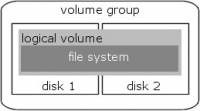
A standard AIX setup has a device relationship that follows the following rules: A volumegroup is created that holds one or more physical disks. A disk contains one or more logical volumes, or a logical volume may span multiple disks. There is a one-to-one relation between a logical volume and the filesystem it contains. With LVM-mirroring each logical partition of a logical volume is placed on two separate disks. This typical setup is shown in the figure below:
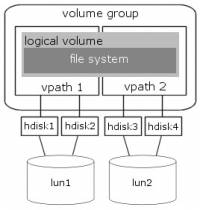
In a SAN environment, this picture looks like this:
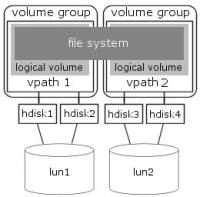
Each volume group of GPFS contains only 1 (one) physical disk. Each disk contains only 1 (one) logical volume. Each filesystem contains multiple logical volumes (one for each disk). LVM mirroring is not supported (there is only one disk in a volume group). This translates in the following picture:
In GPFS 2.3 the GPFS volumes are called Network Storage Devices (NSD), that contain each only one physical disk. No volume groups and/or logical volumes are created in this GPFS version. In migrated clusters (from GPFS 2.2 to GPFS 2.3) you will still see volume groups and logical volumes, but only for the “old” disks. New disks and filesystems will be created without them.
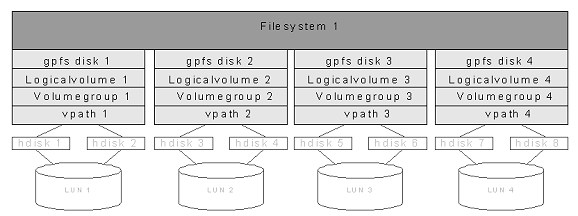
We change the picture in a more “stack”-like representation. Here you see one GPFS filesystem that is made up out of four separate disks. AIX multipath-software has created the hdisk and vpath devices.
On the AIX level GPFS creates a separate volume group for each disk, so 4 volume groups in total. GPFS fills each disk with a logical volume, so 4 logical volumes in total. These logical volumes are represented as disk in the GPFS configuration. These GPFS-disks are used in the filesystem. A file stored in the filesystem is striped across the four disks (in 8kb blocks). The command used to create the GPFS disks is mmcrlv.
Mirroring versus replication
Traditional AIX mirrorring on the logical volume level can not be done in a typical GPFS device setup. The volume group holds only one disk that is completely filled with one logical volume, so there is no destination possible for the second copy of the lv's logical partitions. GPFS provides replication as the alternative.
GPFS provides a structure called replication that provides a means of surviving a diskfailure. On the file level you can specify how many copies of that file must be present in the filesystem (one or two). When you specify two copies, GPFS will duplicate the file across two “failuregroups”. Setting replication on the file level is error-prone, this can easily be forgotten. It is also possible to specify this globally on the filesystem level. Set the “Default number of replicas = 2” and the “Maximum number of replicas = 2” on each GPFS filesystem, so that every file in all the GPFS filesystem are automatically replicated. Keep in mind that replication stores two file copies in the same filesystem. Each file will use twice the amount of space, so the filesystem free space will drop in size twice as fast. An example: The free space in the filesystem is 15 MB . You want to save a file of 10 MB , the result is a FILE SYSTEM FULL ERROR. The reason is that you need at least 20 MB free space to hold both copies of the file!
Failure groups
GPFS groups disks into “failuregroups”. A failuregroup is a collection of disks that share a single point of failure (SPOF). In a SAN setup there is usually only one SPOF for the disk: All disks are usually multipath, so a single Host Bay Adapter (HBA) failure is no problem. All systems can be connected to two separate SAN fabrics, so a fabric failure is also no problem. Each disk is hosted by one ESS. When the ESS fails, all disks in that ESS will fail. Unless you have a second ESS, you can prevent this failure by using failuregroups. GPFS uses these failure groups to prevent that both replication copies of a file will fail at the same time. It does this by writing the two copies of a file to disks in separate failuregroups.
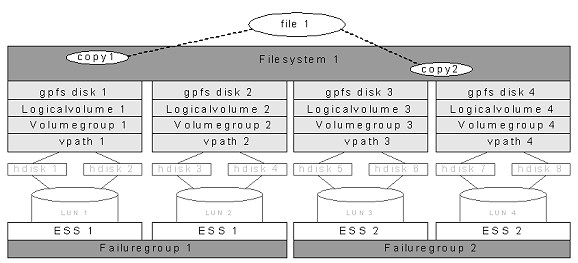
In the example above you see that the file is written twice in the filesystem. One copy is striped over lun 1 + 2 and the other copy is striped across lun 3 + 4. When ESS1 fails the second copy of the file is still completely usable on ESS2.
Striping
Large files in GPFS are divided into equal sized blocks, and consecutive blocks are placed on different disks in a round-robin fashion. To minimize seek overhead, the block size is large (typically 256K). Large blocks have the advantage that they allow a large amount of data to be retrieved in a single I/O from each disk. GPFS stores small files (at the end of large files) in smaller units called sub-blocks, which are as small as 1/32 of the size of a full block. Striping works best when disks have equal size and performance. This is why you should use one disksize for data storage in a filesystem; do not mix and match large and small luns.
GPFS transaction log
Just like JFS, GPFS is a journaled filesystem. GPFS records all metadata updates that affect file system consistency in a journal log. Each node has a separate log for each file system it mounts, stored in that file system. Because this log can be read by all other nodes, any node can perform recovery on behalf of a failed node. It is not necessary to wait for the failed node to come back to life. After a failure, file system consistency is restored quickly by simply re-applying all updates recorded in the failed node's log. Once the updates described by a log record have been written back to disk, the log record is no longer needed and can be discarded. Thus, logs can be fixed size, because space in the log can be freed up at any time by flushing “dirty” metadata back to disk in the background.
GPFS data and metadata
The GPFS filesystem contains two types of data: Data and Metadata. “Data” means the actual files you want to store in the filesystem. This is the usable storage space. “Metadata” refers to all sorts of information used by GPFS internally. For each GPFS disk you can specify what it will contain: DataAndMetadata, MetadataOnly, Dataonly or DescOnly. “DataAndMetadata” is used for normal disks, so most disks in the system will have this designation. “DescOnly” is used for “quorum busters”.
GPFS filesystem descriptor quorum
There is a structure in GPFS called the Filesystem Descriptor (FSDesc) that is written originally to every disk in the filesystem, but is updated only on a subset of the disks as changes to the filesystem occur, such as adding or deleting disks. The subset of disks is usually a set of three or five disks, depending on how many disks and failuregroups are in the filesystem. The disks that constitute this subset of disks can be found by reading any one of the FSDesc copies on any disk. The FSDesc may point to other disks where more up-to-date copies of the FSDesc are located.
To determine the correct filesystem configuration, a quorum of the subset of disks must be online so that the most up-to-date FSDesc can be found. If there are three special disks, then two of the three must be available. GPFS distributes the copies of FSDesc across the failure groups. If there are only two failuregroups, one failure group has two copies and the other failure group has one copy. In a scenario that causes one entire failure group to disappear all at once, if half of the disks that are unavailable contain the single FSDesc that is part of the quorum, everything stays up. On the other hand, if the downed failure group contains the majority of the quorum, the FSDesc cannot be updated and the filesystem must be force unmounted. If the disks fail one at a time, the FSDesc is moved to a new subset of disks by updating the other two copies and a new disk copy. However, if two of the three disks fail simultaneously, the FSDesc copies cannot be updated to show the new quorum configuration. In this case, the filesystem must be unmounted to preserve existing data integrity. To survive a single ESS failure in a dual ESS configuration, there must be a third failure group on an independent disk outside both ESSs (the so-called TieBreaker node, which contains one disk per filesystem which contains the third FSDesc).
The final picture will be:
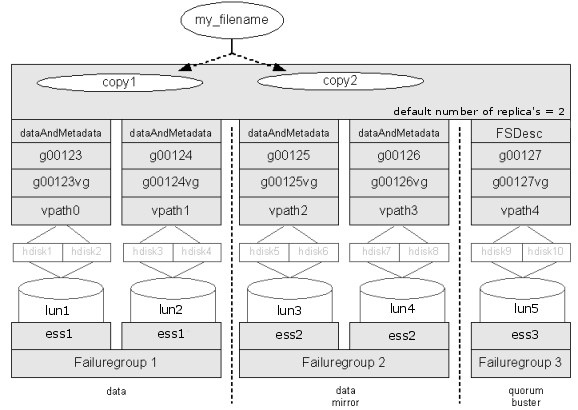
Taking all things mentioned above in account, the final solution for a GPFS filesystem is:
All files in the filesystem are replicated across two failuregroups on two nodes (preferably in two sites). This is controlled by the filesystem setting “default number of replicas = 2”. The number of disk that hold data is the same at each of the two sites. The number of disk used for data has no practical limit. You will probably create multiple filesystems for other reasons than the disk limit. These disks also hold a copy of the metadata.
There is a third site with one disk used as quorum buster on the TieBreaker node. These disks hold no data or metadata, only a single filesystem descriptor (FSDesc).
GPFS software
For GPFS 2.3 the following filesets are installed on each node of the GPFS cluster:
For Oracle RAC using GPFS 2.3, installation of HACMP 5.2 (and RSCT) is required. This is specifically necessary for Oracle RAC and not for GPFS.
GPFS. Часть 1. Создание GPFS кластера
После одной из моих последних статьей на хабре про серверную оптимизацию мне прислали множество вопросов про распределенные файловые системы. И теперь я нашел в себе силы и возможности написать про замечательную кластерную файловую систему GPFS.
- Сервер виртуализации Xen. Dom0 под SLES11
- 3 Xen DomU виртуальных сервера под quorum-ноды с двумя дополнительно проброшенными блочными устройствами
- 2 Xen DomU виртуальных сервера под client-ноды
Создание кластера GPFS
Делится на следующие этапы:
Лицензирование GPFS
Лицензирование в GPFS достаточно непростое. В версии 3.3 наконец-то сделали разделение между серверной и клиентской частью, и теперь за «клиента» можно платить меньше. Для клиентской и серверной части назначается разное количество Processor Value Units, и стоят эти PVU для клиентской и серверной частей по-разному. Подсчитать PVU для вашего кластера вы можете здесь. Более подробную информацию и part number gpfs можно получить из следующего документа. Купить GPFS можно у любого авторизованного реселлера IBM.
- Выбор типа дисков (NAS/SAN или Directly Attached)
- Выбор сетевой инфраструктуры (Gigabit Ethernet/Fibre Channel/InfiniBand)
- Также стоит продумать структуру будущего GPFS-кластера
Тут всё просто. Покупаем, устанавливаем на все ноды, которые планируют использовать GPFS.
Создание кластера (mmcrcluster)
Связываем все ноды так, чтобы каждая нода имела беспарольный доступ к любой другой, включая и саму себя :). Далее инициализируем сам кластер.
Тюнинг параметров GPFS (mmchconfig)
Увеличиваем лимиты, включаем использование InfiniBand verbs и т.д. и т.п.
Запуск GPFS (mmstartup)
Благодаря тому, что все ноды имеют доступ на все остальные, большую часть работы они выполняют сами, будь то добавление сервиса в автозагрузку или же настройка fstab’а.
Создание NSD — Network Shared Disk (mmcrnsd)
Так как я использую топологию с Directly Connected дисками, то я не могу использовать tiebreaker-диск. Поэтому просто экспортирую все диски которые есть в системах, разделив их на 3 Failre-группы.
Создание файловой системы поверх NSD (mmcrfs)
При создании файловой системы можно указывать множество различных параметров, которые в дальнейшем будут влиять на быстродействие и отказоустойчивость системы.
Монтирование GPFS (mmmount)
Всё готово, монтируем файловую систему и можно начинать работать.
Структура нашего обучающего миникластера
У нас будет 3 Failover-группы:
1 — DataAndMetadata — Данные и Метаданные (primary):
диски gpfs00.edu.scalaxy.local и gpfs01.edu.scalaxy.local
2 — DataAndMetadata — Данные и Метаданные (backup):
диски gpfs03.edu.scalaxy.local и gpfs04.edu.scalaxy.local
3 — DescOnly — Реплика дескриптора (aka system descriptor) GPFS. Тут не хранятся ни данные, ни метаданные, диск предназначен только для сохранения quorum’а в случае потери основной реплики дескриптора:
диск gpfs02.edu.scalaxy.local
Создание кластера
Начнём с установки переменной окружения $PATH:
Далее создадим файл с нодами и их ролями:
# cat <<EOF >>gpfs.nodes
gpfs00.edu.scalaxy.local:quorum-manager:
gpfs01.edu.scalaxy.local:quorum-manager:
gpfs02.edu.scalaxy.local:quorum-client:
gpfs03.edu.scalaxy.local:client:
gpfs04.edu.scalaxy.local:client:
EOF
manager | client — Indicates whether a node is part of the node pool from which file system managers and token managers can be selected. The default is client.
quorum | nonquorum — Indicates whether a node is counted as a quorum node. The default is nonquorum.
gpfs00.edu.scalaxy.local и gpfs01.edu.scalaxy.local у нас будут участвовать в выборах manager’а (quorum-нод)
gpfs02.edu.scalaxy.local будет хранить реплику дескриптора GPFS
gpfs03.edu.scalaxy.local и gpfs04.edu.scalaxy.local будут клиентами, которые читают/пишут на GPFS
# mmcrcluster -N gpfs.nodes -p gpfs00.edu.scalaxy.local -s gpfs01.edu.scalaxy.local -r /usr/bin/ssh -R /usr/bin/scp -C gpfs-cluster -A
-N gpfs.nodes — имя файла с нодами (также можно передать разделённый запятыми список)
-p gpfs00.edu.scalaxy.local — primary-нода, на которой хранится конфигурация кластера
-s gpfs01.edu.scalaxy.local — secondary-нода, на которой хранится конфигурация кластера
-r /usr/bin/ssh — бинарник для удалённого выполнения команд на удалённом сервере
-R /usr/bin/scp — бинарник для безопасного копирования файлов на удалённый сервер
-C gpfs-cluster — имя для будущего кластера
-A — автоматически запускать на нодах gpfs-демон
Primary / Secondary ноды хорошо описаны в man’е:
It is suggested that you specify a secondary GPFS cluster configuration server to prevent the loss of configuration data in the event your primary GPFS cluster configuration server goes down. When the GPFS daemon starts up, at least one of the two GPFS cluster configuration servers must be accessible.
If your primary GPFS cluster configuration server fails and you have not designated a secondary server, the GPFS cluster configuration files are inaccessible, and any GPFS administration commands that are issued fail. File system mounts or daemon startups also fail if no GPFS cluster configuration server is available.
На основном кластере применяется примерно такой тюнинг для GPFS (подробнее):
У mmchconfig есть опция -I которая говорит ему применить параметры, но не сохранять их на диск. Весьма полезна при тестах, а также рискованных операциях.
maxFilesToCache — количество файлов для кэширования. Лучше выставлять сразу максимальное значение — 1000000.
maxMBpS — ограничение GPFS на ввод-вывод с одной ноды. Лучше выключить, выставив очень большое значение.
pagepool — на нодах с дисками отдается вся память, оставляя
500Mb под систему.
verbsPorts — имя HCA и номер порта для использования verbs — только при наличии InfiniBand. Можно указывать сразу несколько портов через пробел, тогда GPFS создаст несколько RDMA-коннектов.
verbsRdma — enable — только при наличии InfiniBand, иначе disable.
worker1Threads — количество запросов, обслуживаемых одновременно. Максимум 500 для 64 битных систем.
nsdthreadsperdisk — недокументированный параметр, определяет количество потоков, обслуживающих каждый диск.
Менее употребляемые параметры:
cipherList — GPFS может шифровать данные при их передаче и безопасно аутентифицировать ноды.
pagepoolMaxPhysMemPct — максимальный процент памяти который может быть выделен под PagePool.
unmountOnDiskFail — если стоит в no, то в случае смерти диска на ноде GPFS продолжит нормально работать. В no рекомендуют ставить в случае, если используется реплицирование данных и метаданные (-m -M -r -R в mmcrfs). Если выставить в yes, то GPFS-раздел, содержащий этот диск, будет отмонтирован на локальной машине в случае гибели диска. Остальные же ноды продолжат (если смогут) функционировать в штатном режиме. Данный вариант рекомендуется для SAN-стораджей и DescOnly-дисков.
Теперь небольшое лирическое отступление — в GPFS документация делится две части:
Официальная (aka external documented) — это та, что выкладывается в интернете и в man’ах.
Неофициальная (aka internal documented) — та, что написана в комментариях в shell-скриптах mm* (да-да, почти все команды gpfs это shell скрипты. По сути, 99% команд, лишь обертки к низкоуровневым сишным прожкам, которые являются лишь интерфейсом к функциям демона mmfsd. Весь функционал в демоне.)
Про internal документацию написано следующее: configuration parameters to be used only under the direction of IBM service
Но мы не из робких, так что можно смело искать всякие крутилки в /usr/lpp/mmfs/bin/mmchconfig и тестировать их в работе.
Запуск GPFS
Итак, после того как мы создали ноды, можно дистанционно на всех машинах запустить gpfs (заметьте, что большинство команд я выполняю на машине gpfs00, а они, в свою очередь, применяются на всём кластере):
Далее выставляем нодам нужный тип лицензий.
Одна часть у нас будет серверами:
# mmchlicense server —accept -N gpfs00.edu.scalaxy.local,gpfs01.edu.scalaxy.local,gpfs02.edu.scalaxy.local
# mmchlicense client —accept -N gpfs04.edu.scalaxy.local,gpfs03.edu.scalaxy.local
Создание NSD — Network Shared Disk
Теперь создаём файл с описанием дисков и их содержимого:
Формат файла таков:
DiskName — для Unix-систем — имя блочного устройства.
ServerList — список серверов, с которых доступен этот диск. Можно указать до восьми серверов, из которых будет выбран первый работоспособный. В нашем случае, где не используется SAN, это всего один сервер — тот, к которому подключён этот диск. Если не указать ничего, то GPFS будет считать, что диск доступен всем нодам кластера.
DiskUsage — dataAndMetadata|dataOnly|metadataOnly|descOnly варианты говорят сами за себя, да и в мануале более подробное объяснение, разве что у descOnly, который я описывал выше.
FailureGroup — группа, к которой принадлежит диск. GPFS использует эту информацию, раскладывая данные и метаданные так, чтобы при единичном отказе обе реплики не погибли. То есть, например, диски, подключённые к одному контроллеру, к одному серверу или находящиеся в одном датацентре, принадлежат одной Failure-группе.
DesiredName — имя, которое мы хотим присвоить nsd. Должно попадать под регексп /[A-Za-Z0-9_]+/. По дефолту — gpfsNNnsd, где NN — целое, положительное, уникальное среди других nsd число.
StoragePool — имя Storage Pool’а, которое потом без изменений передаётся на mmcrfs.
Таже рекомендую прочитать более подробно о mmcrnsd
# mmcrnsd -F gpfs.disks -v no
Создание FS поверх NSD
После удачного завершения mmcrnsd файл gpfs.disks модифицируется для дальнейшего использования командой mmcrfs:
Далее идёт команда mmcrfs, к ней нужно отнестись весьма серьёзно, ибо она имеет множество параметров, каждый из которых влияет как на функциональность, так и на производительность GPFS, а после её создания изменить часть из них будет уже нереально.
# mmcrfs gpfs0 -F gpfs.disks -A yes -B 1M -E no -S yes -m 2 -M 2 -r 2 -R 2 -T /gpfs-storage
Подробнее о некоторых параметрах mmcrfs:
-A — автомонтирование GPFS при загрузке сервера. automount монтирует GPFS при первом обращении (на Linux, на Windows аналогично yes).
-B — размер блока — это минимальная единица аллокации GPFS. Он может быть равен 16 KB, 64 KB, 128 KB, 256 KB (default), 512 KB, 1 MB, 2 MB или 4 MB. Минимальный размер файла на диске это 1/32 размера блока. Также, размер блока является максимальным размером read/write request’а.
Рекомендуют подстраивать размер блока под размер strip’а на raid’е или же под размеры буферов приложений.
Документация предлагает использовать больший размер блока для увеличения производительности sequential read and write, а маленький для small random read and write и metadata-intensive-сценариев.
В pagepool данные кешируются также блоками, то есть, при увеличении размера блока, желательно также поднять размер пула.
Размер блока не может превышать maxblocksize, который по умолчанию равен 1MB. Изменить maxblocksize можно командой mmchconfig.
-D — схема блокировок. Если GPFS планирует отдаваться через nfs4 или samba, то нужно использовать nfs4, если GPFS будет отдаваться по NFS3 или же не будет экспортироваться никак, то лучше использовать posix.
-j — метод выделения блоков для файла. Для больших инсталляций лучше использовать scatter, для маленьких cluster. Подробнее в мануале.
-L — размер логфайла. Варьируется от 256kb до 16MB. Стоит поднимать на высоконагруженых файловых системах и при большом количестве метаданных.
-N NumInodes[:NumInodesToPreallocate] — количество inodes. Поддерживаются суффиксы, i.e. 10M
-r DefaultDataReplicas — количество реплик для данных файла по умолчанию. Не может быть больше, чем MaxDataReplicas. По умолчанию значение равно «1».
-R MaxDataReplicas — максимальное количество реплик, которое можно задать через mmchattr
-m DefaultMetadataReplicas — аналогично -r
-M MaxMetadataReplicas — аналогично -r
-E no — не выполнять realtime-обновление mtime-файлов (чаще всего это не нужно)
-S yes — запретить обновление atime. При включении функции gpfs_stat(), gpfs_fstat(), stat() и fstat() отдают atime равное ctime.
-T /gpfs-storage — точка монтирования, по-умолчанию DefaultMountDir/Device, DefaultMountDir = /gpfs
Если при создании файловой системы вы не включили автомаунт, то придётся примонтировать его вручную (подробнее).
Монтирование GPFS
# mmmount gpfs0 -a
Вот, в принципе, и все, что я хотел рассказать о настройке GPFS. На днях я планирую написать продолжение этой статьи, в которой будет рассказано про эксплуатацию GPFS-кластера.
What is GPFS filesystem in linux?
The IBM® General Parallel File System (GPFS™) is a cluster file system. This means that it provides concurrent access to a single file system or set of file systems from multiple nodes. You can create a GPFS cluster of AIX® nodes, Linux nodes, Windows server nodes, or a mix of all three.
What is GPFS storage?
IBM General Parallel File System (IBM GPFS) is a file system used to distribute and manage data across multiple servers, and is implemented in many high-performance computing and large-scale storage environments. GPFS is among the leading file systems for high performance computing (HPC) applications.
Is GPFS posix?
GPFS has full Posix filesystem semantics. GPFS distributes its directory indices and other metadata across the filesystem.
Is GPFS block storage?
With the GPFS driver, instances do not actually access a storage device at the block level. Instead, volume backing files are created in a GPFS file system and mapped to instances, which emulate a block device.
How does parallel file system work?
A parallel file system breaks up a data set and distributes, or stripes, the blocks to multiple storage drives, which can be located in local and/or remote servers. Users do not need to know the physical location of the data blocks to retrieve a file, as the system uses a global namespace to facilitate data access.
How do I mount a GPFS file system in Linux?
- To mount all GPFS file systems on all of the nodes in the cluster, issue this command: mmmount all -a.
- To mount file system fs2 read-only on the local node, issue this command: mmmount fs2 -o ro.
- To mount file system fs1 on all NSD server nodes, issue this command: mmmount fs1 -N nsdsnodes.
What are the maximum cluster size that GPFS runs on?
The GPFS disk data structures support file systems with up to 4096 disks of up to 1TB in size each, for a total of 4 petabytes per file system.
What is the difference between HDFS and GPFS?
For starters, GPFS is POSIX compliant, which enables any other applications running atop the Hadoop cluster to access data stored in the file system in a straightforward manner. With HDFS, only Hadoop applications can access the data, and they must go through the Java-based HDFS API.
How does GPFS file work?
The IBM® General Parallel File System (GPFS™) is a cluster file system. This means that it provides concurrent access to a single file system or set of file systems from multiple nodes. These nodes can all be SAN attached or a mix of SAN and network attached. A GPFS cluster can be configured in a variety of ways.
How do I open a GPFS file in Linux?
For details, see the IBM Spectrum Scale: Concepts, Planning, and Installation Guide .
- Start the daemons on all of the nodes in the cluster by issuing the mmstartup -a command: mmstartup -a.
- Check the messages recorded in /var/adm/ras/mmfs.log.latest on one node for verification.
What is the largest file system size supported in GPFS?
263-1 bytes
GPFS supports 64-bit file size interfaces, allowing a maximum file size of 263-1 bytes.
General Parallel File System
General Parallel File System (GPFS, Общая параллельная файловая система) — высокопроизводительная кластерная файловая система, разработанная IBM. GPFS отличается от других кластерных файловых систем возможностью одновременного высокоскоростного доступа к файлам для приложений, выполняющихся на нескольких узлах кластера под управлением операционных систем AIX 5L, Linux или гетерогенного кластера из узлов на AIX, Linux и Windows. Помимо возможностей хранения данных, GPFS предоставляет инструменты для управления и администрирования GPFS-кластера и позволяет осуществлять совместный доступ к файловым системам с удалённых GPFS-кластеров.
GPFS предоставляет высокопроизводительный доступ к данным как для одного узла, так и для множества. Самая большая существующая на данный момент конфигурация состоит из 2000 узлов. [источник не указан 869 дней] GPFS доступна для AIX с 1998 года, на Linux с 2001 года и на Windows с 2009 года.
История
GPFS изначально разрабатывалась как Tiger Shark file system в 1993 году в исследовательском центре IBM Almaden Research Center. Первый коммерческий релиз GPFS состоялся в 1998 году.
GPFS изначально проектировалась для поддержки мультимедиа-приложений, требовательных к полосе пропускания. Такой дизайн хорошо подходит для научных вычислений. Сегодня GPFS используется на многих суперкомпьютерах из списка 500 самых мощных. С самого начала GPFS была успешно использована для множества коммерческих приложений.
Ссылки
| Файловые системы (список • сравнение) | |
|---|---|
| Дисковые | |