How to Find Binance Pay ID or USDT Address on Binance
Are you looking to find your Binance Pay ID or USDT address on Binance? Look no further! In this comprehensive guide, we will walk you through the process step by step, ensuring that you have all the information you need to navigate the platform with ease. Whether you’re a beginner or an experienced trader, finding your Binance Pay ID or USDT address is essential for seamless transactions. So, let’s dive right in and discover how to find your Binance Pay ID or USDT address on Binance!
Understanding Binance Pay and USDT Address
Table of Contents
Before we delve into the steps of finding your Binance Pay ID or USDT address, let’s take a moment to understand what they are. Binance Pay is a feature on the Binance platform that allows users to send and receive payments using various cryptocurrencies, including USDT. USDT, or Tether, is a stablecoin that is pegged to the value of the US dollar, making it a reliable digital asset for trading and transactions.
Your Binance Pay ID serves as a unique identifier for your Binance Pay account, enabling others to send payments directly to you. On the other hand, your USDT address is a string of alphanumeric characters that represent your digital wallet on the Binance platform. With this understanding in mind, let’s move on to the steps of finding your Binance Pay ID or USDT address on Binance.
How to Find Binance Pay ID or USDT Address on Binance
1. Accessing Binance Account
To begin, you need to log in to your Binance account. If you don’t have one already, you can easily sign up for a free account on the Binance website. (You can find our guide to registering your account on Binance) Once you’ve logged in, you will be greeted with the Binance dashboard, where you can access various features and settings.
2. Navigating to Binance Pay
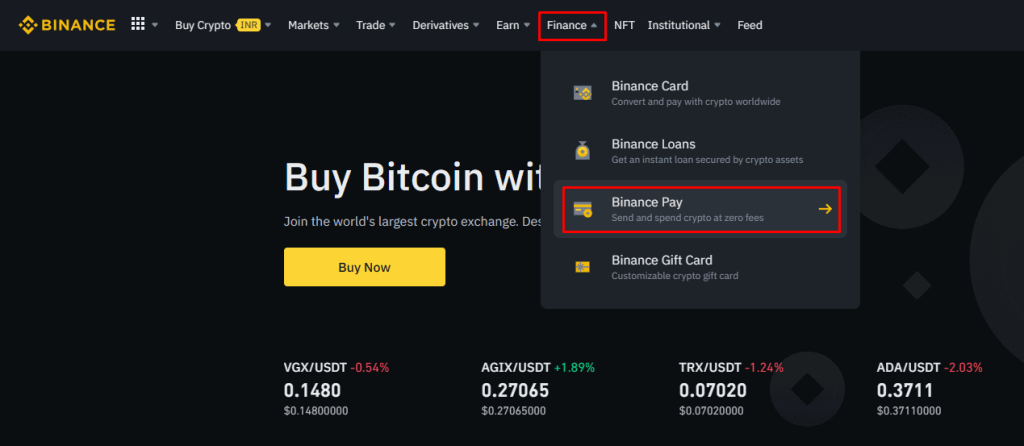
To find your Binance Pay ID and USDT address, navigate to the Finance/More > Binance Pay section. You can usually find it in the main menu or sidebar of the Binance dashboard. Click on the Binance Pay option to proceed.
3. Locating Your Binance Pay ID
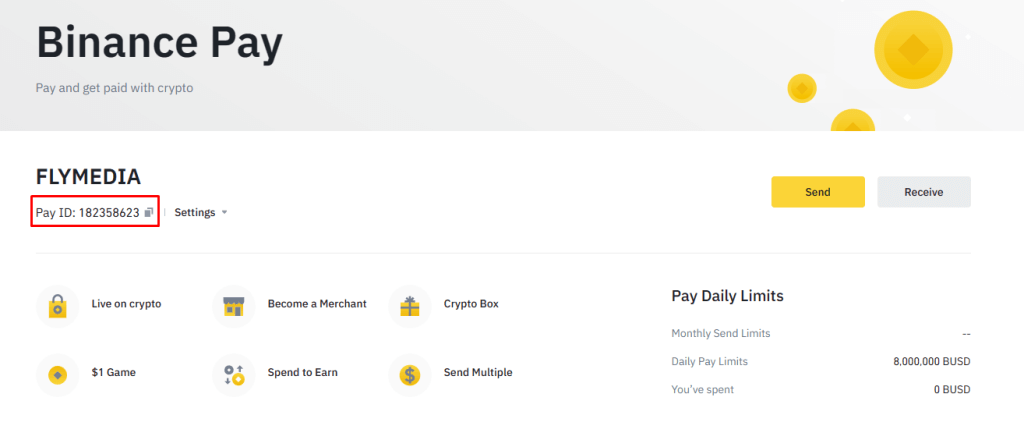
In the Binance Pay section, you will find your Binance Pay ID displayed prominently. It is a unique alphanumeric code that identifies your Binance Pay account. You can easily share this ID with others who wish to send payments to you. Take note of your Binance Pay ID for future reference.
4. Finding Your USDT Address
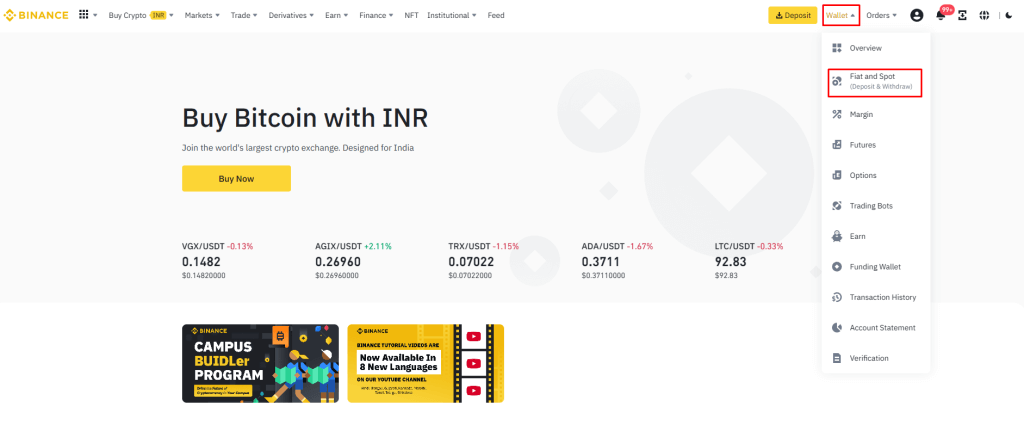
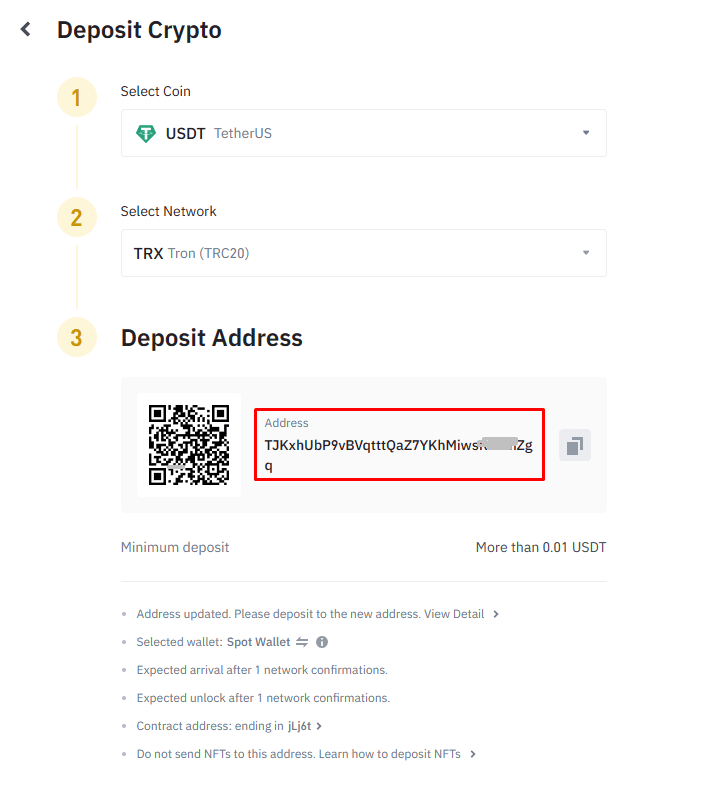
To locate your USDT address, go to the “Wallet” or “Funds” section on the Binance dashboard. And then select the “Fiat and Spot option”
Look for the specific cryptocurrency tab, which in this case is USDT or Tether. Once you’ve located the USDT tab, click on “Deposit” to access your USDT wallet.

Within your USDT wallet, you will find your unique USDT TRC 20 address. It is a long string of characters, starting with “T,” that represents your wallet on the Binance platform. This address is essential for receiving USDT from other users or external wallets. Make sure to copy and store your USDT address in a secure place as you will need it for transactions and transfers.
Congratulations! You have successfully found your Binance Pay ID and USDT address on Binance. Now you can easily receive payments and manage your USDT funds with confidence. Remember to exercise caution and double-check the accuracy of the addresses when conducting transactions to avoid any mistakes.
Frequently Asked Questions
1. Can I use the same Binance Pay ID for multiple transactions?
Ans: Yes, your Binance Pay ID remains the same for all your transactions. It serves as a permanent identifier for your Binance Pay account, allowing others to send payments to you consistently.
2. Is it possible to change my Binance Pay ID?
Ans: No, the Binance Pay ID is unique and cannot be changed. It is designed to provide a consistent identification method for your Binance Pay account.
3. What should I do if I forget my Binance Pay ID?
Ans: If you forget your Binance Pay ID, you can easily find it by following the steps mentioned earlier in this guide. Simply log in to your Binance account, navigate to the Binance Pay section, and locate your Binance Pay ID.
4. Are USDT addresses unique to each user?
Ans: Yes, USDT addresses are unique to each user. Every Binance user has their own specific USDT address, ensuring that transactions and transfers are accurately directed to the intended recipient.
5. Can I receive cryptocurrencies other than USDT at my USDT address?
Ans: No, your USDT address is specifically designed for receiving USDT or Tether transactions only. If you wish to receive other cryptocurrencies, you will need to obtain the corresponding wallet address for that particular cryptocurrency.
6. How long does it take for a USDT transaction to be processed?
Ans: The processing time for USDT transactions may vary depending on network congestion and other factors. Generally, USDT transactions on the Binance platform are processed quickly, often within minutes. However, it is always a good practice to check the transaction status and confirmations on the Binance platform for the most accurate information.
Conclusion
In conclusion, finding your Binance Pay ID and USDT address on Binance is a straightforward process that enables you to send and receive payments with ease. By following the steps outlined in this guide, you can quickly locate your Binance Pay ID and USDT address within your Binance account. Remember to keep your Binance Pay ID and USDT address safe and secure to ensure smooth transactions and safeguard your digital assets.
Now that you have the knowledge and tools to find your Binance Pay ID and USDT address, you can confidently navigate the Binance platform and engage in seamless cryptocurrency transactions. Enjoy the convenience and efficiency that Binance offers, and make the most of your trading and payment experiences.
Web server is returning an unknown error Error code 520
There is an unknown connection issue between Cloudflare and the origin web server. As a result, the web page can not be displayed.
What can I do?
If you are a visitor of this website:
Please try again in a few minutes.
If you are the owner of this website:
There is an issue between Cloudflare’s cache and your origin web server. Cloudflare monitors for these errors and automatically investigates the cause. To help support the investigation, you can pull the corresponding error log from your web server and submit it our support team. Please include the Ray ID (which is at the bottom of this error page). Additional troubleshooting resources.
Cloudflare Ray ID: 8190759845a334d0 • Your IP: Click to reveal 5.253.206.36 • Performance & security by Cloudflare
Binance usd address где найти
How to Find Your Binance Wallet Address for Beginners
Your Binance wallet address is a unique identifier that is used to send and receive cryptocurrencies on the Binance exchange. It is important to keep your wallet address safe and secure, and never share it with anyone.
To find your Binance wallet address, follow these steps:
Log in to your Binance account.
Click on the "Wallet" icon in the top navigation bar.
Select "Fiat and Spot" from the menu.
Search for the cryptocurrency you want to find the wallet address for.
Under "Deposit", you will see the wallet address for that cryptocurrency.
You can also find your wallet address by following these steps:
Go to the Binance website and click on the "Deposit" button.
Select the cryptocurrency you want to deposit.
You will see the wallet address for that cryptocurrency in the "Address" field.
It is important to note that some cryptocurrencies can be sent on multiple networks. For example, Bitcoin can be sent on the Bitcoin network or the Bitcoin Cash network. When you are finding your wallet address, make sure to select the correct network.
Once you have found your Binance wallet address, you can use it to send and receive cryptocurrencies on the Binance exchange.
Here are some additional tips for keeping your Binance wallet address safe:
Never share your wallet address with anyone.
Only use your wallet address on trusted websites and exchanges.
Keep a backup of your wallet address in a secure location.
Use a strong password for your Binance account.
By following these tips, you can help to keep your Binance wallet address safe and secure.
I hope this article was helpful. Let me know if you have any other questions.
Как узнать адрес кошелька на Бинанс
На бирже нельзя торговать без внесения криптовалюты на счет. Чтобы пополнить баланс, нужно разобраться, как узнать адрес кошелька на Binance. Он создается автоматически, но для просмотра становится доступен после верификации личности.
- Что такое адрес кошелька на Binance и зачем он нужен
- Варианты, как узнать номер кошелька
- На сайте Бинанс
- В приложении
- Часто задаваемые вопросы
Что такое адрес кошелька на Binance и зачем он нужен
Это уникальный идентификатор хранилища. Его используют для переводов цифровых валют между криптокошельками. Binance, как и другие централизованные биржи, хранит деньги пользователей. Из-за этого клиенты не могут переводить цифровые активы напрямую.
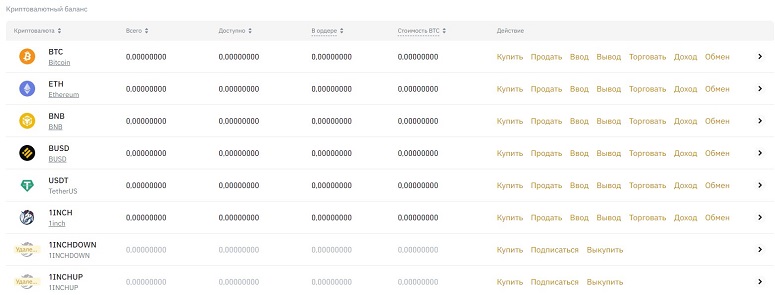
Хранилища на Бинанс
Криптоадрес, указанный в личном кабинете, создан из публичного ключа и используется для оформления транзакций. Информацию можно не скрывать от других людей.
Чтобы смотреть номера, необходимо сначала пройти верификацию. Для этого подойдет аккаунт с любым уровнем. Подробнее о подтверждении личности на бирже ― в таблице.
| Статус | Ограничения | Что нужно для получения |
|---|---|---|
| Базовый | Заблокированы ввод и вывод криптовалюты, Р2Р-платформа | Регистрация |
| Верификация | Снятие до 100 BTC в сутки, пополнение до $50 тыс. | Персональные данные, скан-копия паспорта или водительского удостоверения, фотография лица |
| Верификация Plus | Вывод до 100 BTC в день, внесение до $200 тыс. | Подтверждение места проживания |
Базовая проверка проходит в течение 1-3 часов, поэтому пользователь сможет внести токены почти сразу после регистрации. Главное — отправить качественные фотографии паспорта и лица, чтобы модератор принял их с первой попытки.