How to Create a BEP20 Token

BEP20 is the Binance Smart Chain equivalent to the popular ERC20 specification for tokens on the Ethereum network. The difference is the BEP20 Token isn’t run on the Ethereum Network, but the Binance Smart Chain network. Despite this difference, because BSC (Binance Smart Chain) implements the Ethereum Virtual Machine (EVM) for all of their smart contracts, they end up being practically identical in both specification and implementation. This guide will walk you through how to create your very own BEP20 Token.
Prerequisites:
- MetaMask browser extenstion
How to deploy your BEP20 Token in less than a minute (for FREE)
If you don’t want to learn solidity nor setup your own environment and code and deploy your Token using an Binance Smart Chain node, you can use
BEP20 Token Generator.
BEP20 Token Generator is a simple decentralized application (DApp) that allows you to easily deploy Smart Contract for a Standard, Capped, Mintable, Burnable BEP20 Token.
1. Install MetaMask: you need to have MetaMask installed with an amount of BNB to pay for contract deployment.
2. Enter Details: enter your preferred Token name and symbol. Choose your supply and Token type.
3. Deploy Token: confirm your transaction using MetaMask. Once deployed your Token is ready to use.
Your Token will be fully compliant with the BEP20 definition and compatible with any BEP20 wallet all around the world. It will have a Name, a Symbol and a Decimals amount.
Check Mark Settings In Token Create
There are also further checkmark settings outlined below.
- Can Burn:This check specifies whether your tokens can be burned to decrease the supply.
- Can Mint: Minting specifies the opposite, whether more tokens can be created to increase the initial supply.
- Can Pause: This check specifies whether your token and all associated operations can be halted and resumed whenever needed. This pausing operation can be used in case of a software vulnerability or a malicious attack. Be aware that enabling pausing gives authority to whoever is allowed to pause or unpause, such as the creator of the token, and this central authority may not suit certain use cases.
- Blacklist:Accounts can also be blacklisted if they act malicius. Depending on the use case, it may be better for some tokens to have this feature turned off. Similar to the pausing feature, enabling blacklists causes central authority, which may not suit certain use cases.
- Deflation Token:You can generate tokens like safemoon with burn, charity, and automatic distribution of holders
Your Token source code will be yet verified on BscScan because of it is similar to already verified contracts.
Note: if you don’t know how to connect MetaMask to BSC follow this guide.
Как создать BEP-20 в сети Binance Smart Chain
Блокчейн-технологии сейчас находятся на такой стадии развития, что практически каждый желающий может освоить алгоритмы создания собственных токенов. Так, относительно недавно появилась платформа Binance Smart Chain. Используя эту экосистему, можно создавать токены BEP-20, о чем мы расскажем в сегодняшней статье.
BEP-20 — стандарт токенов, играющий роль технической спецификации в сети Binance. К основному функционалу BEP-20 относятся возврат баланса, перевод средств и т. п.
Почему я обратил внимание на токены BEP-20:
- на комиссию уходит $0,05, при этом время обработки блока составляет 3 секунды;
- BEP-20 могут использоваться в качестве основы для создания аналогичных токенов;
- к токену можно привязать цифровые валюты из других блокчейнов.
BEP-20 является расширением ERC-20, поэтому данные протоколы совместимы между собой. Несмотря на общие черты двух стандартов токенов, между ними есть некоторые различия. К примеру, BEP-20 используется в смарт-цепочке Binance, а ERC-20 применяется в сети Ethereum. Последний стандарт подходит для разработки любых сгенерированных токенов в блокчейне ETH. BEP-20 применяется только для создания себе подобных смарт-контрактов.
# How to create BEP20 Token
BEP20 Token Generator is a distributed application that runs on the Binance Smart Chain (BSC) network, using specially-developed Smart Contracts to enable users to build their BEP20 Tokens.
Easily deploy Smart Contract for a Standard, Capped, Mintable, Burnable BEP20 Token.
Create a BEP20 Token in less than a minute.
No login. No setup. No coding required.
# Create Token
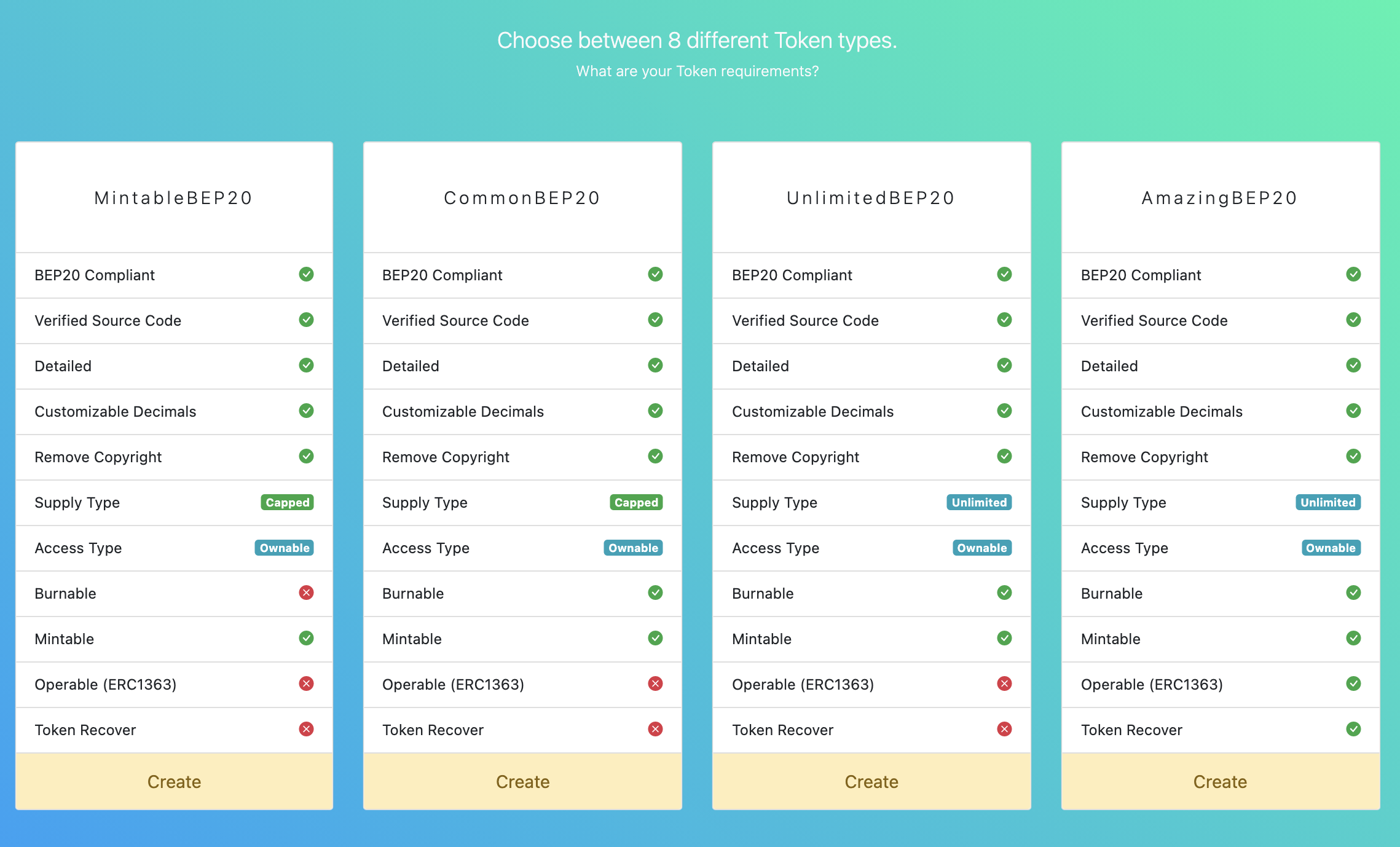
# Choose your token type
Choose between different token types and features.
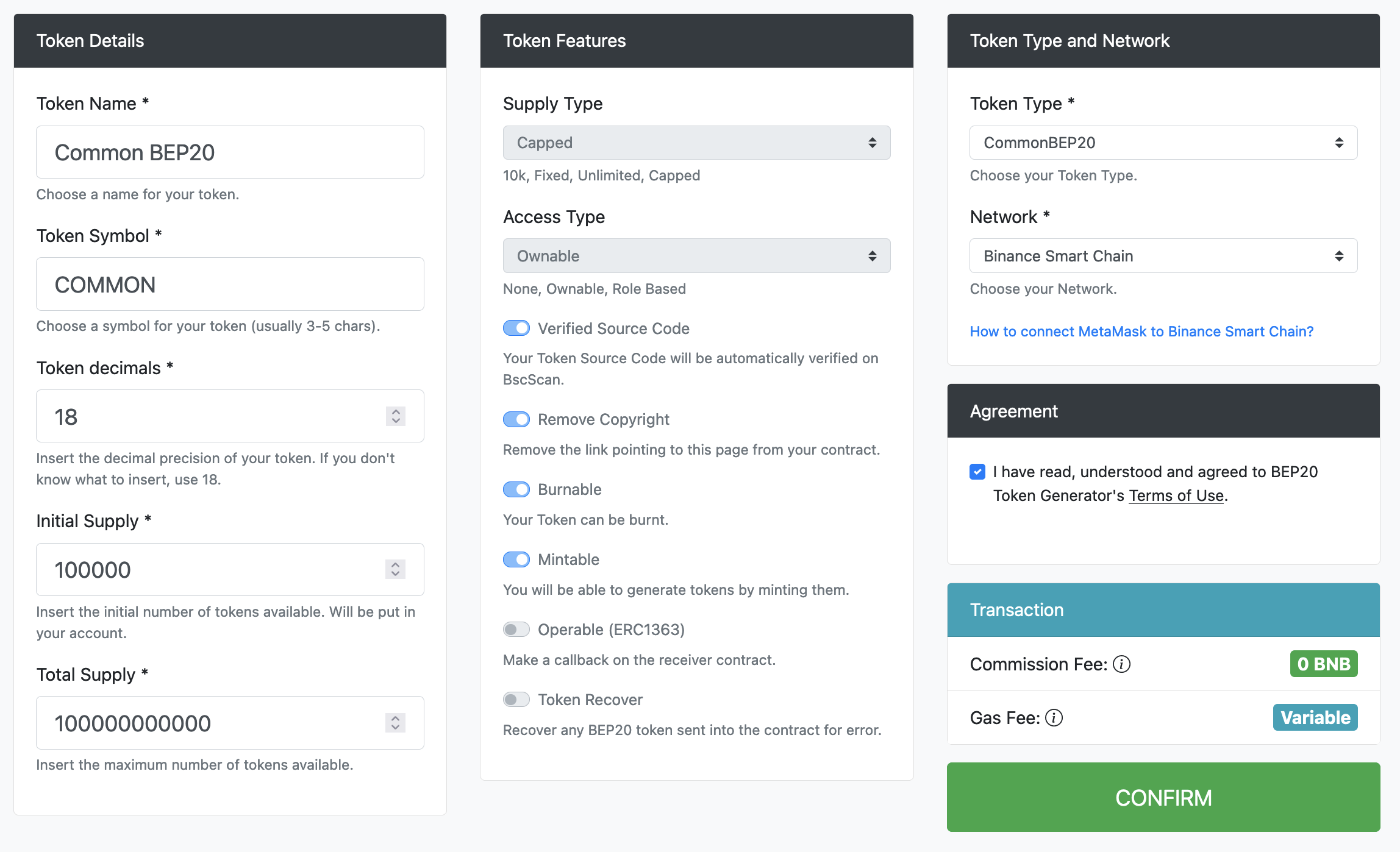
# Enter your details
Enter your preferred Token name and symbol. Choose your supply and Token type.
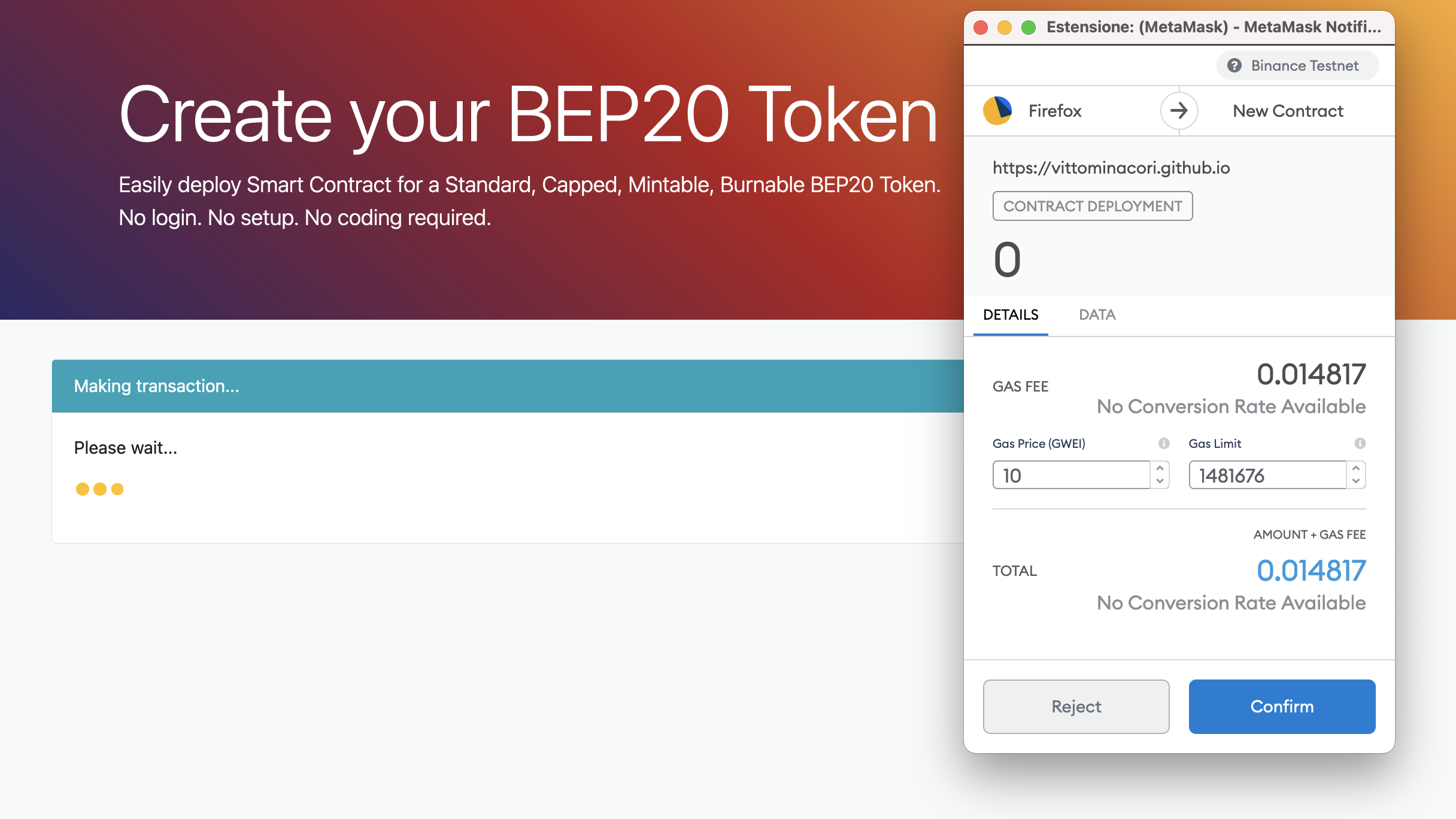
# Confirm your transaction
Confirm your transaction using MetaMask.
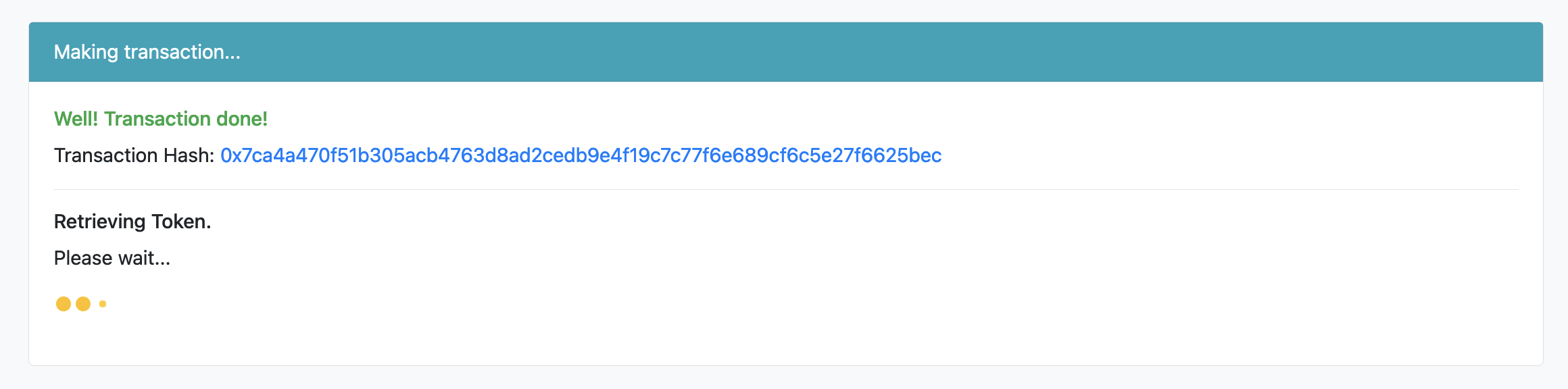
# Waiting for confirmation
Waiting for your transaction to be confirmed.
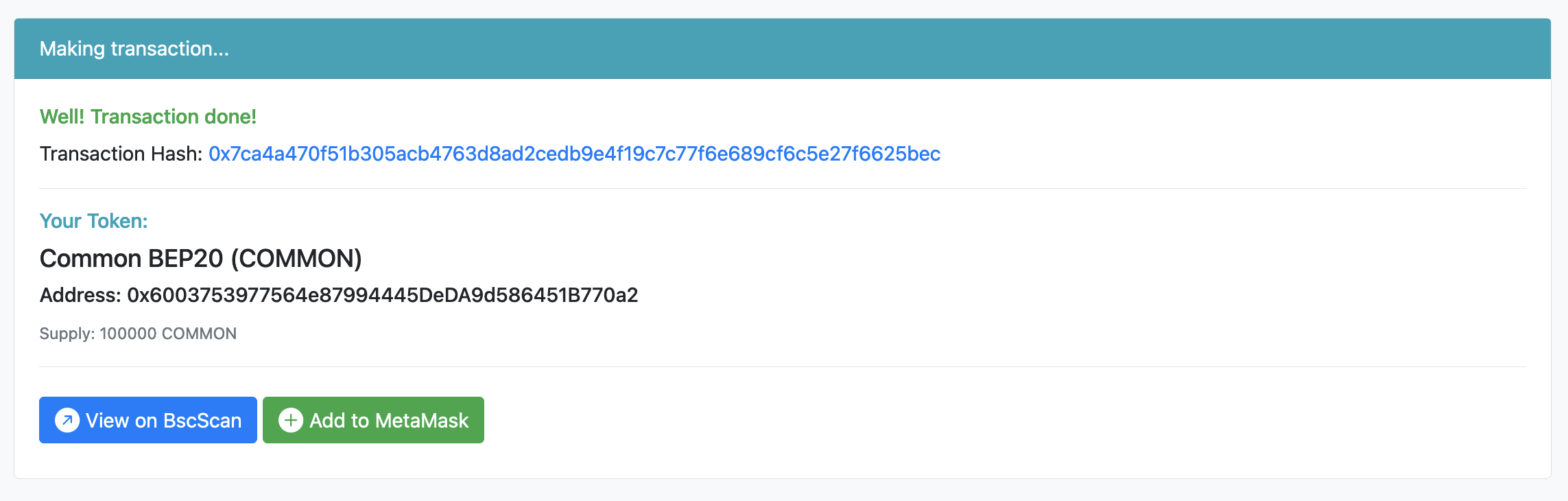
# View your token
Your token is ready to use, view on BscScan or add to MetaMask.
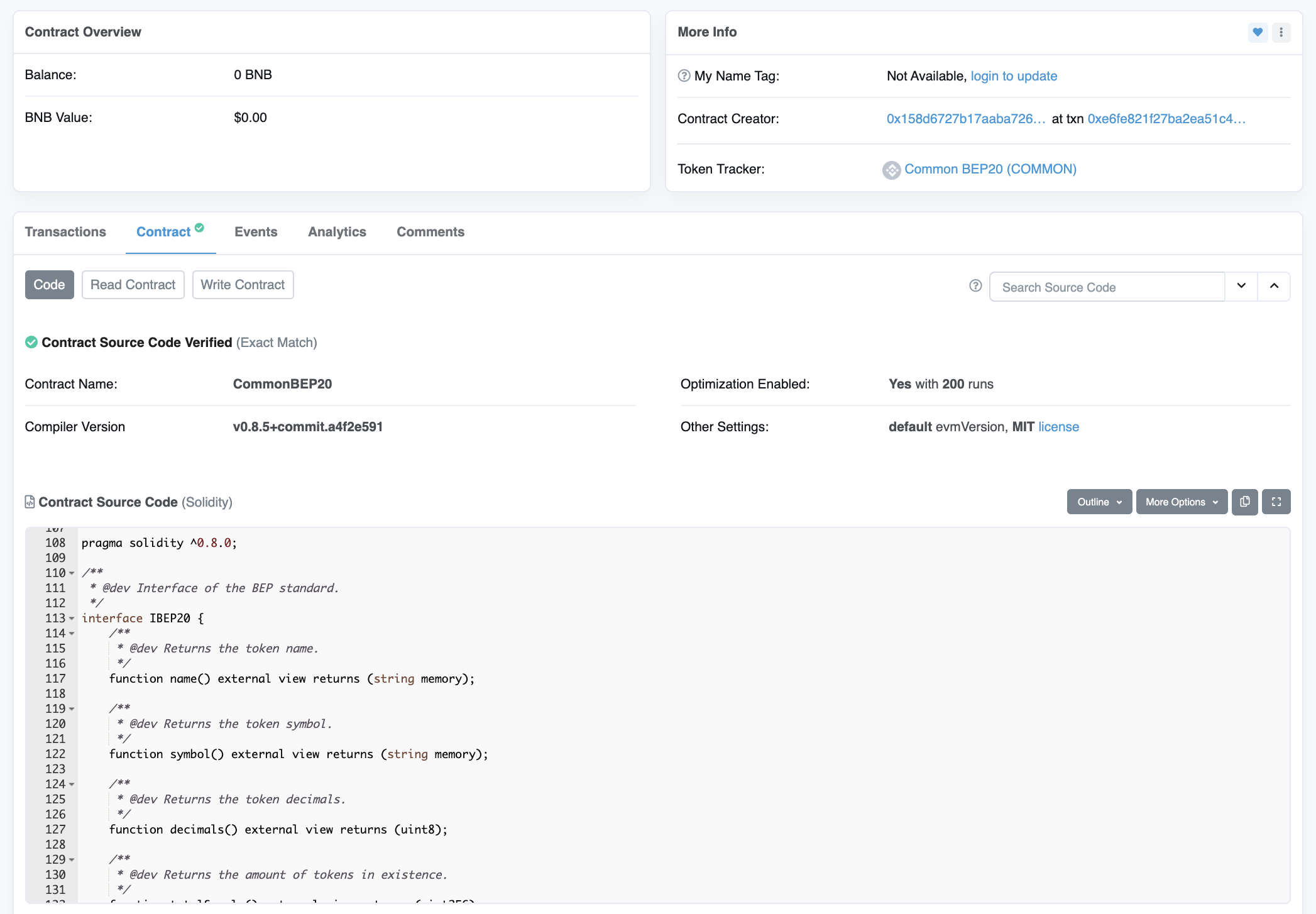
# Verified source code
Your source code will be automatically verified on BscScan.
# Features
# Detailed
Your Token will be fully compliant with the BEP20 definition and compatible with any BEP20 wallet all around the world. It will have a name, a symbol and a decimals amount.
# Burnable
Your Token can be burnt. It means that you can choose to reduce the circulating supply by destroying some of your tokens.
# Mintable
You will be able to generate tokens by minting them. Only token owner will be able to mint. You can also disable minting if you don’t want to generate tokens anymore.
# Supply Type
Your token supply will be 10.000. The entire token supply will be generated during deploy and sent to Token Owner wallet. You can’t increase or reduce supply later.
# Fixed Supply
The entire token supply will be generated during deploy and sent to Token Owner wallet. You can’t increase or reduce supply later.
# Capped Supply
You can define an initial supply to sent to Token Owner’s wallet. You can increase or reduce supply later by minting or burning tokens (if allowed). You won’t be able to generate more tokens than the defined supply cap.
# Unlimited Supply
You can define an initial supply to sent to Token Owner’s wallet. You can increase or reduce supply later by minting or burning tokens (if allowed). You will be able to generate unlimited tokens without an upper limit.
# Access Type
Your Token doesn’t need an access type because of there are not actions that needs privileges.
# Ownable
Your Token will have an Owner. The account you use to deploy your Token will be owner by default and will be able to mint new tokens or call the finish minting function. You can transfer token ownership to addresses or Smart Contract.
# Role Based
Your Token will have Roles. Accounts with "MINTER" role will be able to mint new tokens. Accounts with "ADMIN" role will be able to add or remove roles to minters or other admins. The account you use to deploy your Token will be ADMIN and MINTER by default. In addition your Token will have the Ownable behaviour too.
# Operable Token (ERC1363)
The Operable Token is a BEP20 compatible Token that can make a callback on the receiver contract to notify token transfers or token approvals.
# Token Recover
There are lots of tokens lost forever into Smart Contracts. It allows the contract owner to recover any BEP20 token sent into the contract for error.
# View App
# Disclaimer
BEP20 Token Generator and its author are free of any liability regarding Tokens built using this App, and the use that is made of them. Tokens built on BEP20 Token Generator, their projects, their teams, their use of Token (as well as anything related to Token) are in no way connected to BEP20 Token Generator or its author.
BEP20 Token Generator’s code is provided under MIT License. Anyone can use it as per their needs. The App’s purpose is to make people able to tokenize their ideas without coding or paying large amounts for it. Source code is public and well tested and continuously updated to reduce risk of bugs and introduce language optimizations. Anyway the purchase of tokens involves a high degree of risk. Before acquiring tokens, it is recommended to carefully weighs all the information and risks detailed in Token owner’s Conditions.
# Contacts
If you have a technical or support question, a privacy concern, complaint, or any type of question, please open an issue here
Создайте свои собственные токены BEP20 на Binance Smart Chain (BSC)
С самого начала DeFi Summer 2020 года множество новых проектов, связанных с криптовалютой и блокчейном, наводнили сеть Ethereum, что привело к росту цен на газ. Люди были в ситуации, чтобы заплатить 100 долларов за газ за транзакцию в 10 долларов. Итак, все начали переносить свои проекты и инфраструктуру на различные газоэффективные платформы, и одна из этих платформ — Binance Smart Chain (BSC).
Вкратце, BSC — это почти блокчейн, похожий на Ethereum, но с некоторыми небольшими изменениями. Он также поддерживает EVM. Таким образом, любой смарт-контракт, работающий на Ethereum, может быть развернут на BSC. По состоянию на 14 мая 2021 года — количество ежедневных транзакций достигло колоссальной отметки в 12 миллионов.

Почти во всех проектах DeFi одним из общих компонентов является токен BEP20, родной для проекта, который будет использоваться для некоторых конкретных целей внутри или даже за пределами их платформы. Стандарт токена BEP20 почти аналогичен стандарту ERC20 для Ethereum.
В этой статье мы научимся создавать и развертывать очень простой и простой токен BEP20 в тестовой сети BSC с помощью Remix IDE и MetaMask .
Детали токена:
- Имя: Токен SampleBEP20
- Символ: SBT
- Общий объем: 1 миллион SBT
Контракт токена BEP20:
№1. Откройте свой браузер (в котором настроена MetaMask) и перейдите на https://remix.ethereum.org.
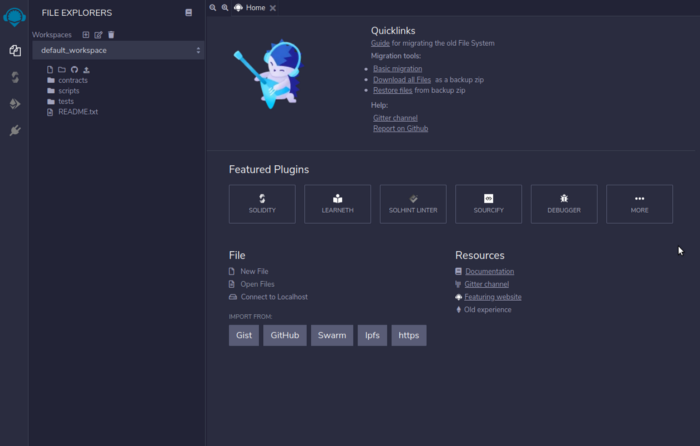
№2. Вы можете импортировать файл, используя эту ссылку Gist . Или вы также можете создать новый файл с именем SampleBEP20Token.sol и добавить код контракта токена BEP20, указанный выше.
№3. Мы должны скомпилировать наш код перед развертыванием. Нажатие Ctrl + S клавиш приведет к компиляции кода. Также мы можем перейти на страницу компиляции, щелкнув второй вариант на панели навигации (крайний левый).
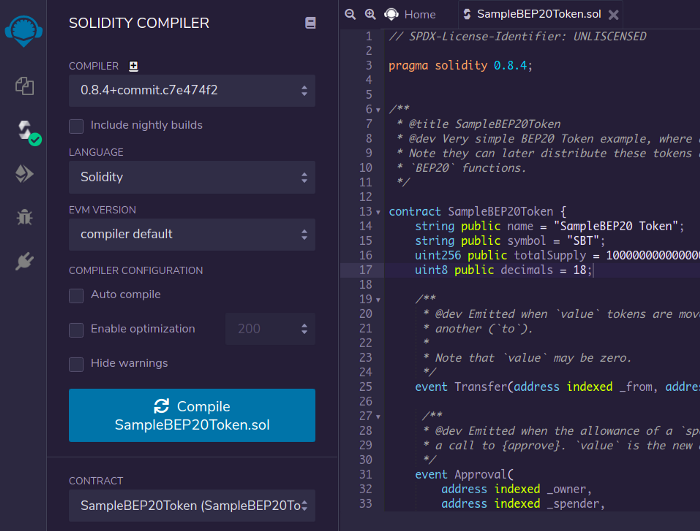
Мы указали версию Solidity, как 0.8.4 в нашем коде, поэтому нам нужно выбрать ту же версию компилятора и в ремиксе.
№4. После успешной компиляции мы можем перейти к панели развертывания, щелкнув значок под значком «Компилятор».
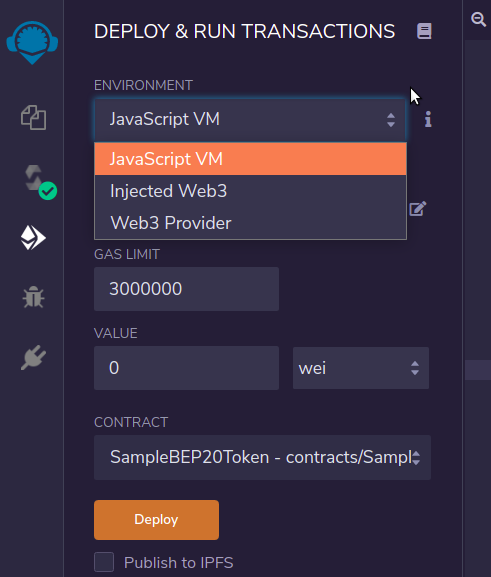
ENVIRONMENT Должно быть , Injected Web3 как мы используем MetaMask для развертывания. Также убедитесь, что вы выбрали SampleBEP20Token контракт в CONTRACT раскрывающемся списке (над Deploy кнопкой).
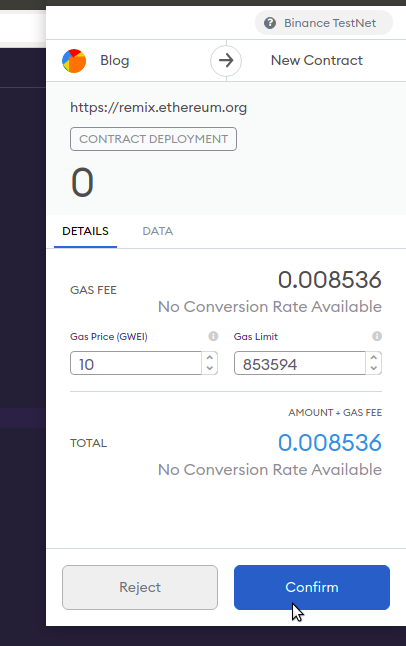
Мы готовы развернуть наш токен SBT. Нажмите Deploy кнопку. Это вызовет всплывающее окно MetaMask для подтверждения. Щелкните, Confirm чтобы развернуть токен.
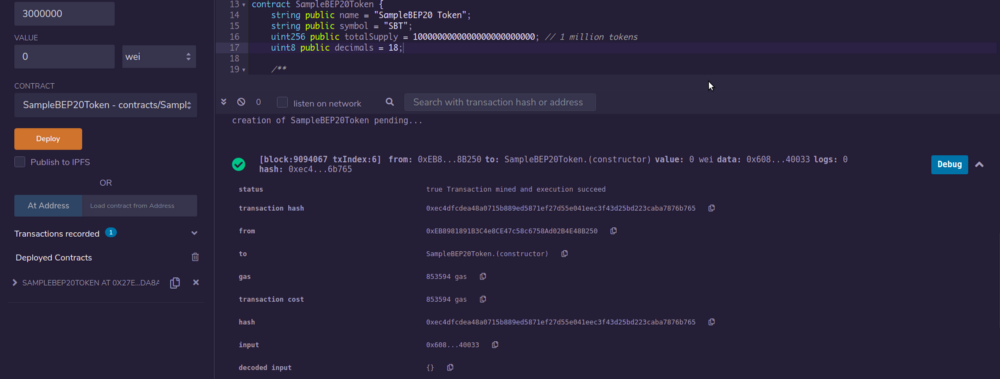
№5. Как только транзакция будет добыта, мы сможем увидеть журналы, а также детали контракта, которые появятся в Deployed Contracts разделе.
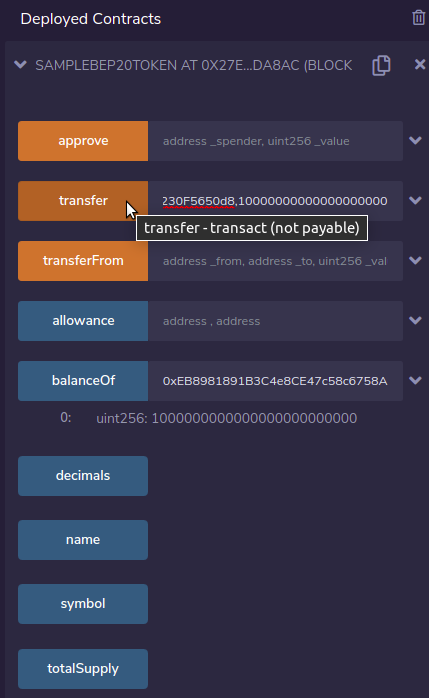
№6. Если мы нажмем на SAMPLEBEP20TOKEN опцию под, Depolyed Contracts мы увидим общедоступные методы и переменные, с помощью которых можно протестировать наше развертывание. Проверим баланс владельца контракта.
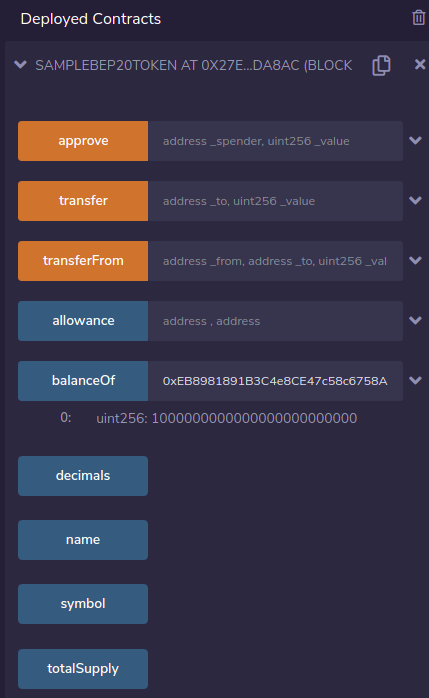
Вау ���� Теперь мы видим, что владелец / администратор владеет всем токеном, как и ожидалось.
№7. Давайте теперь попробуем перевести токены на другой кошелек с помощью transfer метода. После того, как получатель address и объект amount для отправки (с точностью 18) введены, нажмите transfer кнопку. В MetaMask снова появится всплывающее окно с запросом подтверждения транзакции. Обратите внимание, что это всплывающее окно включает количество введенного токена.
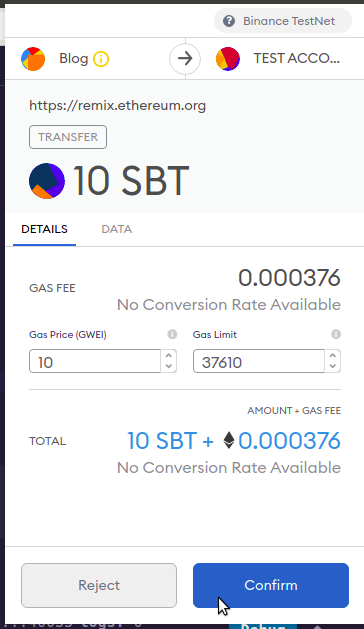
Нажмите на Confirm кнопку, чтобы провести транзакцию. Через несколько секунд статус транзакции можно будет увидеть в журналах Remix IDE. Мы также можем проверить статус транзакции в проводнике тестовой сети BSCScan .
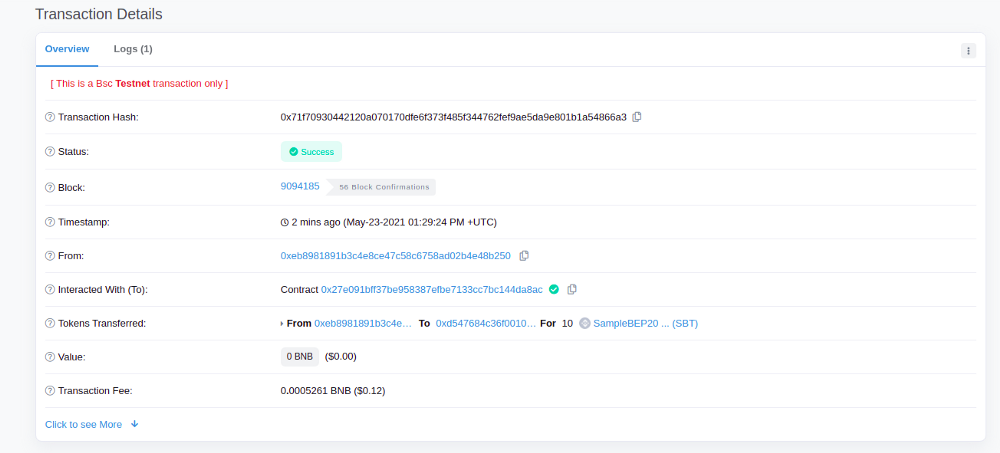
Теперь, если мы снова проверим баланс кошелька владельца balanceOf методом на Remix, он будет на 10 токенов меньше миллиона.

На кошелек получателя будет зачислено 10 SBT.
Круто ���� Теперь вы можете развернуть столько токенов, сколько захотите. Эту же процедуру можно выполнить для развертывания смарт-контрактов в основной сети BSC. Но это будет стоить основной сети BNB за газ.
✨ Бонус: добавление нашего токена в MetaMask
Теперь мы проверим баланс SBT нашего кошелька получателя (который также является одной из моих учетных записей) на MetaMask.
- Нажмите Add Token кнопку внизу выбранной учетной записи MetaMask.
- Введите адрес контракта, который мы развернули. Символы token name и token symbol будут обнаружены автоматически. Щелкните по Next .
Баланс токенов учетной записи будет отображаться на следующем шаге. Щелкните, Add Tokens чтобы добавить токены в учетную запись MetaMask.
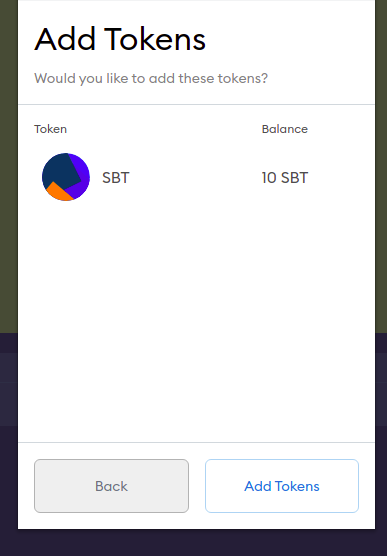
После добавления токен можно найти в Assets разделе учетной записи MetaMask, в которую был добавлен токен.
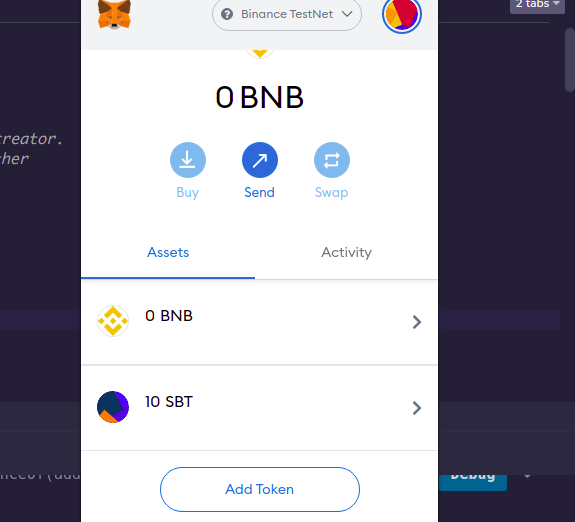
Таким же методом можно добавить любой из развернутых токенов в выбранной сети, в нашем случае это было BSC Testnet .