Как перевести деньги с Coinbase на Binance — 5 простых шагов

Самый простой способ купить криптовалюту — присоединиться к бирже, привязать банковский счет, а затем совершить покупку. К сожалению, многие популярные биржи, предлагающие эту функцию, недоступны в некоторых регионах. Вы можете купить Bitcoin или Ethereum с помощью кредитной карты, но не более того.
Лучший способ обойти это ограничение — купить криптовалюту на одной бирже, а затем перевести средства на другую. Coinbase и Binance являются основными кандидатами на обмен такого типа.
Самый быстрый и простой способ купить множество криптовалют — это пополнить свой счет в Coinbase, перевести эти средства в Binance и начать торговать. Как перевести BTC или ETH с Coinbase на Binance? Сколько времени занимает перевод с Coinbase на Binance? Даже если вы никогда не переводили свои средства ранее, приведенное ниже руководство поможет вам пройти весь процесс шаг за шагом.
Coinbase
Coinbase — американская криптовалютная биржа, одна из крупнейших криптовалютных бирж в мире. Coinbase работает под двумя разными названиями, Coinbase и GDAX. Скорее всего, Coinbase специализируется на розничных клиентах, которые хотят купить биткойны за фиатные валюты, а GDAX является более совершенной платформой для торговли криптовалютой. Поскольку Coinbase является американской биржей криптовалют, инвесторы из США могут свободно торговать здесь.
 Coinbase
На этой бирже доступно всего несколько монет (их список на GDAX гораздо более полный). Основные криптовалюты доступные здесь: BTC, BCH, ETH и LTC. Это означает, что сервис в первую очередь предназначен для людей, которые чувствуют себя неуверенно в торговле криптовалютой и, возможно, делают только свои первые шаги в криптовалюте.
Методы депозита
Вы можете внести депозит на Coinbase банковским переводом или кредитной картой. Это может показаться особенно полезным для начинающих инвесторов криптовалюты.
В целом, стоит обратить внимание на различные комиссии за внесение фиатной валюты на биржи за банковские переводы и кредитные карты, поскольку они могут различаться. При внесении депозита на эту биржу с помощью кредитной карты, вы, скорее всего, заплатите комиссию за депозит в размере 4%. Это значительная сумма. Если вы пополните свой счет банковским переводом, комиссия за депозит составит 1,5%, что также значительно по сравнению с комиссиями конкурентов, присутствующих на рынке.
Binance
Binance — биржа из Гонконга, который имеет огромное количество обменов. В каком-то смысле Гонконг — это Мекка торговли криптовалютой. Неполный список конкурентов-соотечественников этой биржи включает в себя Bit-Z, KuCoin, Gatecoin, BitFlip и CoinEx Market.
 Binance
Binance не запрещает американским инвесторам торговать на своей собственной бирже. Тем не менее, все инвесторы из Соединенных Штатов должны самостоятельно провести тщательный анализ и выяснить, существуют ли какие-либо правовые препятствия, налагаемые их государством, которые могут помешать им торговать на сайтах, включенных в топ-биржи криптовалют, одна из которых может быть признана лучшей биржей криптовалюты.
Методы депозита
В настоящее время Binance принимает в качестве депозита исключительно криптовалюты. Таким образом, новые инвесторы в криптовалюту не смогут сразу начать торговать на Binance. Если вы только начали инвестировать в криптовалюту и хотите начать торговать на бирже, вам сначала нужно купить криптовалюту на другой бирже, а затем внести депозит в Binance. В этом обзоре это будет Coinbase.
Зачем переходить с Coinbase на Binance?
Coinbase является одной из самых известных бирж в мире. Его ключевой особенностью является возможность обменивать фиатные валюты на криптовалюты. Связав кредитную карту или банковский счет с Coinbase, вы можете конвертировать средства в Bitcoin, Bitcoin Cash, Ethereum, XRP или Litecoin.
Тем не менее, Coinbase не является универсальной площадкой для реализации всех торговых потребностей. Сервис известен своими высокими комиссиями и явно маленьким количеством торговых пар. Если вы хотите приобрести криптовалюту, отличную от BTC или ETH, вам необходимо перевести средства из Coinbase на другую биржу.
Binance — это одна из крупнейших в мире по объему криптовалютных бирж, которая ежедневно составляет около 1 миллиарда долларов. Он предлагает торговые пары с сотнями криптовалют, мощные функции покупки и продажи и невероятно низкие комиссионные по сравнению с Coinbase.
Если вы хотите совершить свои первые криптовалютные транзакции, пополнение вашей учетной записи Coinbase и перевод средств на Binance, безусловно, правильный путь.
Как перейти с Coinbase на Binance?
Переводить средства с Coinbase на Binance не так сложно, как может показаться на первый взгляд. Сейчас мы покажем вам, как сделать это за 5 простых шагов.
Шаг 1.
Зайдите в личный кабинет в Coinbase и выберите «Учетные записи» на панели вкладок. Если вы используете мобильное приложение, то эта вкладка будет расположена в самом нижнем углу экрана.
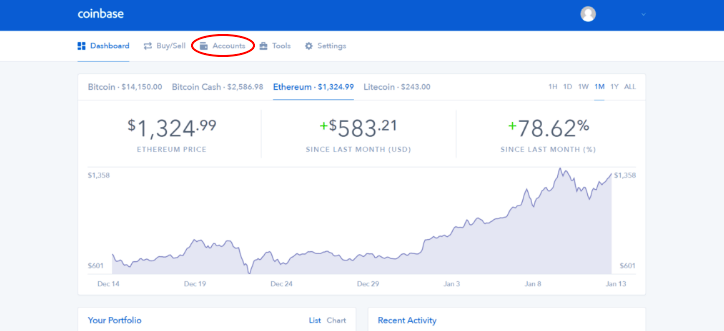 Учетная запись
Шаг 2.
Далее из списка доступных криптовалют выберите монету, которую хотите отправить, и нажмите кнопку «Отправить». Вы можете перевести биткойны, Ethereum, XRP, Litecoin и другие криптовалюты из Coinbase на Binance. В этом примере мы переведем BTC из Coinbase на счет Binance.
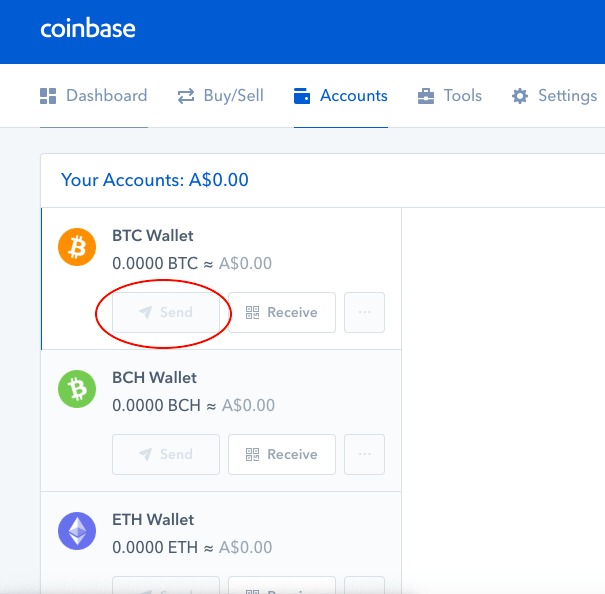 Перевод средств
Шаг 3.
На этом этапе вам необходимо ввести свой адрес Binance, который будет создан в вашей учетной записи Binance. Если вы осуществляете перевод через мобильное устройство, нажмите на маленький значок бумажного самолетика, который находится в правой верхней части экрана, и вам будет предложено ввести сумму, которую вы хотите отправить, и нажмите «Отправить». Этот перевод не будет отправлен, поэтому вам все равно необходимо указать свой депозитный адрес Binance.
 Адрес Binance
Чтобы найти этот адрес, вам нужно перейти в свою учетную запись Binance и выбрать «Средства» в меню в верхней части экрана (или внизу, если вы находитесь на мобильном телефоне), а затем нажать «Deposits Withdrawals» (в мобильной версии это просто депозит наверху).
 Депозит
Как только это будет сделано, просто нажмите «Депозит» в криптовалюте, которую вы переводите, и вы получите адрес депозита.
Шаг 4.
Теперь осталось ввести адрес, который был только что сгенерирован для вас, прямо в поле «Получатель» в вашей учетной записи Coinbase. Просто введите сумму, которую вы хотите отправить. На вашем мобильном телефоне просто добавьте адрес, который вы только что получили, а затем нажмите «Отправить», и все готово!
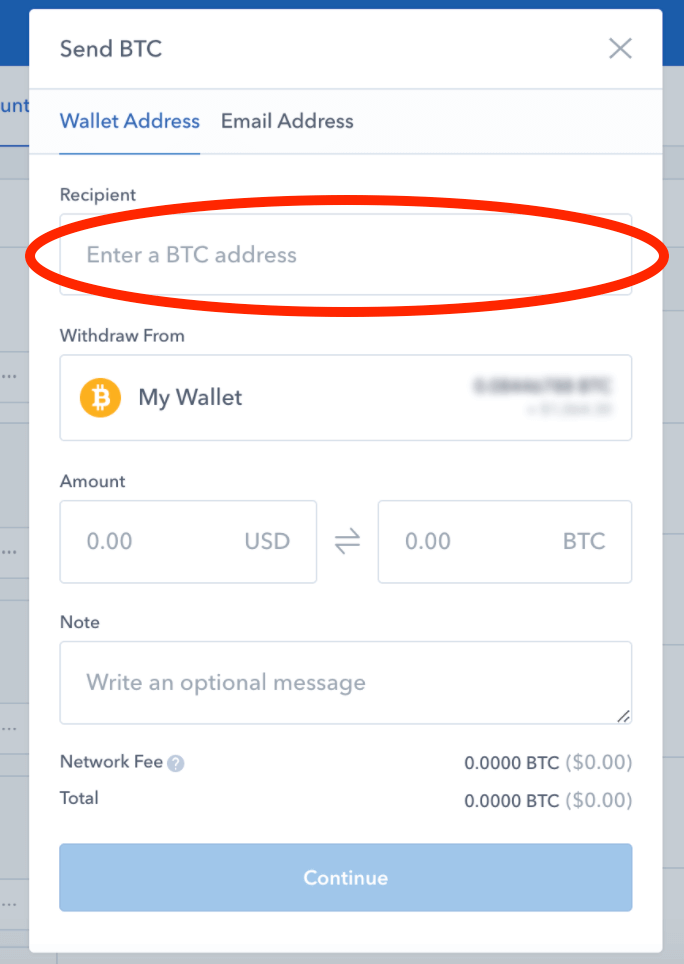 Введение адреса
Шаг 5.
На последнем шаге нажмите «Продолжить» и проверьте все детали транзакции, а затем завершите отправку. Готово!
Сколько времени занимает перевод биткойнов или других криптовалют с Coinbase на Binance? Как правило, перевод не занимает много времени для обработки, это зависит от нескольких факторов: валюта, сумма, загрузка блокчейна и т. д. Обработка может занять от 5 минут до часа.
Заключение
Отлично сработано! Перевод криптовалюты из Coinbase в Binance не так сложен, как кажется. После завершения процедур начальной настройки все остальное — просто перевести средства с одного кошелька на другой. Лучший совет для любого начинающего трейдера криптовалюты — делать это медленно.
Blockchain specialist and crypto advisor. I love cooking, dancing and collecting books. Crypto investor since 2013. Earlier had a career in sales. Political views: Libertarian Right.
Beginner’s Guide: How to Transfer from Coinbase to Binance
The easiest way to buy cryptocurrencies is to join an exchange, link a bank account, then make a purchase. Unfortunately, many popular exchanges offering this feature are lacking in other areas. You can buy bitcoin or ethereum with a credit card, but not much else.
The best way around this limitation is to buy cryptocurrencies on one exchange, then transfer the funds to another service. Coinbase and Binance are prime candidates for this type of exchange.
The fastest and simplest way to buy a variety of cryptocurrencies is to fund a Coinbase account, transfer those funds to Binance, then start trading. Even if you’ve never purchased a cryptocurrency before, our guide below will walk you through the entire process, step by step.
Why Transfer from Coinbase to Binance?
Coinbase is one of the best-known exchanges in the world. Its key feature is the ability to connect fiat (hard currency like U.S. dollars) to cryptocurrencies. By linking a credit card or bank account to Coinbase, you can transform funds into Bitcoin, Bitcoin Cash, Ethereum, Ethereum Classic, or Litecoin.
Coinbase isn’t a one-stop shop for everyone’s trading needs, however. The service is known for high fees and a distinct lack of trading pairs. If you want to purchase a cryptocurrency other than BTC or ETH, you’ll want to transfer funds out of Coinbase to a more powerful exchange as soon as possible.
Binance is the world’s largest cryptocurrency exchange by volume, transacting nearly $1 billion on a daily basis. It offers trading pairs with hundreds of cryptocurrencies, powerful buying and selling features, and incredibly low fees compared to Coinbase.
If you’re looking to make your first cryptocurrency trades, funding a Coinbase account and transferring to Binance is definitely the way to go.
How to Transfer from Coinbase to Binance
The most time-consuming part of the Coinbase to Binance transfer is getting accounts with both exchanges set up and verified. The first 2 steps below will walk you through this process. If you already have active accounts with both exchanges, skip to Step 3 to start the transfer.
Step 1: Join Coinbase
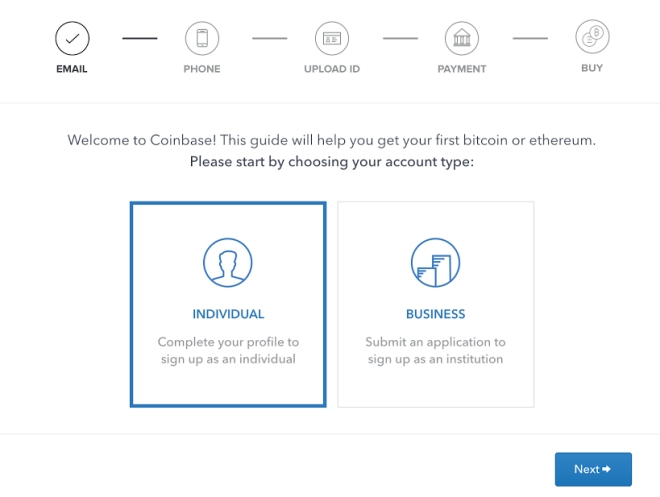
Go to the Coinbase home page and click the “Sign Up” button at the top right. Fill in your personal details, including a valid e-mail address, then click “Create Account.” Coinbase will send a verification email with a link you’ll need to click to continue the sign-up process.
Once email validation is complete, go to your Coinbase account and choose to create an Individual account. Next, add a phone number, then choose a payment method. Bank accounts are recommended over debit cards, as Coinbase’s fees are much lower for this type of transaction.
After selecting “Bank Account,” Coinbase will prompt you to provide verification details for your ID. This is the KYC (Know Your Customer) process, and it’s a common practice for most cryptocurrency exchanges. Gather the required documents and upload them to Coinbase.
Next you’ll be prompted to enter account details for your bank. Add the relevant information and Coinbase will send 2 test transactions to that account, each just a few cents. Once those appear on your statement, you’ll need to go back to Coinbase and enter the amounts to confirm you own the account.
Once you’ve completed these steps, your Coinbase account will be set up. It may take a few days for the bank account transactions to complete, but apart from that you’re ready to go..
Step 2: Join Binance
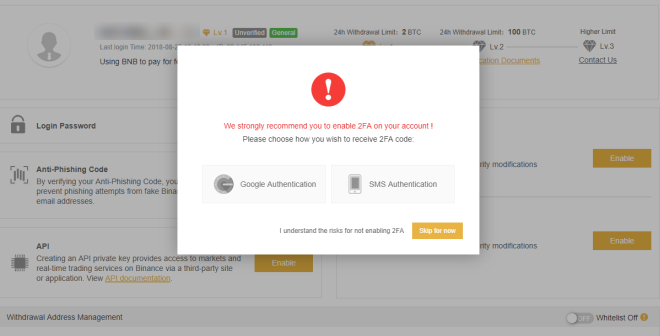
Before you can send funds to Binance, you’ll need an active account. This will be faster and simpler than setting up the Coinbase account, as there’s no bank information to share or validate.
Start by going to the Binance registration page. Enter a valid e-mail address, followed by a password. Binance will send an email to you for verification. Click the link inside and your account will be activated.
Log into Binance using your email and password. Read and accept the safety risk notices and click “Continue”.
Next, you’ll want to set up 2-factor authentication either using the Google Authentication app or SMS Authentication. You can skip this step, but we strongly suggest you choose a method and use it for added security.
After 2FA is complete, your account is ready. There is an initial withdrawal limit of 2 BTC per day, which you can raise by submitting KYC documents under your Account page.
Need more help setting up a Binance account? Check out our full beginner’s guide to using Binance.
Step 3: Add Funds to Coinbase
Once you’ve got both Coinbase and Binance accounts set up, you can finally begin the transfer process.
The first thing you’ll need to do is add funds to Coinbase via bank account transfer. You can also use a debit card or wire transfer to fund your Coinbase wallet, but they carry higher fees and aren’t recommended.
Start by logging into your Coinbase account and clicking on the “Buy/Sell” tab at the top. You’ll see a selection of cryptocurrencies outlined in light gray. Choose the one you want to buy (BTC or ETH, most likely), then select a payment method from the dropdown box below.
The bank account you added during setup should show up by default here.
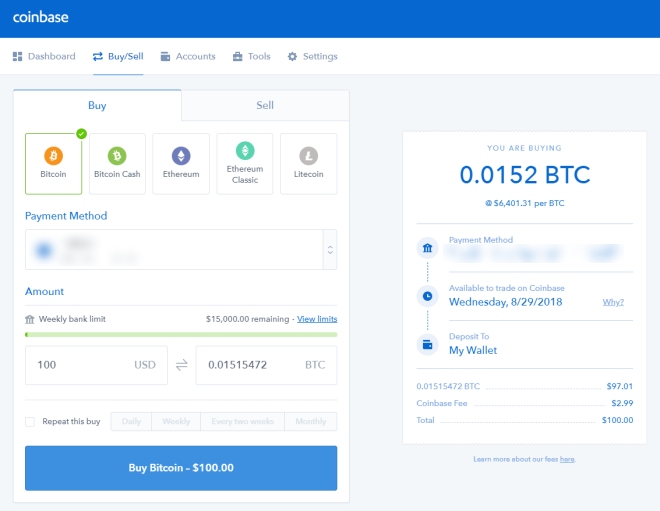
Now choose an amount you want to transfer by entering an amount in USD on the left. Coinbase will automatically convert this to your chosen cryptocurrency. You can see a breakdown of the transaction on the right, complete with the included Coinbase fee.
If everything looks good, click the blue “Buy” button at the bottom. Coinbase will then start the process of withdrawing the fiat funds from your bank account. Your cryptocurrency purchase will take several days to appear in your wallet, so be patient.
Step 4: Transfer from Coinbase to Binance
Transferring funds from Coinbase to Binance is as straightforward as any cryptocurrency transfer. You already have the accounts and cash in the right place, all that’s left is to send coins from one wallet to another.
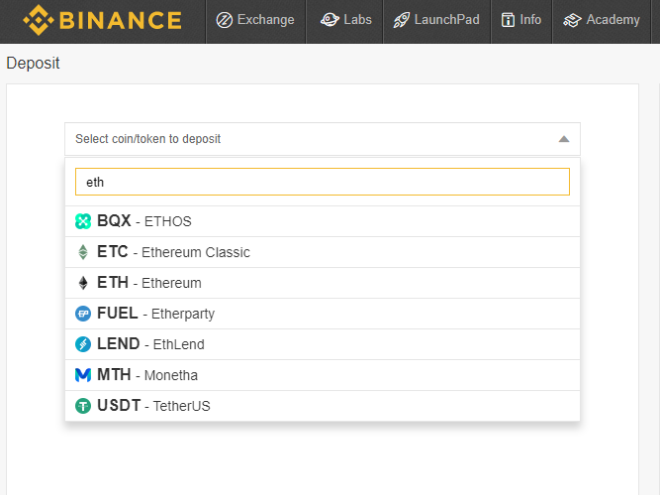
First, we’ll need to visit Binance and copy our receiving address. Log into the site and choose “Deposits” from the “Funds” menu at the top of the screen. On the left, you’ll see a dropdown menu that says “Select coin/token to deposit.” Type the name of the coin you want to receive, then click its entry.
Binance will generate a wallet address for the coin of your choosing. Copy the address to your clipboard. Make sure you copy the whole thing, and make sure you only send this type of cryptocurrency to the address, otherwise you’ll lose your deposit.
Now go to Coinbase and click the “Accounts” tab at the top of the screen. Scroll down to the cryptocurrency you want to send to Binance. Click the “Send” button, the one with the little paper airplane on the side.
Coinbase will open a small window with the transfer information ready to go. Paste the wallet address from Binance into the “Recipient” box near the top. A green circle will let you know it’s valid.
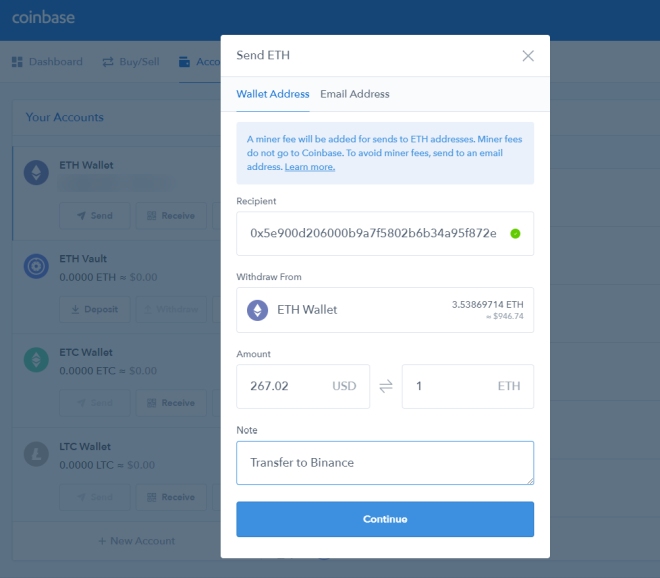
Next, choose the amount you want to transfer out of your Coinbase account using the bottom left box. You can enter the amount in USD or in the cryptocurrency itself, and Coinbase will show you the conversion.
Finally, put a small note on the bottom of the transfer, just so you know what your funds are doing. Enter something like “Transfer to Binance,” then click the “Continue” button to start the process.
Unlike fiat transfers, cryptocurrencies generally resolve transactions in seconds or minutes. This can vary depending on the network speed associated with your chosen crypto.
Coinbase will end you a confirmation email to let you know the transfer is taking place.
Once it’s complete, head over to Binance and click “Funds > Transaction History.” You should see your Coinbase transfer here, along with the transferred amount sitting in your Binance wallet, ready to trade.
If you need help making your first trade on Binance, our How to Use Binance article provides a step-by-step guide!
Transfer from Coinbase to Binance on Mobile (iPhone, Android)
Not every cryptocurrency exchange has a mobile app. Both Coinbase and Binance do, though, and they provide most of the functionality from the desktop interface in a portable, touch-friendly form.
You can transfer funds from Coinbase to Binance on your iOS or Android device in much the same way as outlined above. Make sure you have your accounts created and verified on both Coinbase and Binance, then download and sign into each of the apps on your phone.
Open the Binance app and log in. Tap the “Funds” icon at the bottom of the screen, then the “Deposit” label at the top. Select the coin you want to deposit from the menu on the next screen. The app will generate a wallet address on the spot. Tap “Copy Address” to store it on your device’s clipboard.
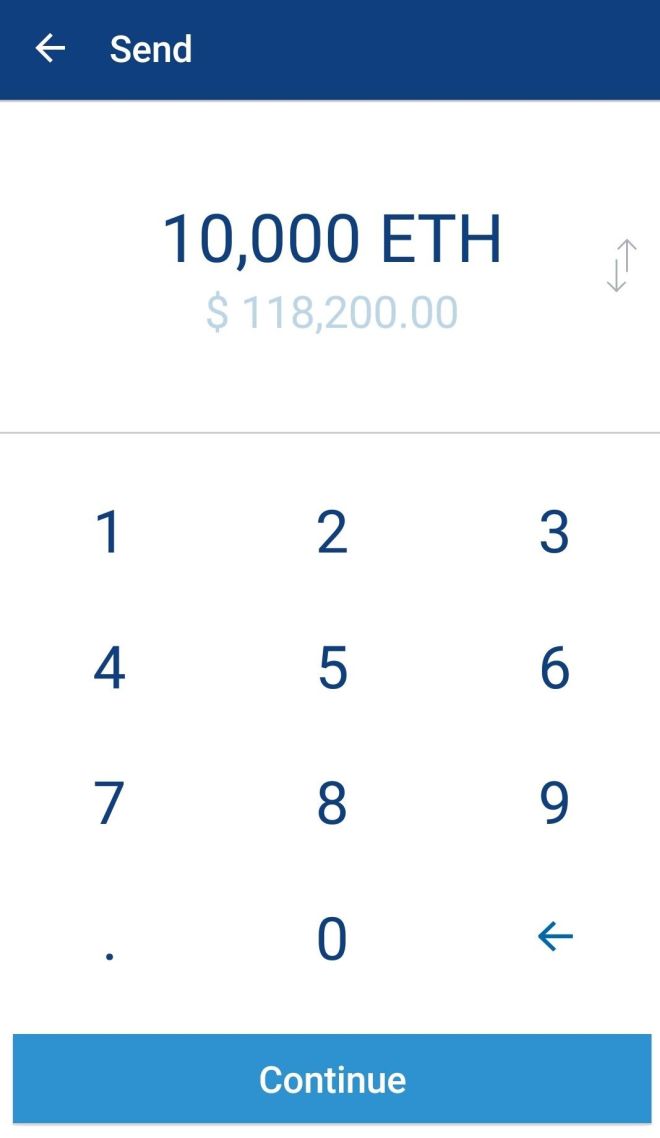
Next, open the Coinbase app and sign in. Tap “Accounts” at the bottom, followed by the cryptocurrency you want to send to Binance. Tap the small paper airplane icon at the top right corner of the screen to open the “Send” dialog.
Enter the amount you want to transfer to Binance, then tap “Continue.” Paste your Binance wallet address into the “To” field on the next screen, then add an optional note at the bottom. When everything looks good, tap the airplane icon in the top right corner of the screen, then hit “Confirm.”
Coinbase will initiate the transfer right away. Again, depending on the network associated with the cryptocurrency you sent, it could take a few seconds or a few minutes for the transaction to verify.
Once it does, check your Binance app’s “Funds” tab to see the amounts added to your wallet.
Minimizing Fees When Transferring From Coinbase to Binance
Coinbase is known for its high fees. The exact amount varies depending on funding method, action, and country of origin, but most users can expect to pay 1-3% when they deposit funds into Coinbase or withdraw into a bank account.
By comparison, Binance charges 0.1% for crypto-to-crypto transactions, and it offers the ability to lower those fees by holding BNB tokens in your account. You can’t link a bank account to Binance, of course, but this enormous disparity in cost is one of the reasons why so many people transfer funds from Coinbase to Binance.
An easy way to dodge some of these deposit and withdrawal fees is to move your funds from Coinbase to Coinbase Pro (formerly Gdax). When you create a Coinbase account, you automatically gain access to Pro and funds can be swapped between the two with ease.
If you’re just getting into cryptocurrencies, know that the Coinbase to Coinbase Pro transfer process is a little complicated. Coinbase Pro is designed for experienced traders, after all.
If you are eager to save on fees and want to give it a go, try this guide on transferring from Coinbase to Coinbase Pro.
The next biggest way to save on fees when dealing with Coinbase is to use a bank account instead of a credit card. Coinbase charges 1.5% to transfer fiat from a bank to your Coinbase account. Using a credit card is faster, but it’ll cost you 4%. Unless you’re in a hurry, stick with bank accounts instead.
Tips and Strategies for Investing
Once you have a cryptocurrency or two in your Binance account, you’re ready to participate in the market. Investing isn’t an easy affair, especially in the highly volatile digital currency market.
Before you trample off and lose your funds, take a look at the tips below for maximum investment safety.
If you’re brand new to the world of crypto investing, a great place to get started is our article Investing in Cryptocurrency: A Beginner’s Guide. It covers all the basic strategies you’ll need, including advice on how to manage your own excitement.
Early in your trading career, be sure to make your first transfers small. You don’t want to risk losing more than a few USD if you make a mistake. Once you’re familiar with how things work, you can slowly increase the amounts you transfer.
Creating an active cryptocurrency portfolio is a long and intensive process. If you’re just starting out, hold this piece of advice in mind: keep it simple. Don’t buy a dozen cryptocurrencies and spread your investments thin. Pick 2-3 coins you’re familiar with, and only expand once you’re comfortable and well-informed.
Speaking of well-informed, have you done enough research for that new coin you’re interested in? Chances are you haven’t. Start with this due diligence checklist, then keep researching until you’re an expert.
And finally, are you interested in day trading cryptocurrencies? You might want to think twice before jumping in. Hit up our How to Day Trade Cryptocurrencies article for the full scoop.
Conclusion
Transferring cryptocurrencies from Coinbase to Binance isn’t as complicated as it seems. Once you complete the initial setup procedures, the rest is a simple matter of moving funds from one wallet to another.
The best piece of advice for any beginning cryptocurrency trader is to take it slow. Once you see how easy it is to buy coins, you’ll be tempted to grab them by the fistful. Stay calm, do your research, and remember this is real money you’re dealing with. Patience is everything when it comes to cryptocurrency investing.
How To Transfer Cryptocurrency From Coinbase To Binance
As cryptocurrency grows, more users are gaining the confidence to transfer their cryptocurrency between exchanges, including between Coinbase and Binance.
Whether because of better deals, Coinbase error codes, or you just want a change, users can transfer their cryptocurrency from Coinbase to Binance, and also from Binance to Coinbase. The cryptocurrency market encourages investors to conduct transactions on these exchanges before transferring their traded assets in a secured wallet.
As transferring cryptocurrency can be tricky, we’ve broken down how to transfer your crypto assets from Coinbase to Binance.
Transferring Crypto from Coinbase To Binance
First, you must have an active user account on both exchanges to send cryptocurrency from one wallet to another.
When transferring from Coinbase to Binance, find your wallet address on Binance, and keep it handy. This is vital to get correct, as entering an incorrect address may result in losing your assets.
Once you have saved the address, click on the send part of the Coinbase wallet. This will direct you towards a pop-up tab.
The tab will then ask you to enter the amount of cryptocurrency you want to transfer from Coinbase into your Binance wallet.
Then, enter or paste your Binance wallet you saved earlier into the required section. Click on the pay with field and select the type of cryptocurrency you want to transfer into the Binance account.
Double-check the details before hitting the send button, which will complete the transaction. You can also view the history of your transaction by clicking on the transaction overview tab.
Coinbase To Binance Transfer Fee
As mentioned on the Coinbase website. The transfer fee from coinbase to other third-party platforms depends on several factors including the current status of the network and the congestion associated with it.
Furthermore, Coinbase calculates fees "at the time you place your order and may be determined by a combination of factors, including the selected payment method, the size of the order, and market conditions such as volatility and liquidity. "
The exchange also mentions that "The final fee that Coinbase pays may differ from the estimated fee (for example, due to your transaction being batched with other transactions or due to changes in the network.
Things To Keep In Mind Before Conducting A Crypto Transfer.
A cryptocurrency transfer is a sensitive task and requires the complete attention of the user. To perform such tasks with ease, Binance has already issued a complete guide on how to conduct crypto transfers without encountering any mishaps during the process. Before commencing any such transactions, a user must ensure:
- The cryptocurrency that a user wants to transfer is listed on both exchanges.
- Double-checking the wallet addresses before hitting send can help you validate your transaction.
- Transfer a small amount of crypto first to check whether the address is active or not.
- Network compatibility is equally important hence a user must select a solid network to commence the transaction with.
For any further inquiries, we recommend checking out the following guides by Coinbase and Binance
How to Transfer From Coinbase to Binance
Coinbase is one of the world-leading crypto exchanges both in terms of trading volume and number of users worldwide. It has built a solid reputation thanks to its state-of-the-art security measures, customer care, and innovative trading features.
There’s only one slight drawback and that’s the limited number of supported coins. Coinbase currently supports Bitcoin, Bitcoin Cash, Ethereum, Ripple, and Litecoin as the most popular high-liquidity coins on the market. Therefore, many traders choose to transfer their cryptocurrencies to other platforms that offer a greater variety of trading pairs.
In our guide today, we’re going to teach you how to transfer assets from Coinbase to Binance using Bitcoin as an example.
How to Transfer
Let’s start with a step-by-step explanation:
- Step 1: Sign Up with Binance
First, create an account by registering and completing the application as you did on Coinbase.
If you want to stay anonymous, Binance offers a Limited Account where you can trade without verifying your identity.
However, we don’t recommend this option because it restricts your trading activity and limits your BTC withdrawals. Unless you’re just trying out the platform for fun, we advise you to create a regular account.
- Step 2: Grab Your Wallet Address
When you’re all set, on Binance you can click on Wallet > Overview. On this screen just under Overview you should see the “Deposit” button.
Here you can choose “Crypto Deposit”. You’ll have to transfer over each of your cryptocurrencies separately. For example, you can “Select Coin” and pick Bitcoin. For network pick “BTC Bitcoin”, you will now get a generated address like this:
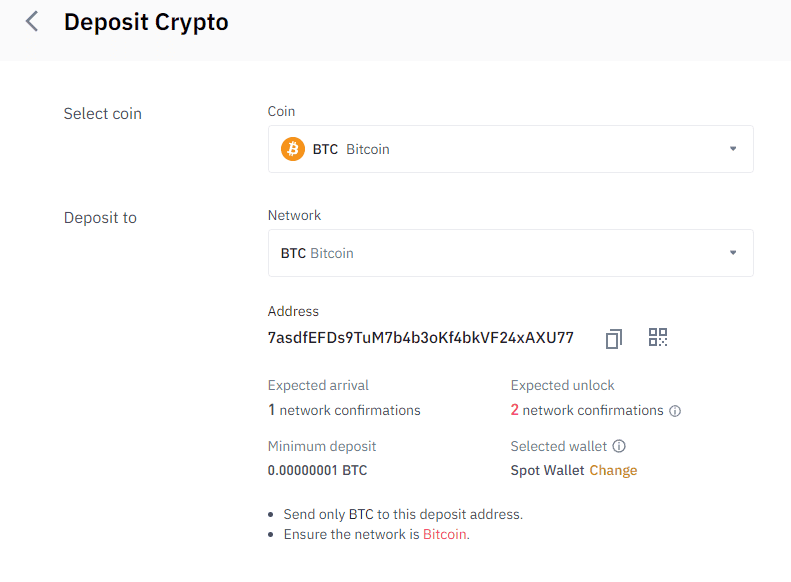
Copy the address, this is where you will send your Bitcoin to from your Coinbase account. You can repeat this process for each cryptocurrency you have, just make sure you are choosing the correct network each time, if you have any issues just ask their support team �� This can be a stressful process the first few times you do it, but once you get the hang of it, it’s quite easy!
- Step 3: Transfer Your Crypto
Once you log into your Coinbase account, click on the “Accounts” tab, and then select the cryptocurrencies you want to transfer. Click on the “Send” button and wait for Coinbase to ask you for the “Recipient Address”. This is where you need to paste the wallet address you copied from Binance. Finally, click “Continue” to send the request forward.
That’s it! Now you just need to wait for the Bitcoin miners to verify your transaction. This could take from one hour to a couple of days if the network’s busy. To check the status of your transaction you can visit https://www.blockexplorer.com/. Coinbase will give you a transaction ID that you can put in here and you can see real-time what’s happening.
How To Transfer From Binance To Coinbase
What if you want to do the opposite and transfer your funds from Binance back to Coinbase? Maybe the coin prices have changed overnight and you’d rather hold onto them for a little while longer. The reverse process is quite straightforward. Just make sure you’re sending currencies that Coinbase supports.
What you need to do is log into your Coinbase account, click on Bitcoin, and find the “Receive” option. The platform will generate a wallet address. Copy this address and paste it on Binance under “Funds” > “Withdraw Bitcoins”. Simple as that! Again, consider the wait time the miners need to process your transaction.
Final Notes
At first, trading digital coins might seem complicated and confusing, something that only experts in the field could do. However, if you follow our carefully laid out steps, you should find no problem transferring cryptocurrencies from Coinbase to Binance and vice versa.
Whatever you do, our final advice is to be ultra-careful about where you store your funds. The crypto exchanges are unfortunately the target of frequent hacking attacks because these people know a lot of users keep their money in online wallets. If you need to store them online, do it temporarily! If you aren’t happy with Binance or Coinbase then you should check out our recommended USA Crypto exchanges, or if you aren’t from the US you can check our lists below:
About The Author

James is the main editor. With a passion for finance and anything blockchain, cryptocurrency is right up his alley. He’s responsible for most of the content on the site, trying his best to keep everything up to date and as informative as possible.
About Crypto Head
At Crypto Head we aim to give people the knowledge to get involved in the fastest moving industry on the planet. Learn more about our team and our mission.
The information on this website is for information purposes only. It is not intended as investment or financial advice and should not be relied on as such. Before making any financial commitment you should seek professional advice from a qualified investment or financial adviser. Any exchanges we list on our pages should be diligently researched, we list exchanges based on public information at the time. Exchanges have been known to suddenly collapse and we highly recommend keeping any cryptocurrencies you own on a cold wallet.