Как удалить аккаунт на Binance?
Вы не совсем довольны своим счетом на Binance? В этой статье мы поможем вам удалить аккаунт Binance.
Шаг 1: Деактивируйте ваш аккаунт на Binance
Прежде чем удалить свой аккаунт на Binance, вы должны сначала деактивировать его. Это также рекомендуется сделать, если есть какие-либо проблемы с безопасностью: это не позволит хакерам или другим злоумышленникам украсть ваши средства.
Перейдите в меню к своему профилю, а затем к настройкам безопасности. Здесь вы можете нажать на Отключить учетную запись.
После деактивации аккаунта вы не сможете вновь активировать его в течение 2 часов.
Шаг 2: Удаление аккаунта
Вы можете удалить свой счет на Binance только тогда, когда на нем не осталось баланса. Это означает, что на вашем счету должно быть менее 0,001 BTC. У вас все еще есть средства на счету? Тогда вы можете сначала вывести их или отправить на внешний кошелек. В этой статье мы объясним, как это сделать.
После деактивации счета вы обычно видите опцию Удалить этот счет. Затем введите свой адрес электронной почты или номер телефона и нажмите кнопку Подтвердить удаление.
Не видите опцию удаления аккаунта? Тогда вы можете обратиться в службу поддержки клиентов Binance.
Стоит ли удалять свой аккаунт Binance?
Я бы не рекомендовал удалять свой счет в Binance. При удалении аккаунта Binance вы потеряете все свои данные. Это касается истории ваших заказов, открытых заказов, приглашенных друзей и информации о безопасности.
Помните, что сохранить свой счет на Binance можно бесплатно. Binance не взимает дополнительную плату, если вы не входите в систему в течение некоторого времени. Сохранив свой аккаунт, вы можете просто войти в него позже.
3 комментария
Здравствуйте у меня возникла ошибка верификации аккаунта, пишет чтобы я зашёл с оригиналом аккаунта а если я его не помню по какой либо причине что мне делать в этом случае, но мне его нужно верифицировать чтобы вывести туда средства
Здравствуйте. У меня на другой бирже заблокировали как подозрительный мой адрес кошелька на binance, пополнить нельзя. Как заменить адрес на новый?
Web server is returning an unknown error Error code 520
There is an unknown connection issue between Cloudflare and the origin web server. As a result, the web page can not be displayed.
What can I do?
If you are a visitor of this website:
Please try again in a few minutes.
If you are the owner of this website:
There is an issue between Cloudflare’s cache and your origin web server. Cloudflare monitors for these errors and automatically investigates the cause. To help support the investigation, you can pull the corresponding error log from your web server and submit it our support team. Please include the Ray ID (which is at the bottom of this error page). Additional troubleshooting resources.
Cloudflare Ray ID: 819362c4e552b36b • Your IP: Click to reveal 45.84.122.38 • Performance & security by Cloudflare
Как удалить аккаунт Бинанс временно и навсегда?
Продолжающийся в 2023 году «медвежий рынок» оказался крайне сложным для крипто-холдеров, у многих появилось желание закрыть счета и удалить аккаунты. Особенно после новости, что Binance решила покинуть российский рынок �� 27 сентября 2023 года .
Аккаунт на Binance можно закрыть через:
✅ Функцию удаления учетной записи на сайте или в мобильном приложении (временная заморозка аккаунта).
✅ Техническую поддержку посредством электронного письма (удаление аккаунта, без возможности восстановления).
Рассмотрим оба способа по порядку.
Как временно заморозить учетную запись?
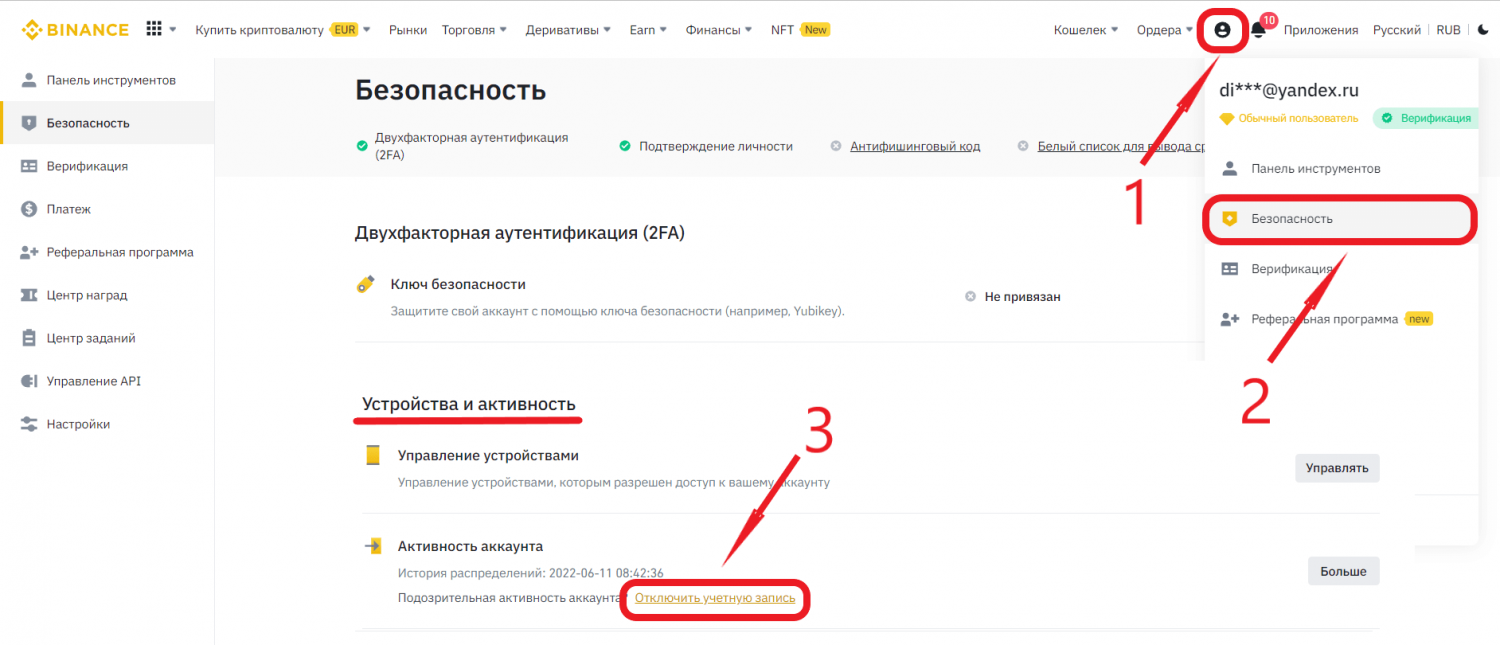
Для отключения аккаунта нужно проделать следующие действия:
- Авторизоваться на сайте «Бинанс» с помощью логина и пароля.
- В меню «Профиля» выбрать строку «Безопасность».
- Проскролить вниз до «Устройства и активность», затем кликнуть на «Отключить учетную запись».
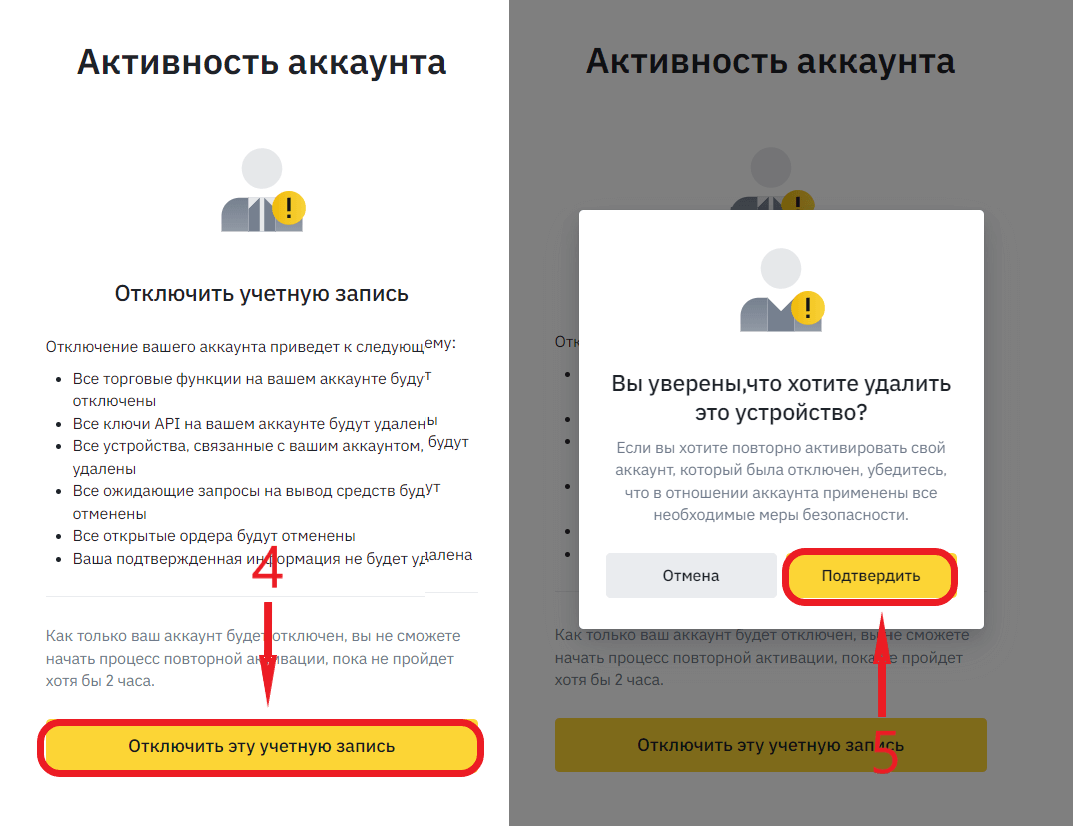
- Появится окно с предупреждениями, стоит внимательно изучить их и нажать на «Отключить эту учетную запись».
- Следом подкрепить свои намерения кнопкой «Подтвердить».
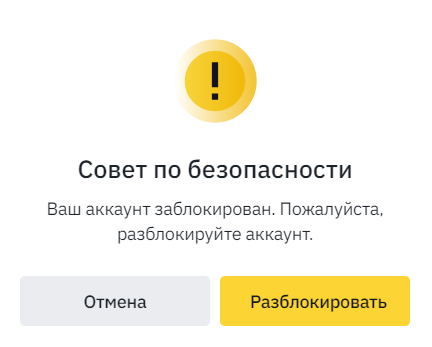
Теперь после авторизации в аккаунте будет появляться совет по безопасности, как удалить профиль навсегда описано ниже.
Отключение аккаунта по e-mail
Так же заблокировать профиль можно по электронной почте. Для этого следует:
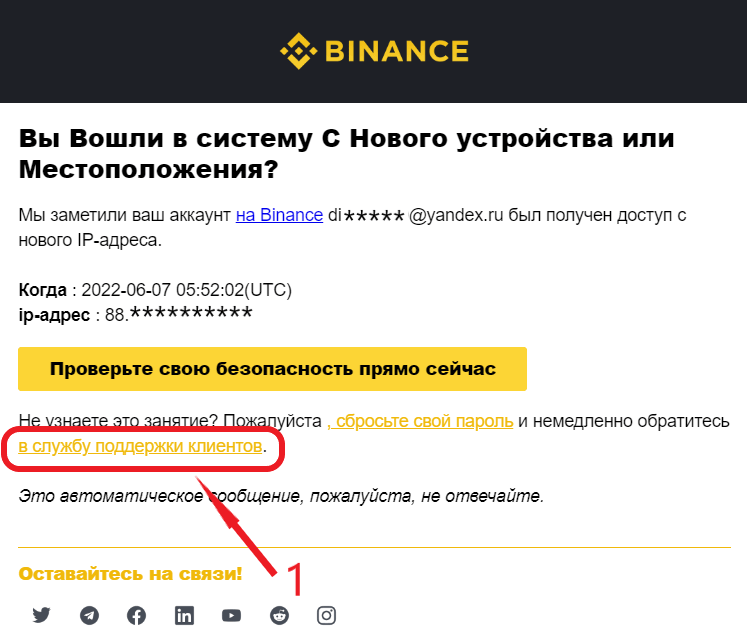
- Найти письма от биржи Binance, например, c уведомлением об изменении IP адреса при входе на биржу;
- Далее «сбросить свой пароль», либо обратиться «в службу поддержки клиентов», ссылка на тех. поддержку находится в письме.
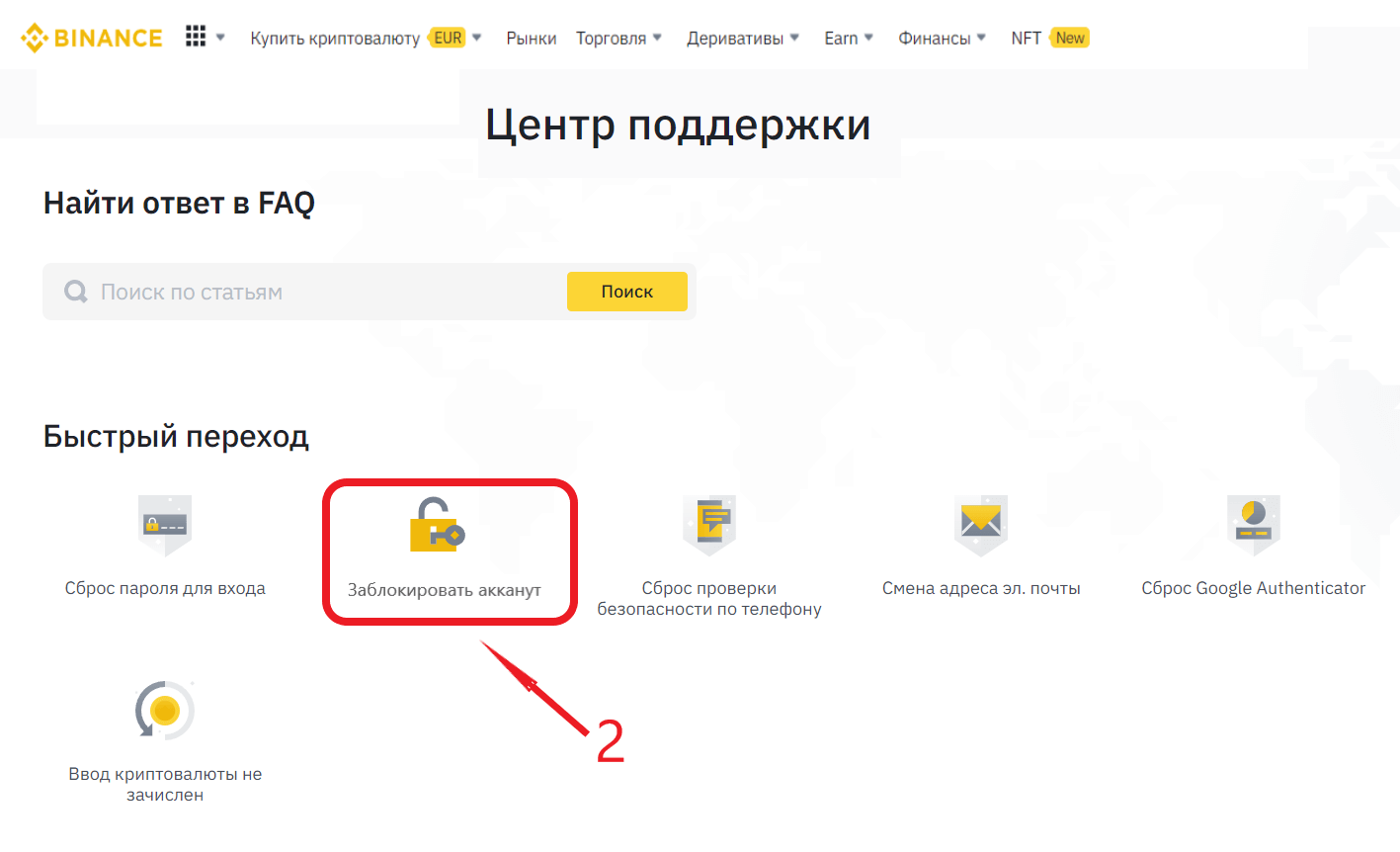
- Откроется «Центр Поддержки», где есть кнопка «Заблокировать аккаунт», нажав на которую также можно отключить профиль.
Как удалить аккаунт навсегда?
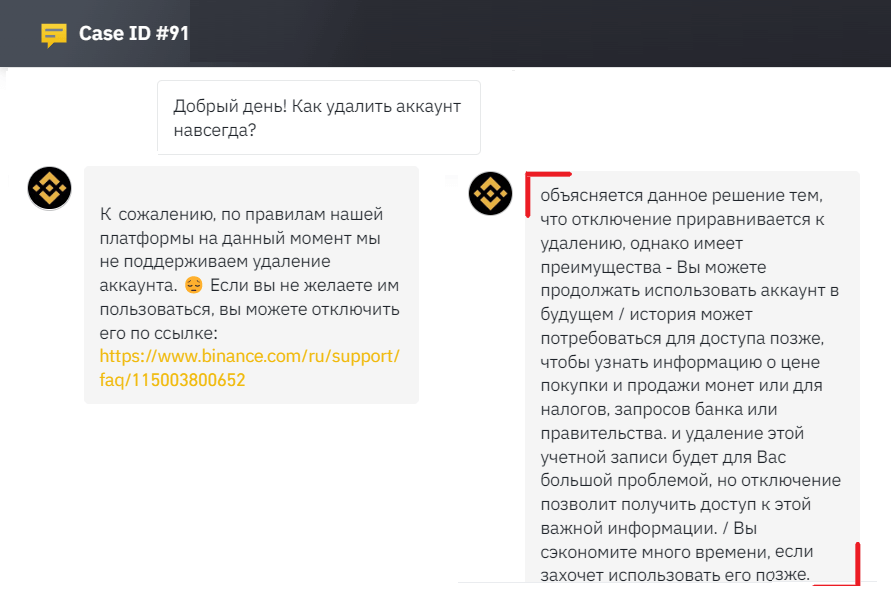
Как видим, Binance дает возможности для замораживания действующего аккаунта, однако полностью удалить профиль получится не всегда. Binance объясняет данное решение следующим образом:
Удаляются аккаунты только в случаях:
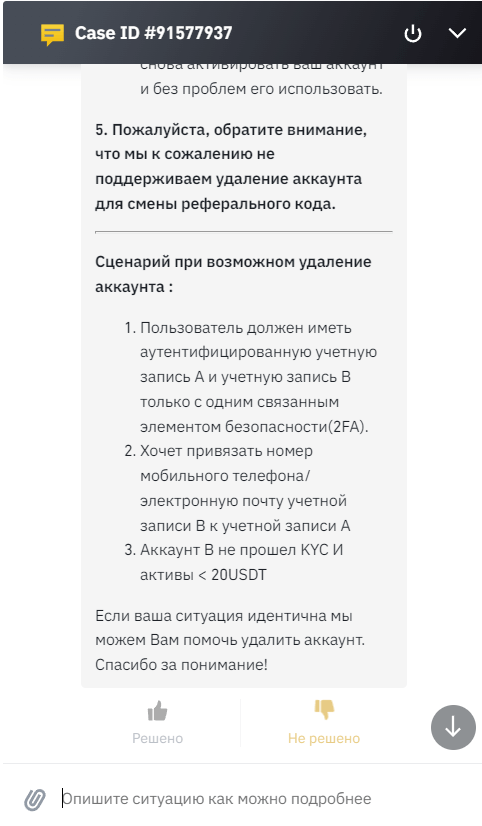
Если у Вас один из указанных выше случаев, то обратитесь в техническую поддержку биржи через онлайн-чат, аккаунт будет деактивирован.
How to Delete Binance Account in 2023
Although Binance was launched in 2017, it has become the largest cryptocurrency exchange platform in the world today, with over 26 million active users (up to October 2021). Are you wondering which factors contributed to the superfast growth of this platform, apart from people’s increasing interest in cryptocurrency? We’ll tell you.
Binance is not only one of the cheapest cryptocurrency exchange platforms in the world but also the one that offers trading options in the highest number of cryptocurrencies (over 500).
Many users claim that not having a built-in wallet discredits this platform, but Binance has solved that problem by including diverse payment options for your transaction.
With all that being said, no platform can be just perfect for all, and the same is true about Binance. The most common problem faced by the users on Binance is its complicated user interface, which can be even trickier for someone who is a beginner.
Moreover, although this platform is used in more than 180 countries globally, its ill-repute within the US says a lot about it.
Are you a Binance user finding it difficult to continue trading on Binance and looking for an out? It can put you in a bit of a pickle since the process of deleting your account on Binance permanently is not as straightforward as it sounds.
But don’t worry, we’ve got it all figured out for you.
In this guide, you’ll learn how to delete Binance account permanently
Do You Want to Disable Your Binance Account Instead?
Have you ever tried to delete your Binance account by yourself? If you have, the chances are that you would’ve reached the Disable option, at which point you felt stuck.
Now, we understand that all you want to do is delete your account, but let’s consider both options before making a decision in haste.
Disabling your Binance account is almost the same as deleting it, with only one major difference. If you disable your account, you can still access it again in the future, i.e., after two hours or a week of disabling it.
So, if you think there might be a possibility of you returning to trade on Binance and don’t want to go through the hassle of re-creating an account there, it is best to disable your account in place of deleting it permanently.
Are you convinced about disabling your Binance account instead? That’s great! Let’s give you quick step-by-step directions about how to do it.
- The first thing you’ll need to do is log into your Binance account. If you’re using the Binance app on your smartphone, it’s even easier.
- At the top left corner of it, you’ll find a tiny icon indicating the user’s account. Click on it.
- Scroll down and tap on the Security option.
- It will lead you to the Security page, where at the bottom you’ll see the Disable Account option. Tap on it.
- You’ll be taken to another warning page informing you about the consequences of this action. Go through these carefully, and if you want to go ahead with your decision, click on the yellow button at the bottom that reads Disable Account.
How to Delete Binance Account
Let’s suppose that you have learned about the differences between disabling and deleting your Binance account and want to go ahead with the latter. Don’t worry; you can delete your account just as easily.
In order to delete your Binance account, you’ll have to repeat all the steps we’ve discussed in the last section until you reach the confirmation page, where they warn you about its consequences.
At the bottom of this page, below the yellow button, you’ll see another OR option, asking, “Do you want to delete this account?” with a grey button underneath, reading “Delete this account” in red. If you’ve made up your mind, click on this grey button instead.
Once you select this button, you’ll be sent to the Delete account application page, where Binance will ask you to enter the phone number or email address linked to your account. You can add any one of these details in order to move forward.
After entering the details, scroll down to the bottom of the page until you can see the Confirm to delete option. Once you select it, your account will not be deleted instantly. Yes, you read that right.
Following these steps will send a deletion request to Binance, after which the Binance team will audit your request, the number of your assets, and your account balance.
If you want them to accept the request, the balance in your account should be 0.001 BTC or less than that. And if it isn’t, your request will ultimately be denied.
Final Words:
First, we talked about Binance and what kind of diversity the platform offers in cryptocurrency exchange. While Binance is achieving great heights in terms of success, there are some undeniable shortcomings of the platform that might make one want to switch to a different platform.
If you’re a Binance user looking for a change, make sure you close your previous account first. However, if you might have to return to Binance in the future, it’s safer to disable your account rather than delete it permanently.